


Publish date:
Salesforce licenses can be costly for organizations, especially when they require multiple or specialized permits. Using Salesforce license optimization strategies can help you avoid overprovisioning, reduce costs by retaining unused licenses, and maximize your Salesforce investment.
If you want to improve customer satisfaction and upgrade your business with Salesforce while saving money on future innovations, this blog post is for you.
In this article, we will discuss:
-
How to calculate Salesforce licensing based on pricing models.
-
Tips for getting better contract prices.
-
Ways to optimize your current Salesforce license costs to maximize your investment.
How to Calculate the Average Cost of Salesforce?
The average cost of implementing Salesforce is detailed in our blog post titled “Real Cost of Salesforce Implementation.” To find the total cost of Salesforce, you need to consider several factors:
-
Number of Salesforce users,
-
License types,
-
Salesforce products and their editions' prices,
-
Data storage cost,
-
Implementation and configuration cost,
-
User training.
To create an accurate budget for Salesforce, take the time to find hidden costs. It's a good idea to contact Salesforce directly or consult a Salesforce partner. They can help you understand and calculate the costs involved.
Salesforce, like other SaaS companies, may use a ‘land and expand’ strategy. It means they often offer low initial rates that can increase by 20% when you renew your service.
Consider forgetting about data storage costs and API call limits, which you might hit sooner than you think. The standard Salesforce mobile app has limited features, so you may need to purchase Salesforce Mobile App Plus, which costs an additional $25 per user per month.
To avoid the risks of paying too much for Salesforce, you should create a strategy to optimize your licenses and negotiate your contract rates. First, let’s look at how Salesforce license costs are structured.
Understanding Salesforce Licenses: A Simple Overview
Salesforce licenses and their costs are essential for businesses to consider. Companies often wonder if the prices they receive are fair. Managing Salesforce licenses effectively is one of the best ways to maximize your CRM investment.
First, let's explain Salesforce licenses. Salesforce has three main pricing models:
-
License-based: Most products, such as Sales and Service Cloud, use this model.
-
Consumption-based: This model is for certain products and add-ons, including Commerce Cloud, Marketing Cloud, and Data Cloud.
-
Percentage of Net Spend: With this model, users can access extra tools like Sandboxes or Salesforce Shield.
Understanding the Basics of the Salesforce License Pricing Structure
Salesforce licenses give users access to specific products and features on the Salesforce platform. Each license is assigned to an individual user and determines their basic access level. This access is further customized using profiles, permission sets, and role hierarchy.
Licenses come with different permissions and preference settings that affect pricing.
You can bundle permission set licenses and preference set licenses into user licenses, which define functionality for the whole organization or for individual users.
Salesforce License Types
To get a more accurate estimate of Salesforce costs, you need to know different types of Salesforce licenses and how to use them. You can combine these licenses within one organization to save money.
Salesforce User Licenses determine what features a user can access. Each user can have only one license type: Salesforce, Platform, or Identity.
Salesforce Feature Licenses give users access to additional features beyond the basic edition. You can assign multiple feature licenses to users. Examples include Flow User, Knowledge User, and Service Cloud User.
As a Salesforce customer, you can mix different license types in your organization. Usually, Salesforce editions include several license types.
For instance, if you buy the Sales Cloud Enterprise Edition, you get a Full CRM user license and a Chatter Free license.
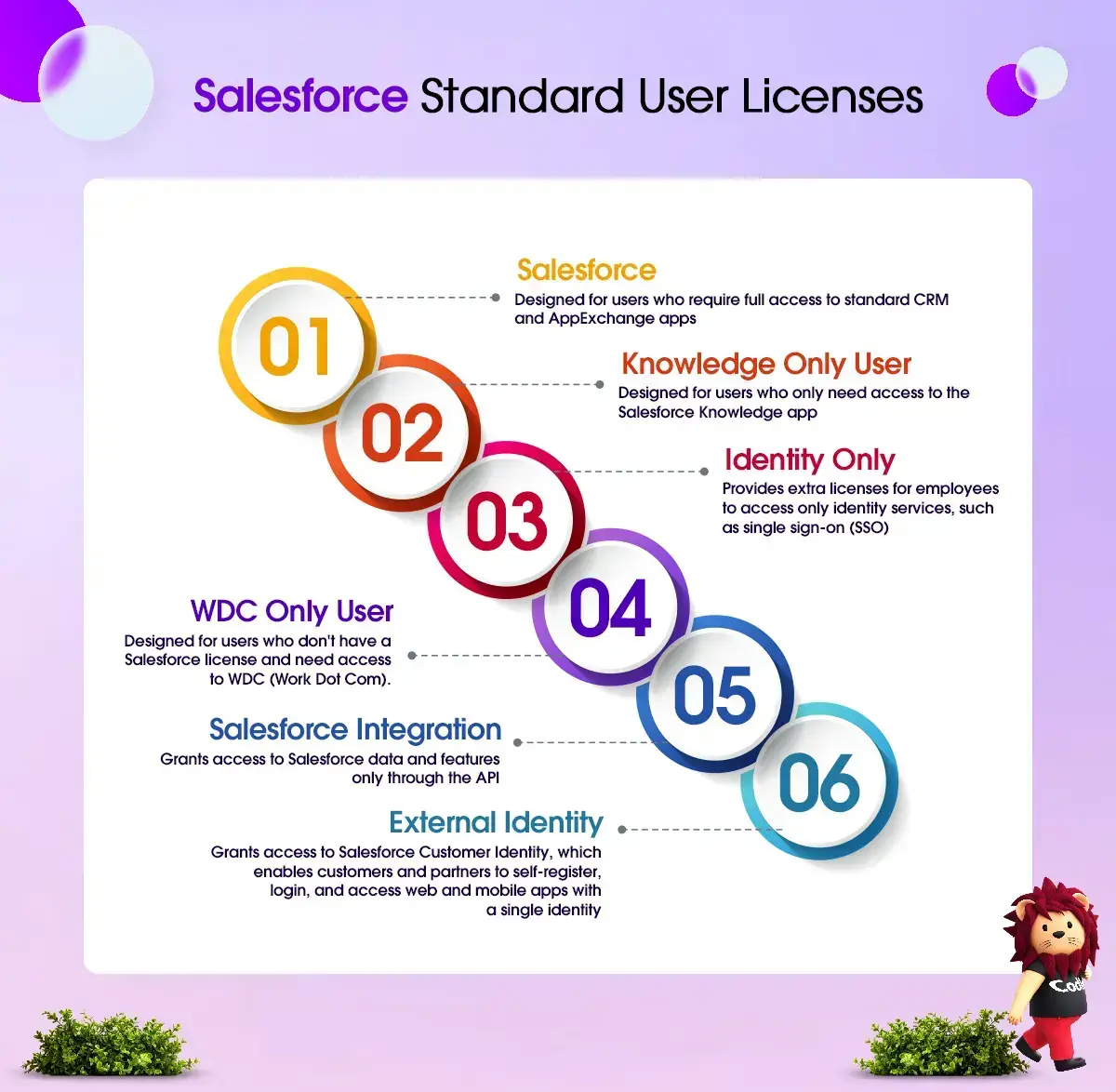
Salesforce Edition Comparison and Its Differences
Salesforce has two main products, Sales Cloud and Service Cloud. Each comes in four editions: Growth, Professional, Enterprise, and Unlimited. Prices range from $25 to $330 per user per month.
-
The Essentials Edition is an affordable choice for small businesses that need basic CRM tools like lead and contact management, email integration, and mobile access.
-
The Professional Edition works well for growing companies that need more features, such as workflow automation and sales forecasting.
-
The Enterprise Edition is designed for large companies that require advanced customization, analytics, and integration capabilities.
-
The Unlimited Edition offers complete customization for businesses with complex CRM needs.
You can also combine Sales and Service Cloud to save money or add extra features with add-on products.
Integration User Licenses
A Salesforce Integration User License is a cost-saving option for connecting systems directly. This license is not suitable for users who need to access Salesforce data or features through a user interface.
Integration User Licenses can change how you use Salesforce. They allow you to move tasks specifically for integration from standard licenses to API-only licenses.
This approach not only unlocks valuable licenses for users but also offers a more cost-effective way to manage access to integrations. It leads to a more efficient and cost-effective Salesforce environment.
Salesforce offers five free Integration User Licenses for Enterprise organizations. If you need more licenses, you can easily buy them for $10 per user each month.
Salesforce Identity – Only License
Use the Identity Only sub-license for Salesforce when your employees only need access to identity services, such as single sign-on (SSO). This license allows your organization to manage user access to Salesforce data and applications.
These licenses allow businesses to create and manage users, set their permissions, and log them in to different applications. For example, some employees might not need full access to Salesforce but could still benefit from logging in directly to a custom web app from their Salesforce account. To find out about license pricing, it’s best to contact Salesforce directly.
Businesses can save money and make better use of Salesforce by combining full licenses, platform licenses, user licenses, and appropriate login licenses.
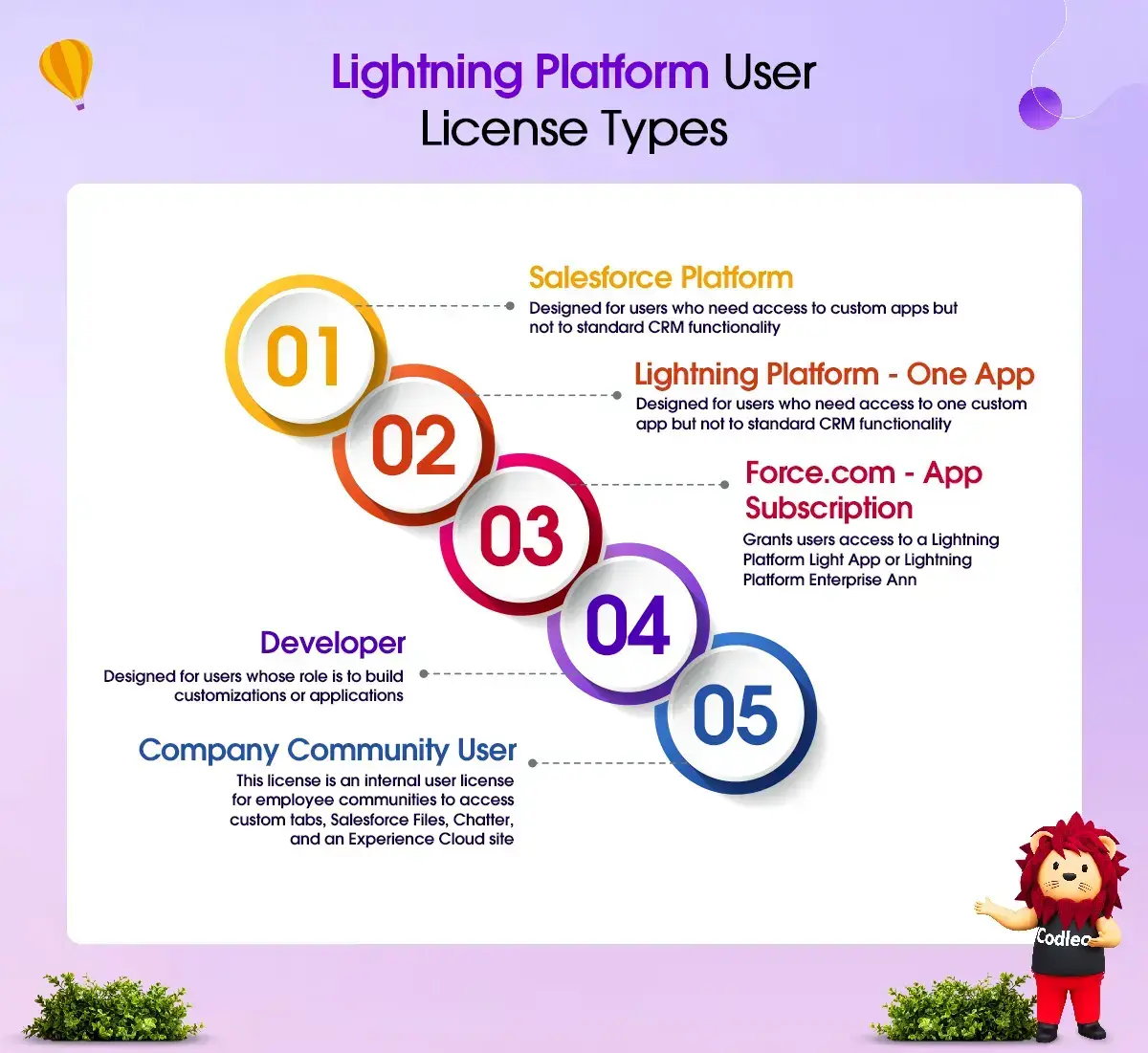
Salesforce Platform Licenses
You can use Salesforce Platform licenses with the Enterprise or Unlimited editions. These licenses give you full access to all custom apps in your organization, as well as core features like:
-
Accounts,
-
Contacts,
-
Reports,
-
Dashboards,
-
Documents,
-
Custom tabs.
However, it’s lacking some of the standard CRM functionality, like:
-
Some user permissions,
-
Standard apps,
-
Forecasts,
-
Leads,
-
Campaigns,
-
Opportunity.
Salesforce offers two pricing options for its Platform: Platform Starter at $25 per user per month, and Platform Plus at $100 per user per month.
The main difference is that Platform Starter provides access to 10 custom objects, while Platform Plus includes access to 110.
These licenses are a budget-friendly choice for users who do not need all the features of full CRM software.
An Enterprise license can cost about $3,000 per user per year, whereas a Platform license can cost only $300 per user per year. It means your organization could save $2,700 per user each year.
Salesforce Community Licenses
A good way to save money is by using login licenses for Experience Cloud users. These licenses are similar to buying mobile phone minutes; you can purchase them as needed.
Login licenses are part of Customer Community licenses. They are designed for external users who need occasional access to the community, but not to the internal organization. These licenses cost $2 for each login per month. For Partner Relationship Management, a portal license costs $10 for each login per month.
What is Salesforce License Optimization and Why Do You Need it?
Salesforce license optimization means ensuring your organization uses the most cost-effective licenses that meet your business needs. This process involves understanding user requirements, auditing license usage, managing unused permits, and negotiating contracts effectively.
Gartner research shows that organizations can reduce software costs by up to 30% with an effective license optimization strategy.
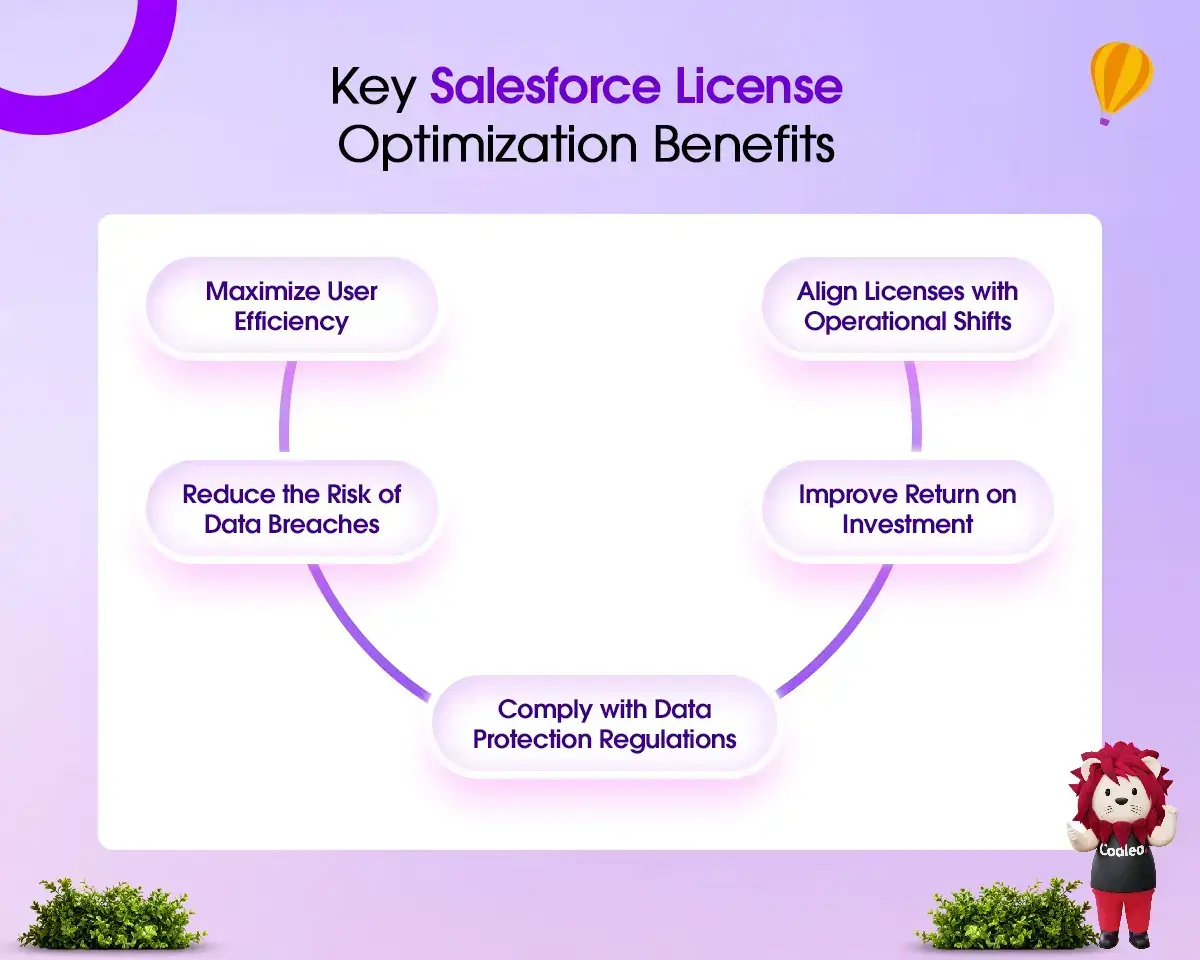
Salesforce license optimization helps you work more efficiently by ensuring users have the proper license with the necessary features. Regularly reviewing and adjusting licenses ensures they are updated when users shift roles, ensuring they have the appropriate access for their new responsibilities.
Some licenses allow access to sensitive data and administrative features. By giving users only the data and features they need, you can reduce the risk of data breaches while complying with data protection laws.
To keep your organization healthy and meet Salesforce security standards, you should regularly assess your system's security posture. You can read more about our best practices for Salesforce security assessments in our blog post.
Salesforce license optimization is crucial for running operations efficiently. It helps reduce costs, enhance security, and improve return on investment.
How to Lower Your Salesforce Subscription Costs and Make the Most of Your Contract
Lowering annual rates is a big challenge for Salesforce customers. It is mainly because the contract terms require customers to pay fixed annual fees and renew all their licenses to maintain their negotiated terms.
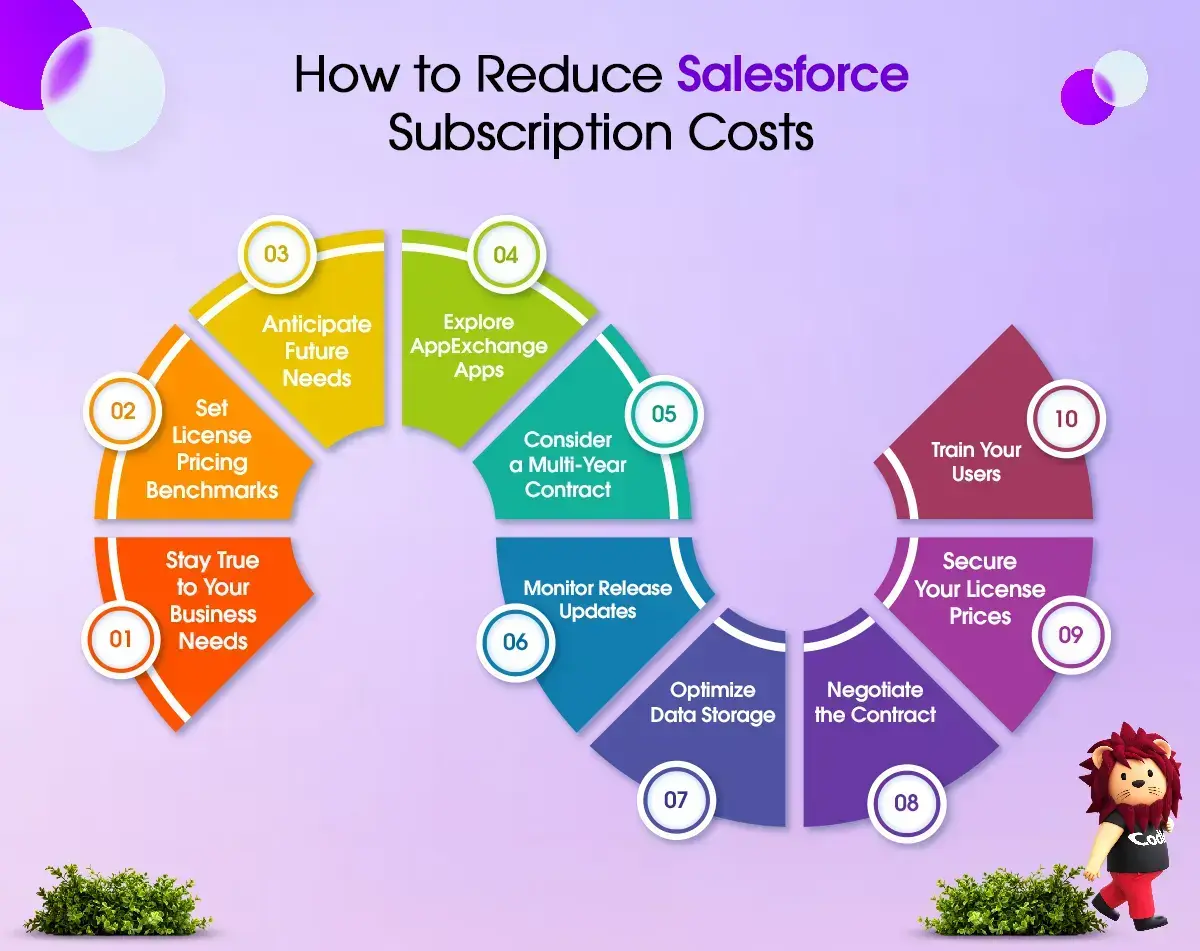
The good news is that there are other options available. You can lower your Salesforce licensing costs and make better use of it by following these steps:
Set Pricing Standards for Salesforce Licenses
If you plan to subscribe to Salesforce CRM, set realistic expectations for pricing. Consider your company size, typical deal size, industry, and budget constraints.
You need to understand what different users want from Salesforce and how they use the data. It will help you choose the right license types and the number you need. Knowing this will also be a good starting point to negotiate your license costs.
If you want a more accurate estimate, talk to Salesforce consultants. They will assess your business needs, determine the project's actual cost, and help you negotiate prices effectively.
Stay Focused on Your Business Needs
Attractive product bundles, such as Customer 360, might catch your eye, but it's essential to focus on what you need right now. Customize your solutions and options to fit your current requirements, keeping in mind that you can grow, upgrade, and renegotiate in the future. Stay flexible, and don't hesitate to discuss better terms or a reduced license when the time is right.
Plan for Future Needs
Predicting software needs can be hard as a business grows. However, it's essential to do this when purchasing software. If you underestimate future needs, you may end up with expensive last-minute purchases or upgrades. On the other hand, overestimating can lead to buying more licenses than needed, resulting in wasted money.
Run an audit to improve how you use Salesforce licenses.
Regularly review your license usage to identify cost-saving opportunities. You can do this by using:
-
Salesforce’s free reporting tools
-
Salesforce Optimizer add-on
-
Third-party license management tools from AppExchange.
These tools will help you identify underutilized Salesforce licenses and reassign them as needed. Some users may not be using all the features their licenses offer, while others may need more capabilities. Before granting access to a permit that someone typically doesn’t need, ask them to explain why they need it.
Conduct a system audit for users who haven’t logged in for 45 to 60 days. It will help you reassign licenses as needed and pay only for the features you actually use. You should also review your user list and deactivate any users who no longer use Salesforce. It can free up licenses for others and help you avoid buying unnecessary ones.
Explore Various Types of Salesforce Licenses and Products on AppExchange
Organize your data by community type, license type, and login frequency. See if you can choose cheaper licenses for users who don’t need full access to the CRM. Also, check whether community licenses, connectors, or AppExchange solutions can be used instead of full licenses.
Make the Most of a Multi-Year Contract.
If you want to lower your Salesforce costs while keeping all the benefits, consider signing a long-term contract. It can help you achieve a better price per user and ensure Salesforce supports your business for years to come, while saving you money.
Watch for updates to releases and any changes to your licenses.
Stay informed about the latest release changes and license updates. It helps you use new features, manage your costs, adjust your licenses, and get the most out of Salesforce for your business.
Find better ways to store your data.
Salesforce adds extra charges for data storage. To save money, manage your data and files well. Clean up and archive old or unneeded data often. It helps you stay within your storage limits and avoid extra fees. If you need more help, you can contact Salesforce consultants like Codleo.
Secure Your Salesforce License Prices.
Don't let your focus on getting the lowest upfront price distract you from the bigger goal: getting reasonable Salesforce licensing pricing for the long term. Plan ahead to ensure you save money and understand your pricing when it's time to renew.
Master the Skill of Negotiating Contracts
Discuss ways to lower your Salesforce licensing costs when it's time to renew your contract. Use the insights you've gained from optimizing your licenses to prepare for this.
Negotiate a cap on renewal cost increases to avoid surprise price hikes. Discuss Salesforce add-on costs as well, since these can help you save money and reduce your total expenses.
Keep in mind that renewing your contract is also a chance to make your business more efficient and more flexible with its finances.
Train Your Users
To help your users fully utilize Salesforce’s features, focus on user training as part of your cost-saving plan. Use video tutorials, guides, workshops, and create videos to teach them how to use the platform effectively. It will reduce the need for extra licenses.
Understanding the Process of Negotiating Salesforce License Pricing
If you want to reduce your Salesforce costs, think about renegotiating your contract when it’s time to renew. It is essential if you have more than 100 licenses. Your Salesforce account executive might agree to reduce the number of permits, offer you a 10% discount, or even provide a 25% discount if your contract is worth several hundred thousand dollars.
Deals like these encourage Salesforce Account Executives (AEs) by offering reliable commissions. However, keep in mind that negotiating lower license costs can involve risks.
Challenges in Contract Negotiations
Financial Effects of Stopping Salesforce Use
In Salesforce agreements, removing or stopping the use of certain products doesn’t always mean you will lower your costs. This means that even if you stop using certain resources, costs in your current environment may not decrease.
Switching from Standard Renewal Caps to One-Time Pricing
Typically, renewal caps remain close to 7%. However, more companies are now using one-time pricing in Salesforce forms. This change allows Salesforce to increase contract prices at renewal significantly.
Finding a Balance Between Cost Savings and Compliance Costs for Restricted-Use Licenses
Negotiating restricted-use licenses with Salesforce can help save costs. This option is ideal for users who need only a subset of features and want to avoid paying for a full license. However, keep in mind that Salesforce does not turn off any unused features.
If you exceed your agreed usage limits, you may be charged extra for breaching the contract. It could mean paying the difference between the full cost of an enterprise license and the current rate for limited-use licenses.
If you decide to negotiate discounts and pursue this type of license cost optimization, keep in mind that you must regularly monitor your use of restricted-use licenses. It will help you avoid exceeding the agreed limits and incurring additional fees. Alternatively, you can hire a service provider like Codleo to manage your license usage effectively.
Limitations on Transferring Products and Swapping Rights
Salesforce allows you to swap unused products for ones that better fit your needs. You can also transfer products between different departments in your organization. However, there may be certain restrictions. Understanding these limitations is essential for your business negotiations.
Essential Tips for Negotiating a Salesforce Contract
1. Identify the exact number of products and services your business needs.
First, collect data on how your organization uses products and review the products you have already launched. Then consider any future needs for license expansion. Create two lists: one for helpful extras and another for smart future investments. Use these lists in your planning model to stay organized. This strategy, focused on the next three years, helps you prepare for what comes next.
2. Make a Negotiation Calendar.
Start your negotiation process by making a clear calendar. From your first contact with Salesforce to presenting your proposal, make sure you manage the timeline. Begin negotiations 8 to 10 months before your license expires.
3. Create Strategic Options
Once discussions are complete, list out different ways you could expand or scale back your planned agreement. Focus on what you truly need versus what you would like to have. Also, think about software deployment timelines that fit your company’s needs.
4. Control Information Sharing
Wait to share project start dates until negotiations are underway. Ask your IT team to begin informal discussions with Salesforce, ensuring they clearly explain their needs without making any commitments.
Key Takeaway
Better coordination of licensing helps make acquiring and disposing of licenses more efficient. It also allows us to see which licenses can be reused more effectively.
If you want a licensing structure that fits your budget, hire Codleo, a certified Salesforce consultant. We can help you reduce your Salesforce license costs and improve usage. With over 10 years of experience, we know the best ways to optimize your Salesforce license use.
We will help your organization get the most from its Salesforce investment. We will focus on saving costs while also improving efficiency and productivity.
Our agency will help you with the following:
-
Calculate the actual cost of moving to Salesforce and setting it up, including any hidden expenses.
-
Lower the initial cost of Salesforce implementation by choosing the right editions and licenses and reviewing your business structure to streamline user access.
-
Check how your organization uses licenses and improve Salesforce license management.
-
Decrease Salesforce development costs by refining the development process using proven techniques and reducing the risk of technical debt.
-
Lower integration costs by finding or creating the best tool for syncing with your system.
-
Cut development and approval costs for your AppExchange app.
-
cost-effectively expand system capabilities and maintain a budget-friendly strategy.
-
Optimize license usage with each update and maximize the benefits of Salesforce innovations with our virtual support and management services.
If you're feeling confused about Salesforce license types or editions, or if you have questions about how to calculate your Salesforce subscription costs, get your free consultation today!
 0
0
About the Author

 603 D-Mall Netaji Subhash Place, Delhi 110034 IND


