


Publish date:
Every week, we get calls from business owners who budgeted $30,000 for Salesforce but got a $75,000 bill. And we get calls from people who budgeted $200,000 and did the whole thing for $55,000.
The difference rarely comes down to luck. It comes down to understanding what actually drives Salesforce implementation costs — before you sign anything.
We have implemented Salesforce for 200+ businesses across the USA, UAE, UK, and India. Small nonprofits. Mid-market financial firms. Healthcare organizations dealing with HIPAA compliance. Manufacturing companies with 400 users across five departments. In all of that experience, the pattern is consistent: businesses that understand the cost structure before they start almost always come in near or under budget. Businesses that don't, don't.
This guide covers everything. License pricing, implementation service costs, hidden fees that catch people off guard, how costs differ by industry, how to compare partner quotes, and a real Year 1 total cost model you can actually use for planning.
Let's get into it.
Table of Contents
-
Cost Estimate for Salesforce Implementation Services in the US
-
How Much Does a Professional Salesforce Setup Usually Cost for Mid-Sized Businesses?
-
Salesforce License Costs — Every Product, Every Edition
-
Implementation Service Costs — Phase by Phase
-
Cost by Salesforce Product (Sales Cloud, Service Cloud, Marketing Cloud, and more)
-
The Hidden Costs Most Businesses Miss
-
Total Cost of Ownership — Year 1 vs Year 3 Model
-
Salesforce Implementation Cost by Industry
-
Salesforce QuickStart Packages — What They Include and Who They're For
-
In-House vs Partner Implementation — Real Cost Comparison
-
How to Reduce Your Salesforce Implementation Cost
-
How to Evaluate a Quote from a Salesforce Partner
-
Frequently Asked Questions
Cost Estimate for Salesforce Implementation Services in the US
The short answer: anywhere from $5,000 to $500,000+, depending on the size of your business, how complex your processes are, how many systems you need to connect, and the quality of your data going in.
Here is a practical reference by business size:
Business Size Users Typical Implementation Cost Timeline
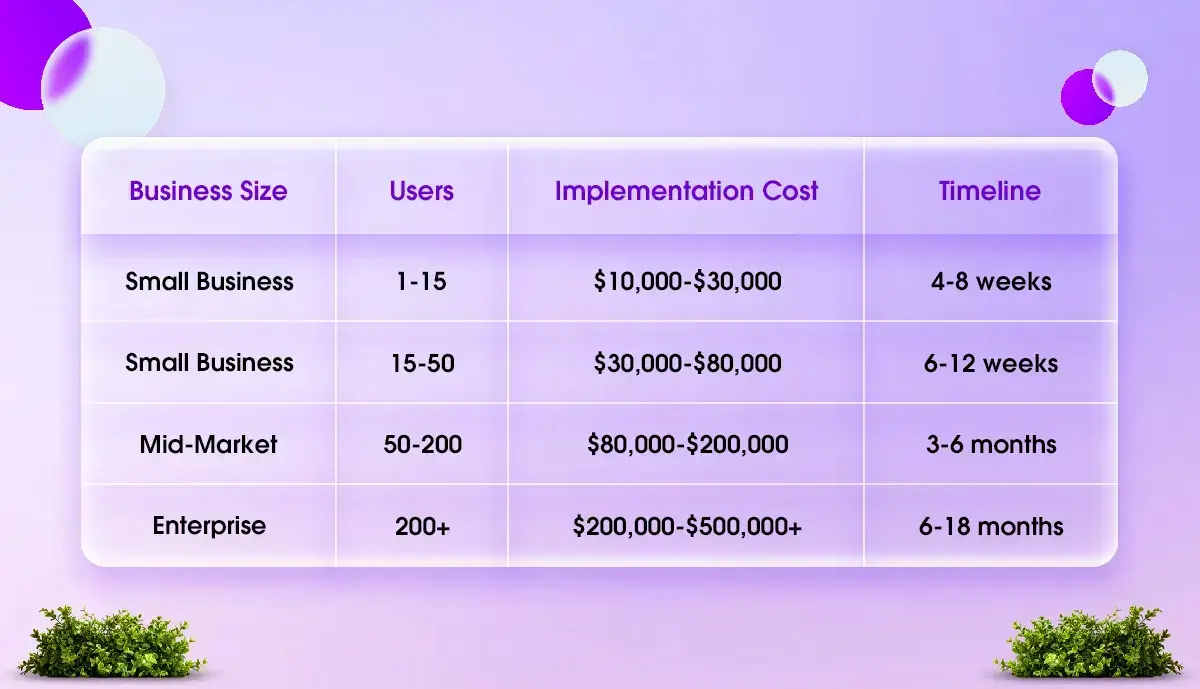
These numbers cover implementation services only — consulting, configuration, customization, data migration, integrations, training, and launch support. Salesforce license fees are a separate, recurring cost on top of this. We break those out in the next section.
One important thing to understand before reading further: the biggest cost variable in any Salesforce implementation is not the number of users. It is complexity. Two companies with 50 users can have implementations that differ by $100,000 because one has clean data and straightforward processes, and the other has messy legacy data, custom approval workflows, four system integrations, and a compliance requirement.
How Much Does a Professional Salesforce Setup Usually Cost for Mid-Sized Businesses?
For most mid-sized businesses in the United States, a professional Salesforce setup typically costs between $50,000 and $150,000. Organizations implementing multiple Salesforce Clouds, custom workflows, third-party integrations, or large-scale data migration projects may invest $150,000 to $250,000 or more, depending on the project's complexity. Industry benchmarks consistently show that implementation services—not Salesforce licenses—account for the largest share of a company's initial CRM investment.
If you're looking for a cost estimate for Salesforce implementation services in the US, it's important to separate implementation costs from annual Salesforce licensing fees. Implementation services include business discovery, solution architecture, CRM configuration, custom development, data migration, API integrations, user acceptance testing, training, deployment, and post-launch support. These one-time services ensure Salesforce is tailored to your business processes rather than functioning as a standard out-of-the-box CRM.
For example, a mid-sized company with 40–100 Salesforce users may require Sales Cloud configuration, Service Cloud setup, ERP integration, automated workflows, and role-based dashboards. While annual software licenses are paid directly to Salesforce, implementation costs vary based on customization requirements, the number of business processes to be automated, compliance needs, and the quality of the existing data. Projects with clean data and limited integrations generally remain within the lower end of the budget, whereas multi-cloud implementations involving legacy system migration and custom development require significantly higher investment.
-
Small Businesses (up to 25 users): Typically invest $10,000–$40,000 for a basic Salesforce implementation with standard configuration and minimal customization.
-
Mid-Sized Businesses (25–200 users): Usually spend $50,000–$150,000 for a professional Salesforce setup that includes customization, data migration, integrations, user training, and deployment support.
-
Enterprise Organizations (200+ users): Generally require an investment of $200,000–$500,000+ for complex, multi-cloud Salesforce implementations with extensive custom development and enterprise integrations.
Salesforce License Costs — Every Product, Every Edition
Your Salesforce license is a recurring subscription fee paid directly to Salesforce, billed annually. This cost exists from day one, before any implementation work begins, and continues every year.
Sales Cloud
Salesforce Sales Cloud offers four editions for sales teams. Each edition has different features, user limits, and costs. Although the prices are listed monthly, you will be billed annually for licenses.
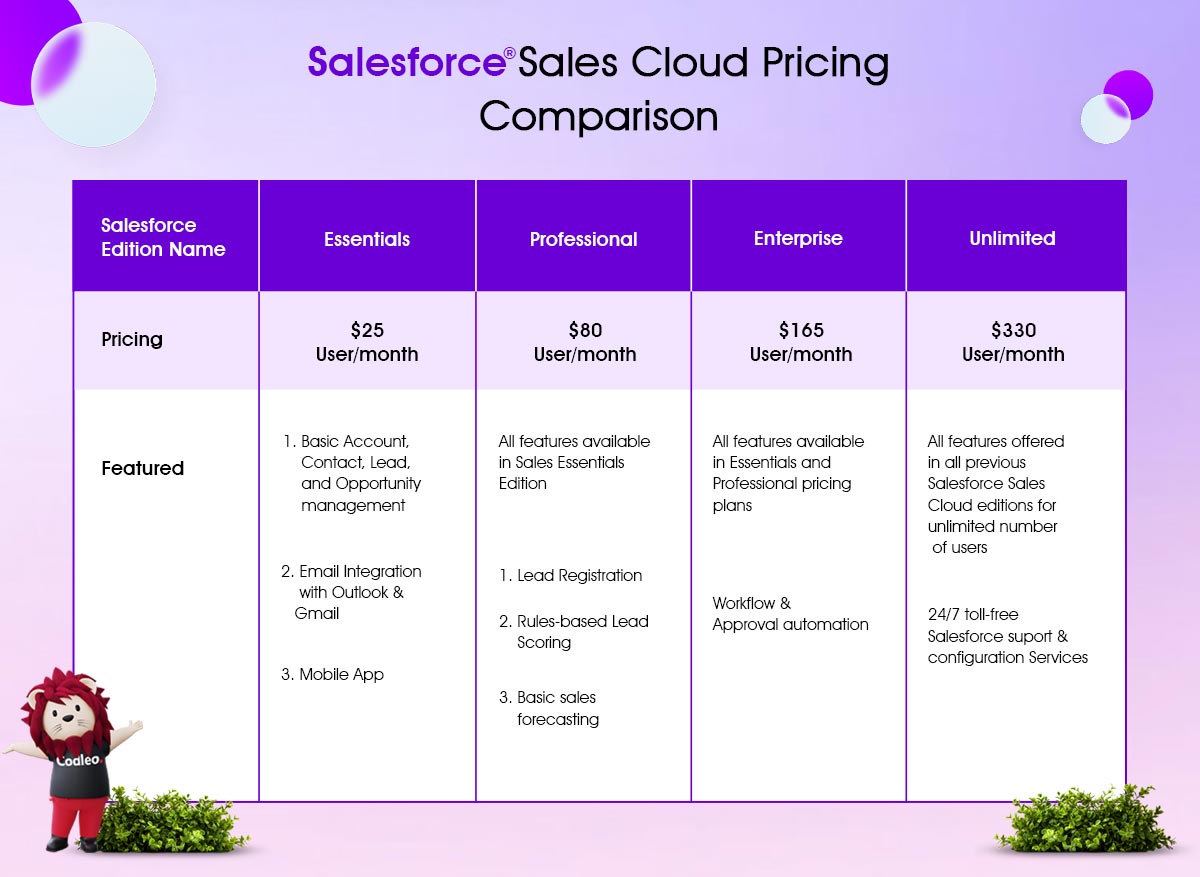
Salesforce Essentials Edition ($25/user/month):
-
This tool is designed for basic customer relationship management (CRM). It helps you manage leads, contacts, and sales.
-
It includes standard account management, works with Gmail and Outlook, and offers a mobile app.
Salesforce Professional Edition ($80/user/month):
-
This software is perfect for mid-sized businesses that have one sales unit.
-
It offers features like lead registration, rules-based scoring, and sales forecasting.
Salesforce Enterprise Edition ($165/user/month):
This edition suits mid to large organizations that need advanced sales automation, workflow, and approval processes.
Salesforce Unlimited Edition ($330/user/month):
This edition provides extensive sales automation features. It includes everything from the other editions and adds 24/7 support and configuration services.
Salesforce Einstein 1 Sales Edition ($500/user/month):
This edition includes Einstein Copilot, which uses Generative AI to help with decision-making. It offers performance management tools, sales programs, and easy collaboration through Slack. It also connects with Data Cloud and Revenue Intelligence for better data integration and sales optimization.
You can improve Sales Cloud by adding Sales Engagement, Salesforce CPQ & Billing, and Pardot (now called Marketing Cloud Account Engagement).
Service Cloud
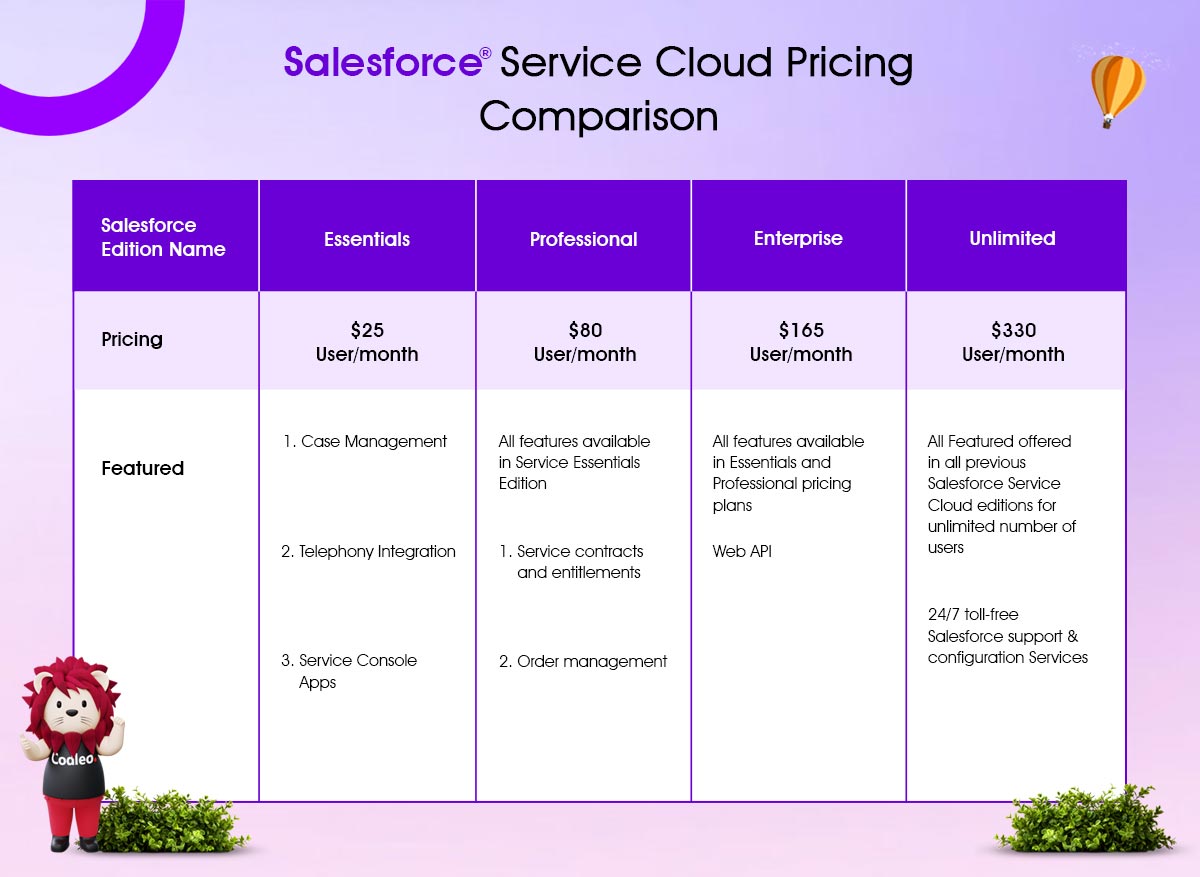
Service Cloud manages customer support operations — cases, tickets, SLAs, knowledge bases, and omnichannel service.
Salesforce Essentials Edition ($25/user/month):
This plan is designed for small customer service teams. It includes basic features such as managing cases across multiple channels, telephony integration, and access to the Service Console app.
Salesforce Professional Edition ($80/user/month):
This edition builds on Essentials, adding features such as service contracts, entitlements, and order management.
Salesforce Enterprise Edition ($165/user/month):
This plan offers advanced customer service automation, enhanced AI-powered reporting tools, and Web API access.
Salesforce Unlimited Edition ($330/user/month):
This package includes the most features, 24/7 support from Salesforce, configuration services, and online training.
Salesforce Einstein 1 Service Edition ($500/user/month):
This plan provides even more features than Unlimited. It includes Digital Channels, Service Intelligence, and Slack integration.
Users also receive access to Einstein Copilot, which uses generative AI to improve service efficiency and support decision-making.
Additionally, this plan connects to Data Cloud for better data integration and improved service performance. Service Cloud can work with other Salesforce Clouds, such as Field Service, Digital Engagement, and Service Cloud Einstein.
Salesforce Marketing Cloud License Pricing
Marketing Cloud has four suites for different areas: email marketing, social media, advertising, and B2B marketing automation.
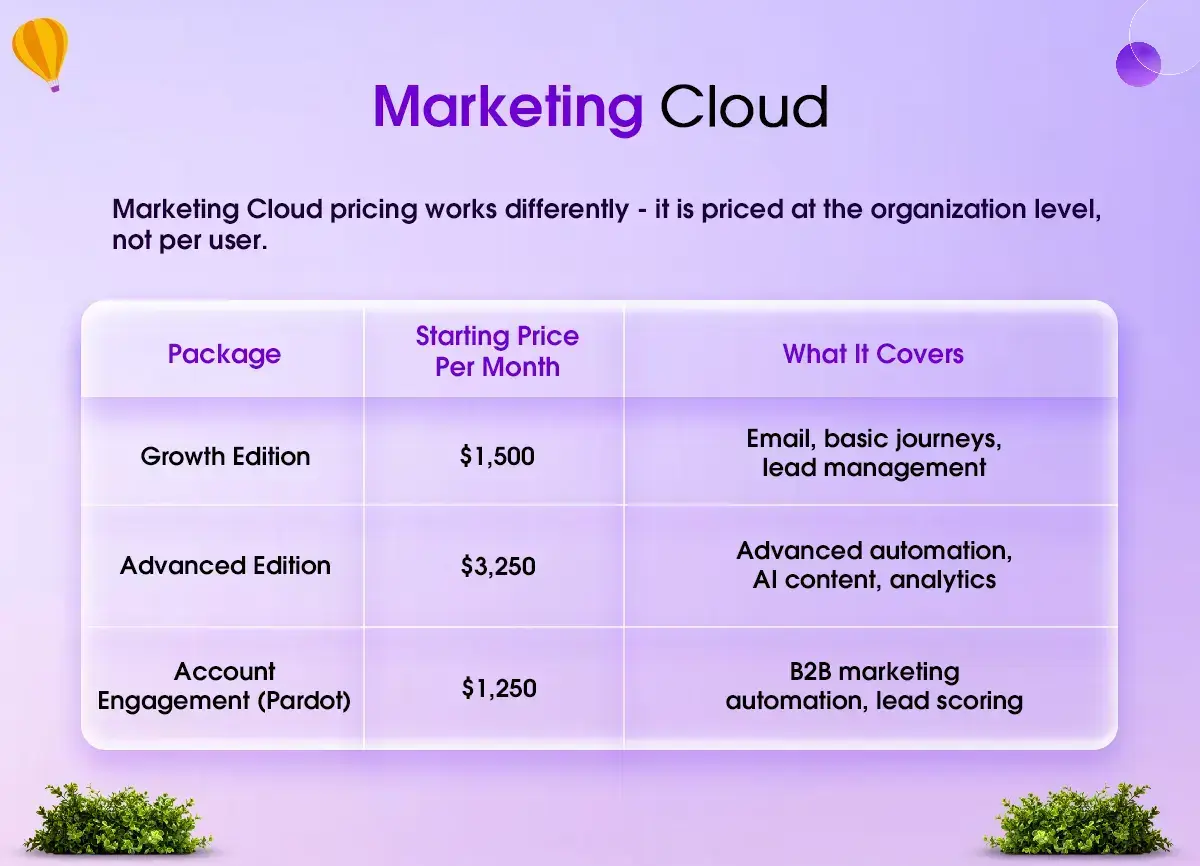
Marketing Cloud Engagement (Starting at $1,250 Org /month)
-
MC Engagement, previously known as Core Messaging/Journeys, helps create personalized customer experiences at every stage of their journey. It allows for consistent messaging across different marketing channels.
-
The service includes creating visual maps of customer journeys to improve them and combines tools from the Email, Mobile, and Web Marketing Suite. These tools include email personalization, content creation, tagging, and audience segmentation.
Marketing Cloud Account Engagement (Starting at $1,250 per month)
-
MC Account Engagement (previously called Pardot) combines all tools for Account-based marketing or B2B marketing automation.
-
It helps move visitors and potential customers through the sales process, from creating marketing materials to connecting qualified leads with sales representatives.
-
It works well with Salesforce, allowing data to sync back and forth with standard Salesforce objects like leads and contacts. It also connects with Salesforce campaigns through the Pardot app.
Marketing Cloud Growth Edition (Starting at $1,500 per month)
-
Marketing Cloud Growth Edition helps teams work together better and use AI to deliver campaigns faster. It also helps build strong, personalized relationships with customers.
-
It has AI features like AI-powered Emails and Campaigns, Multi-Channel Journeys, and Real-Time Sales Alerts. These tools can help drive sales and support the growth of your small business.
Marketing Cloud Personalization (Starting at $108,000 per year)
-
Marketing Cloud Personalization, formerly Interaction Studio, helps businesses connect with customers one-on-one at every point of contact. It uses Salesforce's top solution for real-time personalization and interaction management.
-
This platform combines marketing activities, allowing you to instantly view, track, and manage the customer experience. It aims to enhance your marketing efforts and make every interaction feel personal
Data Cloud for Marketing (Starting at $108,000 per year)
Data Cloud for Marketing collects and uses audience data for personalized interactions. It combines all customer data to create a complete profile, forms accurate audience segments, and shares data across marketing channels.
Marketing Cloud Intelligence (Starting at $3,000 Org /month)
MC Intelligence, formerly Datorama, provides a marketing dashboard that helps you connect to, analyze, and act on your data. This tool can improve your return on investment (ROI), increase efficiency, and support business growth.
To know more about Salesforce Experience Cloud pricing, check out our post titled “What is Salesforce Experience Cloud?”
Next, let's discuss other costs involved in a typical Salesforce implementation. These costs may arise if simple setups and configurations do not solve your business challenges.
To estimate the Salesforce pricing for small and medium-sized businesses, we considered:
-
The average hourly rates for Salesforce implementation consultants and developers,
-
The time needed for implementation tasks,
-
The complexity of the Salesforce implementation project.
A note on pricing trends: Salesforce increased its prices in 2023 and again in 2025. Pricing adjustments for 2026 and beyond are expected. If you are signing a multi-year agreement, it is worth negotiating a price lock — Salesforce will often accommodate this for larger contracts.
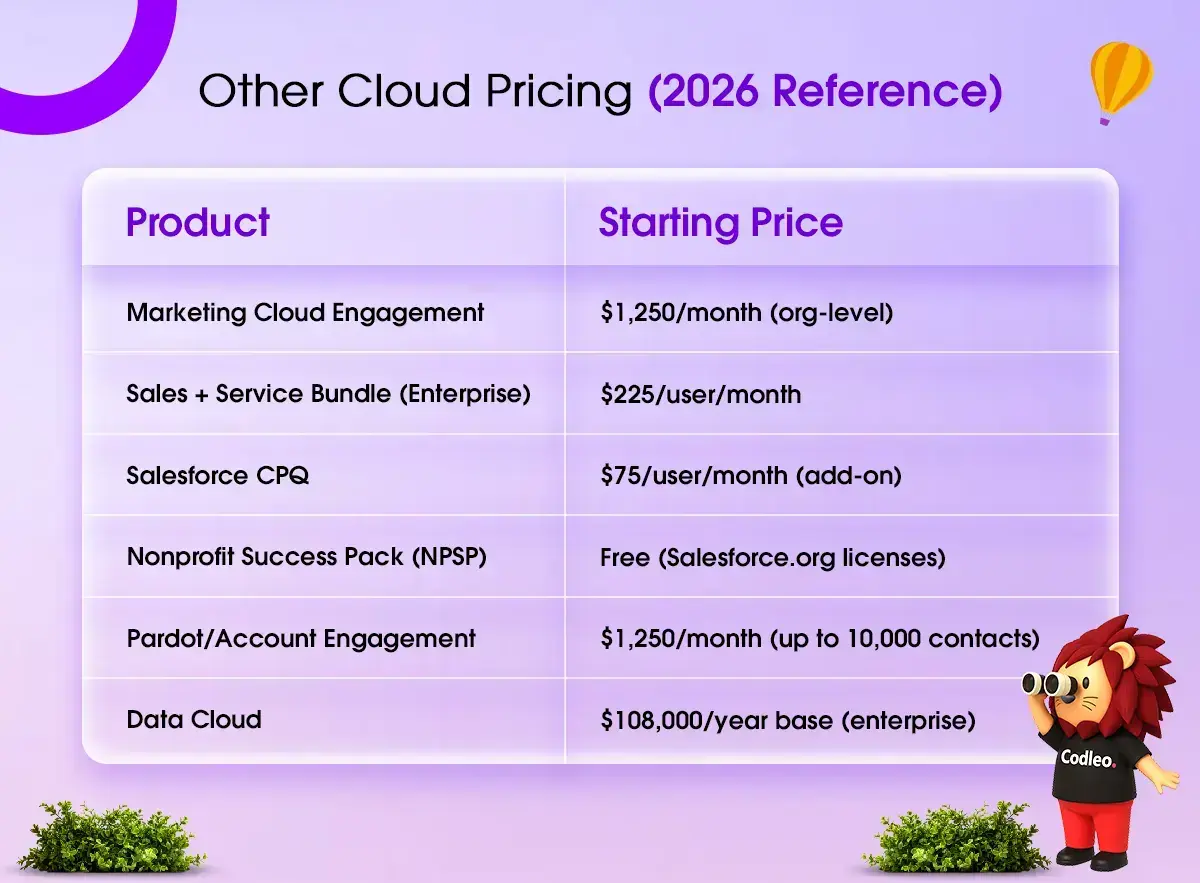
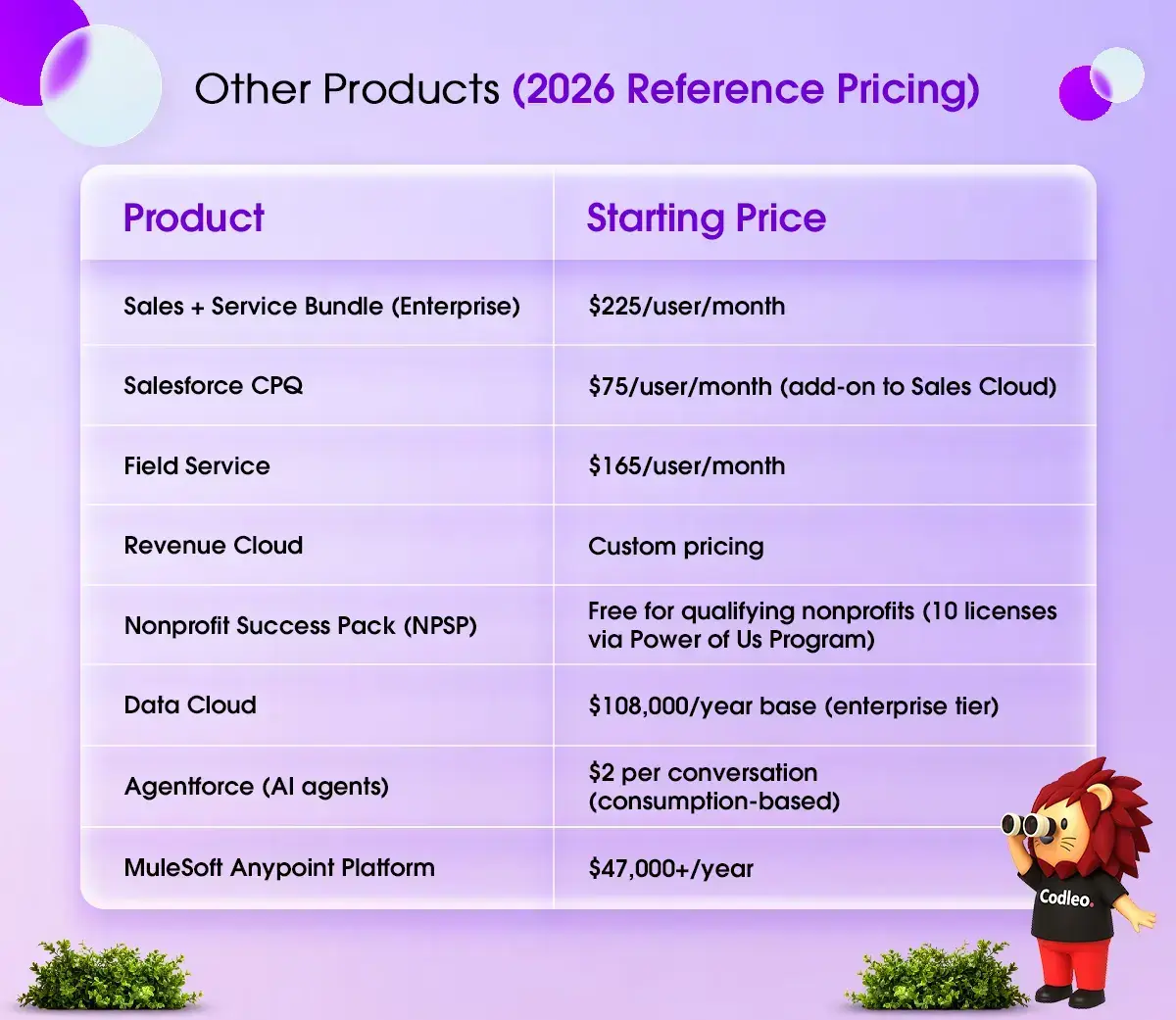
Other Products — 2026 Reference Pricing
Implementation Service Costs — Phase by Phase
Implementation is not one thing. It is a series of distinct phases, each with its own cost drivers. Understanding each phase helps you evaluate quotes accurately and know where your budget is actually going.
Phase 1 — Discovery and Strategy (10–15% of total project cost)
This is where your implementation partner learns how your business actually works — not how you think it works on paper, but the real day-to-day processes, the manual workarounds people have built, the data flows, the edge cases, and the integrations.
A proper discovery phase includes stakeholder interviews, current-state process mapping, future-state design, and a technical architecture plan. For a $100,000 project, expect $10,000–$15,000 allocated here.
Discovery feels like an overhead cost because it produces documents rather than a working system. But it is the most important investment in the entire project. Projects that skip or rush discovery almost always hit major issues during build — either building the wrong thing, or building the right thing in a way that breaks during testing.
Phase 2 — Configuration and Customization (35–50% of total project cost)
This is the core build phase. It splits into two distinct types of work:
-
Configuration means setting up Salesforce using its built-in tools — creating objects and fields, building flows, setting page layouts, configuring roles and permissions, creating reports and dashboards. This is faster and less expensive.
-
Customization means writing custom code — Apex classes, Lightning Web Components, custom APIs. This is needed when standard Salesforce tools cannot meet a specific requirement. It is more expensive, takes longer, and requires ongoing maintenance.
A skilled implementation partner will always try to meet your requirements through configuration before resorting to custom code. Over-engineering with Apex when a Flow could solve the problem is one of the most common ways implementation costs balloon unnecessarily.
Phase 3 — Data Migration (15–25% of total project cost)
Moving your existing data into Salesforce — from spreadsheets, legacy CRMs, databases, or other systems — cleanly and accurately.
This phase is the most consistently underestimated in Salesforce projects. Here is why: the cost depends almost entirely on the quality of your source data, and most businesses overestimate how clean their data actually is.
Common data problems that drive up migration costs:
-
Duplicate records (the same company entered 14 different ways across 8 years of spreadsheets)
-
Inconsistent field formats (phone numbers in 12 different formats, dates as text strings)
-
Missing required fields (contacts without email addresses, opportunities without close dates)
-
Orphaned records (activities linked to contacts that no longer exist)
-
Data is spread across multiple sources that need to be reconciled before migration
If you want to reduce your implementation cost, the single highest-return action you can take before your project starts is to clean your data yourself. Deduplicate, standardize, delete junk. Every hour your implementation partner spends cleaning your data, you pay at your partner's billing rates. Every hour you spend cleaning it beforehand costs you nothing.
Phase 4 — Integrations (15–30% of total project cost)
Connecting Salesforce to the other tools in your business stack.
Common integrations and their typical cost ranges:
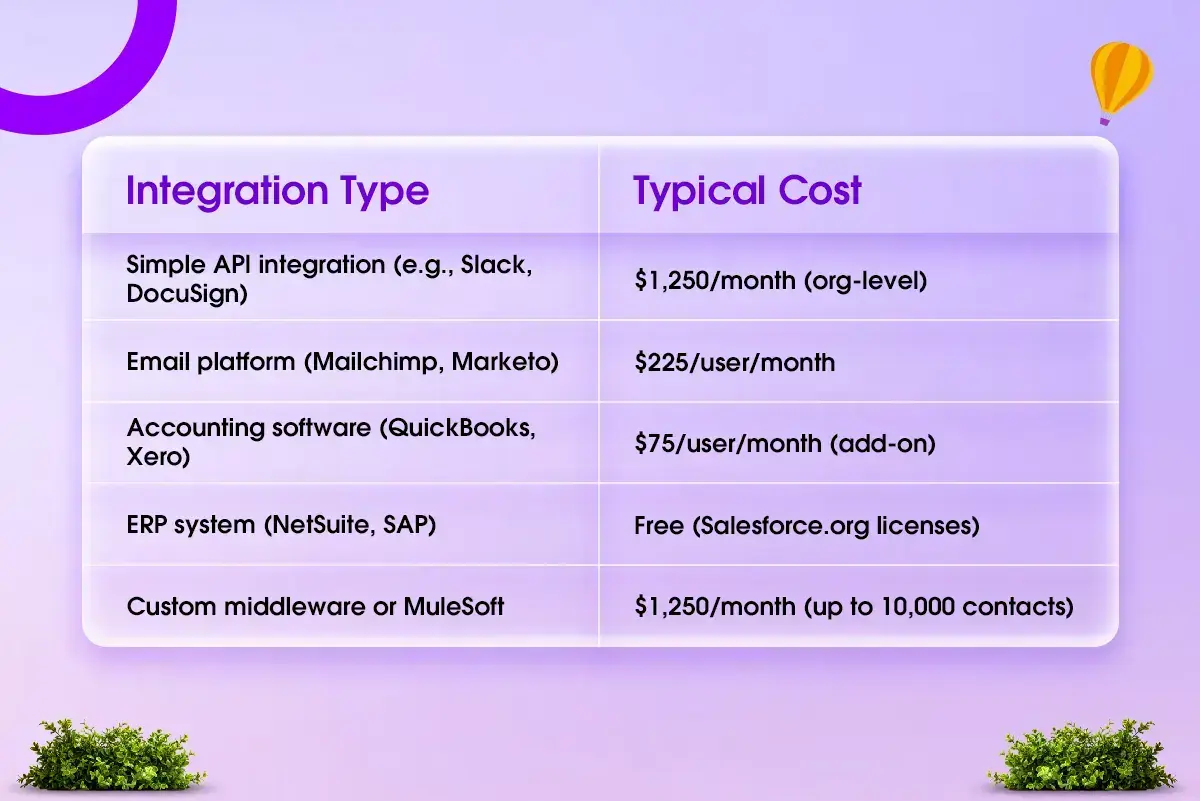
Every integration adds scope, testing cycles, and maintenance complexity. More integrations generally mean more cost and more things that can break. Be thoughtful about which integrations you actually need on day one versus which can wait for phase two.
Phase 5 — Testing and Quality Assurance (5–10% of total project cost)
Unit testing, user acceptance testing (UAT), performance testing, and security validation. This phase is often compressed to save time and money — and it almost always ends up costing more later when issues surface in production. Budget for it properly.
Phase 6 — Training and User Adoption (5–10% of total project cost)
Role-based training, admin training, recorded sessions, user guides, and post-launch office hours.
Salesforce adoption is the silent killer of implementation ROI. A technically perfect Salesforce org that your team does not use returns exactly nothing. Training is not a luxury — it is the mechanism by which your investment generates return.
Budget separately for:
-
End-user training (by role — sales, service, marketing, operations)
-
Admin training (whoever manages Salesforce internally going forward)
-
Executive/management training (dashboards, pipeline visibility, reporting)
Phase 7 — Post-Launch Support (ongoing)
The go-live date is not the end of the project. It is the beginning of Salesforce as a living system in your organization.
Post-launch support typically covers bug fixes, minor configuration changes, new-user onboarding, report updates, and support for Salesforce's three annual release cycles.
Options include:
-
Internal Salesforce Admin: $70,000–$120,000/year for a full-time certified admin in the USA
-
Managed Services Partner: $1,500–$8,000/month, depending on scope, typically covering admin, minor enhancements, release management, and help desk support.
-
Ad-hoc partner support: $100–$250/hour (US-based partner rates)
Cost by Salesforce Product
ProductSimple SetupComplex Implementation
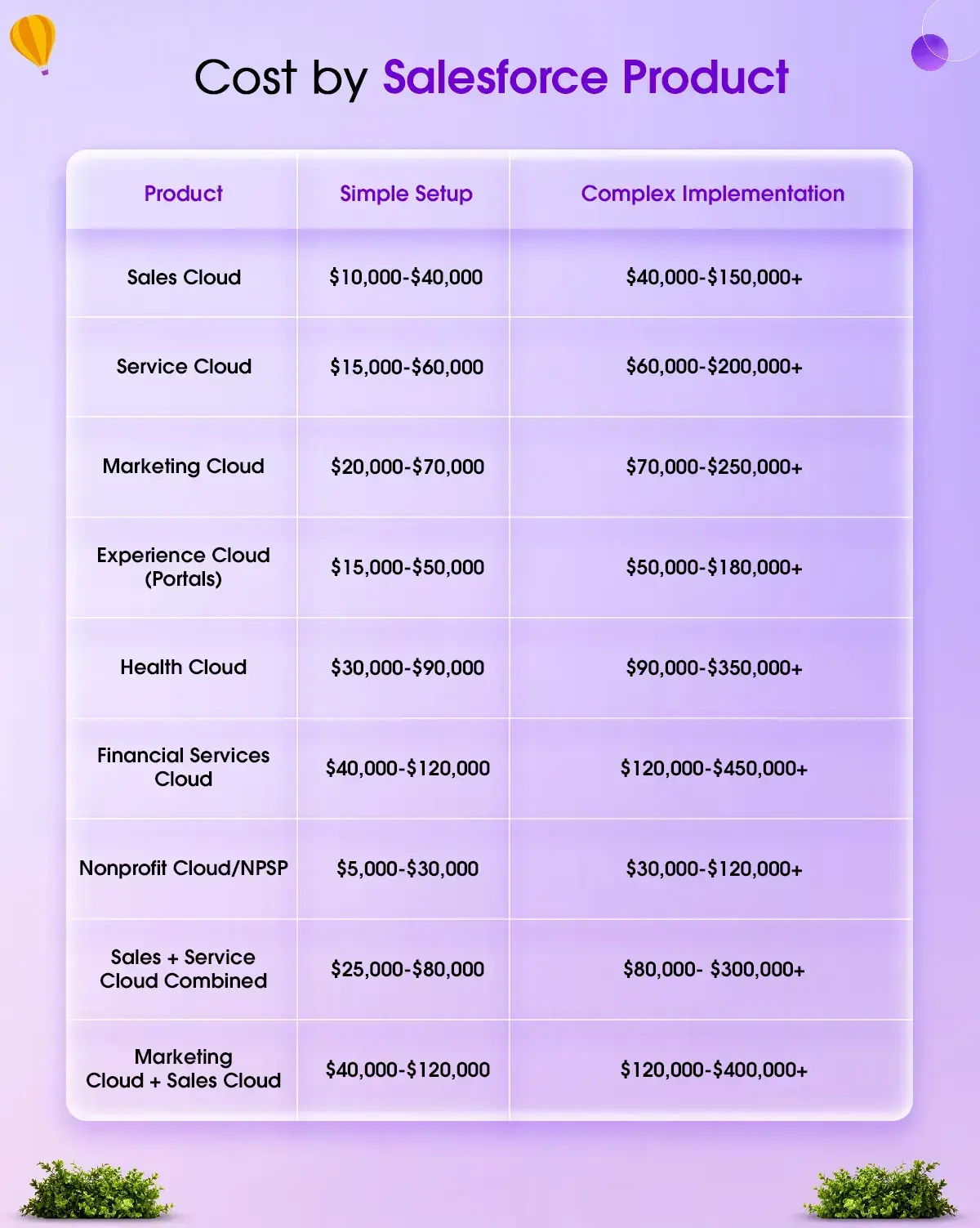
"Simple" means: standard use case, clean data, 1–2 integrations, minimal custom development.
"Complex" means: heavy customization, multiple integrations, large data migration, compliance requirements, or multi-business-unit rollout.
The Hidden Costs Most Businesses Miss
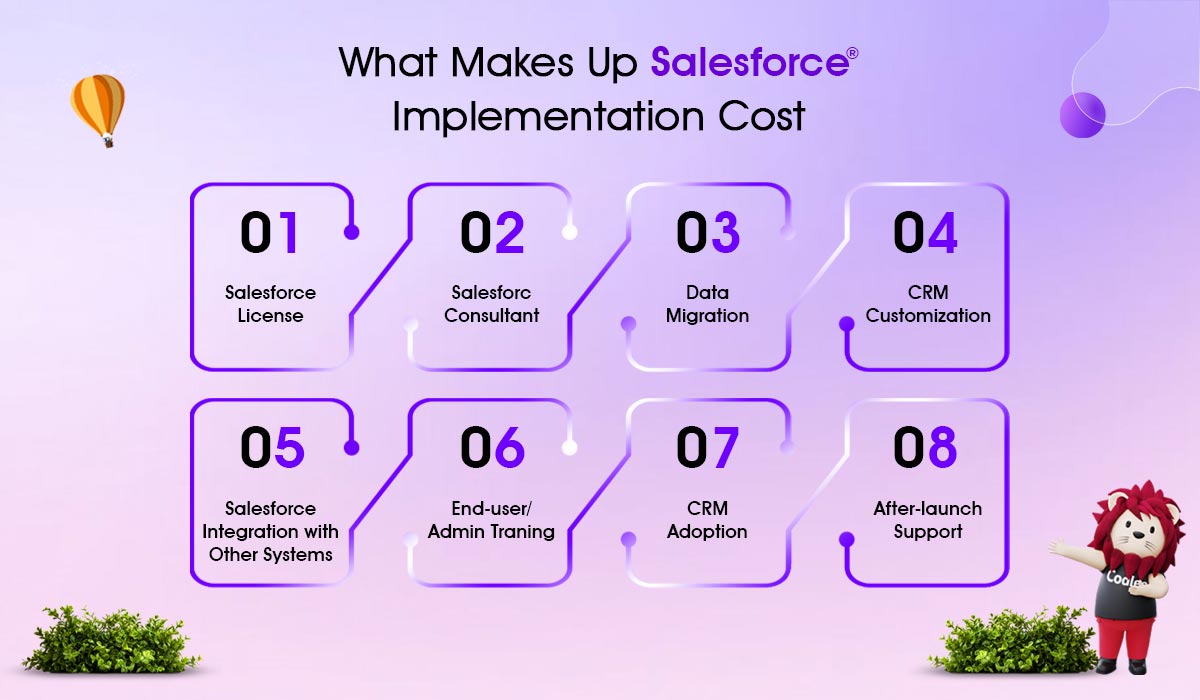
These are the costs that rarely appear in a partner's initial quote — but do appear on your invoice.
Sandbox Environments
Every serious Salesforce organization needs at least one sandbox environment for testing before deploying changes to production. Developer sandboxes come with most editions. Partial and Full sandboxes — which you need for realistic user acceptance testing — cost extra.
A Full Sandbox can add $5,000–$15,000 per year to your Salesforce contract. If you need multiple sandboxes for different teams or release tracks, this compounds.
Data Storage Overages
Salesforce includes 1GB of data storage per org and 20 MB per user. For a 50-user org, that is roughly 2GB total. In practice, many businesses hit this ceiling within 12–24 months, especially if they are storing email attachments, large files, or high-volume transaction records.
Additional storage is priced at approximately $5 per 50MB per month. At scale, this can reach $20,000–$50,000 per year for data-heavy organizations.
Salesforce AppExchange Applications
Salesforce's native functionality is extensive, but most real-world implementations rely on AppExchange applications to fill specific gaps:
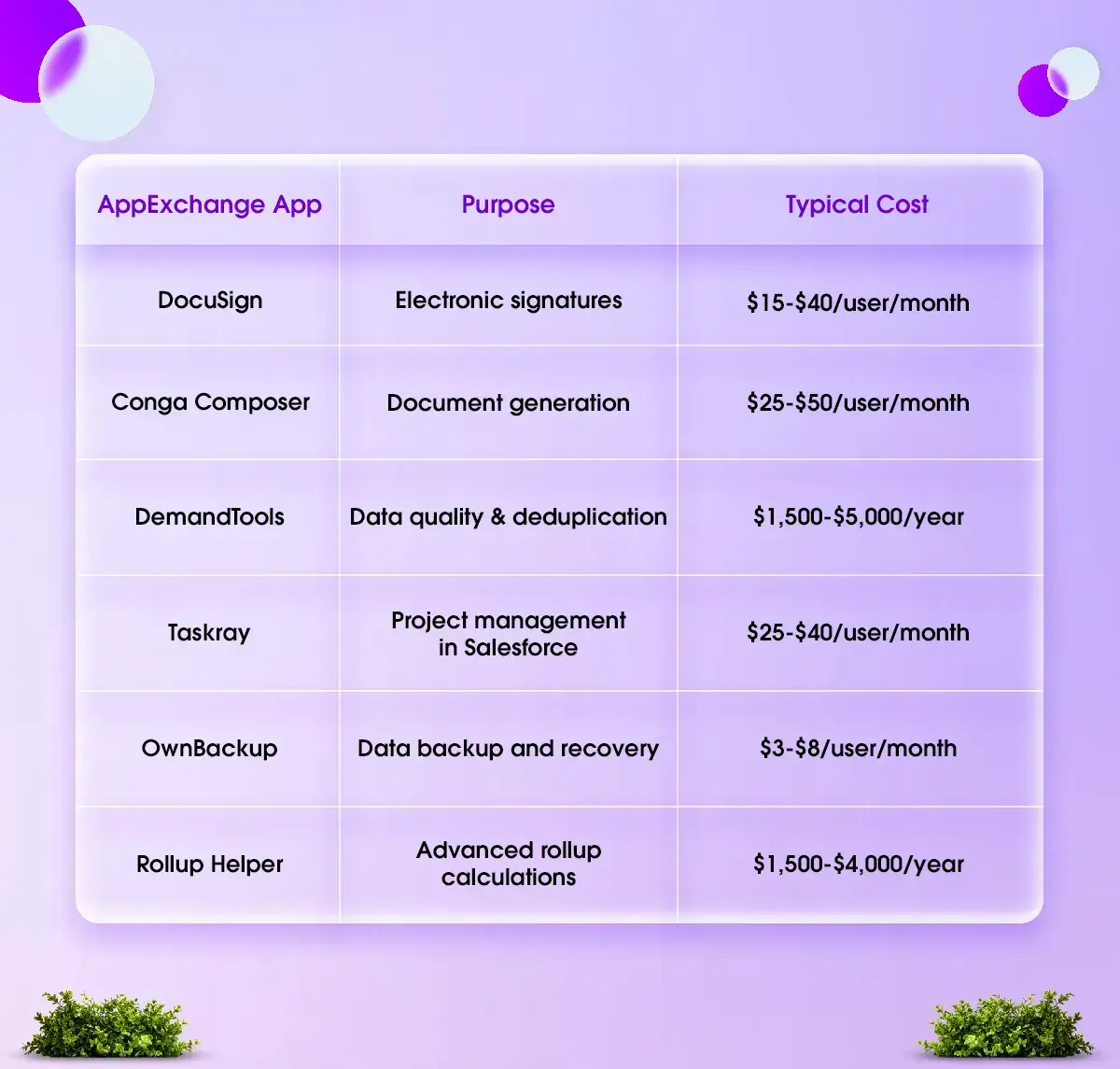
AppExchange AppPurposeTypical Cost
These costs are easy to overlook in early-stage planning, but they add up significantly over a full user base.
Experience Cloud / Community Licenses
If you plan to build a customer portal, partner portal, or employee community using Experience Cloud, you will need external user licenses. These are separate from your internal user licenses.
License Type Cost Per User Per Month
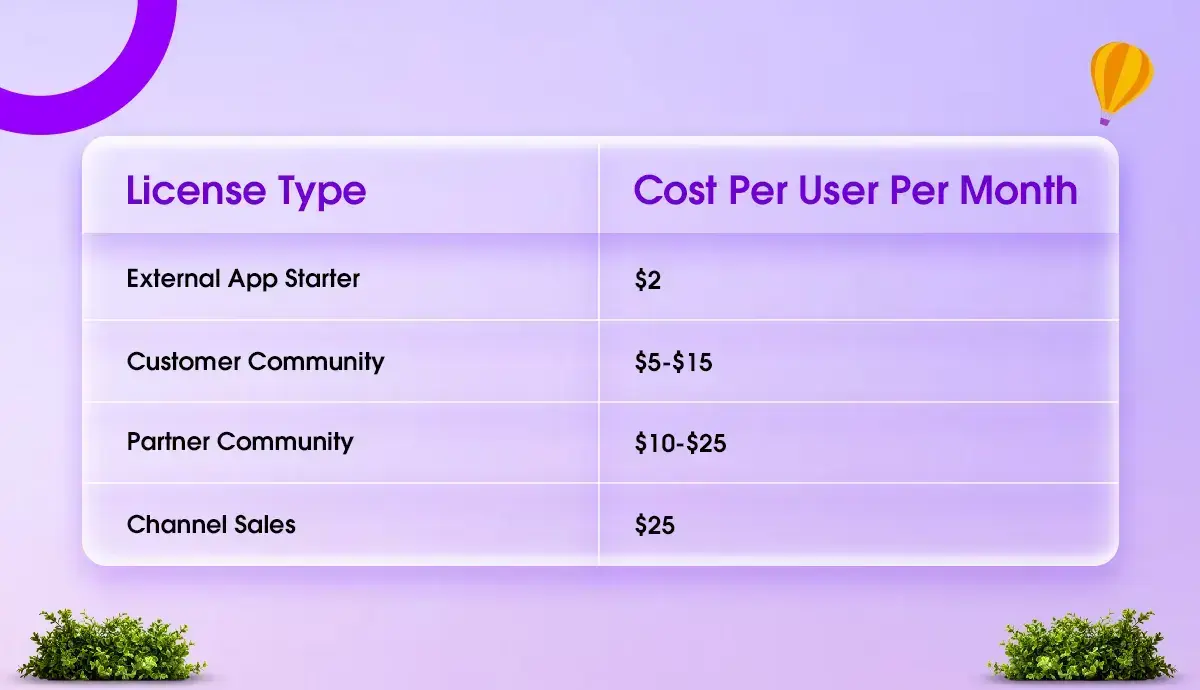
For a portal with 5,000 customer users on a $5 license, that is $25,000/month — $300,000/year. This surprises organizations that assume portal users are covered under their standard licenses.
Rework Costs from Under-Scoped Projects
This is perhaps the most painful hidden cost. When an implementation is rushed or under-scoped — skipping discovery, cutting testing, building without a clear architecture — the organization pays twice, once for the original build, and again when they need to rebuild what was done incorrectly.
At Codleo, a meaningful portion of new client engagements involves fixing or rebuilding Salesforce implementations that were done by previous partners or internal teams without adequate planning. The original implementation seemed cheaper. The total cost was not.
Change Management
Change management is the work of helping your team actually adopt and use Salesforce — not just learning where to click, but genuinely changing how they work.
This includes executive sponsorship facilitation, communication planning, resistance management, and adoption measurement. Organizations that invest in change management see significantly higher user adoption rates — and higher ROI from their Salesforce investment.
Budget 10–15% of your total project cost for change management. Treat it as non-negotiable.
6. Total Cost of Ownership — Year 1 vs Year 3
Planning only for Year 1 costs leads to budget surprises in Years 2 and 3. Here is a realistic model:
Scenario: 30-User Sales Cloud Enterprise Implementation, US-Based SMB
Year 1 Costs:
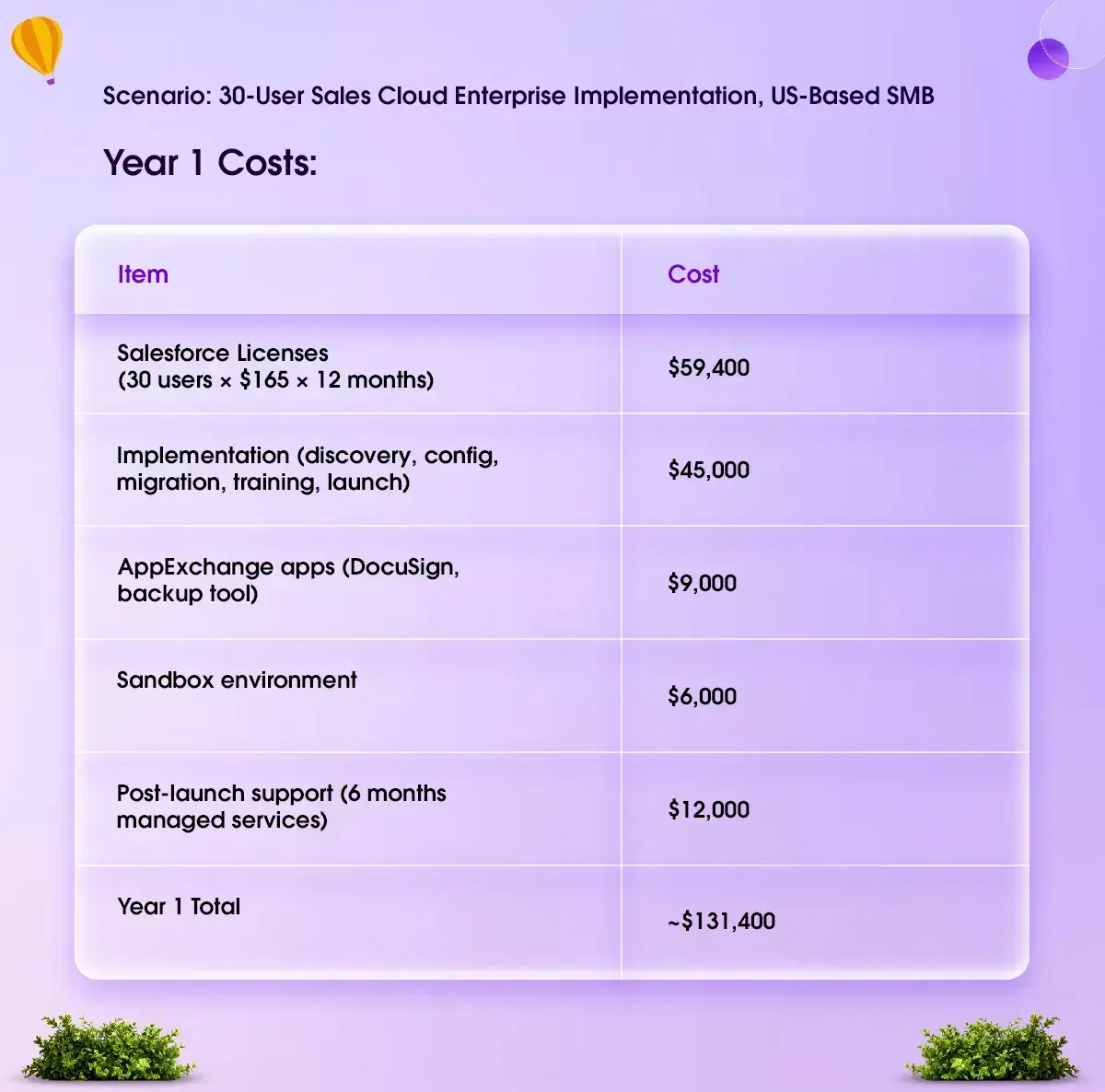
Year 2 Ongoing Costs:
Item Annual Cost
Is this worth it? For a 30-person sales team, yes — if the implementation is done right. Salesforce's own research shows that customers achieve an average 25% increase in revenue, a 26% improvement in customer retention, and a 28% improvement in sales productivity. For a business doing $5M in revenue, a 25% uplift is $1.25M. The ROI math works. The key condition is implementation quality.
Salesforce Implementation Cost by Industry
Industry determines complexity. Compliance requirements, data sensitivity, process standardization, and vertical-specific Salesforce products all affect the cost of your implementation.
Healthcare
Cost range: $50,000 – $350,000+
Healthcare implementations typically involve Salesforce Health Cloud, HIPAA compliance, integration with electronic health record systems (EHRs), patient data management, and care coordination workflows.
HIPAA compliance alone adds significant cost — Business Associate Agreements with Salesforce, specific data security configurations, audit trail requirements, and compliance documentation all take time and expertise.
Codleo works with healthcare organizations across the USA, including multi-location practices, health systems, and medical device companies.
Financial Services
Cost range: $60,000 – $450,000+
Financial Services Cloud (FSC) is a purpose-built Salesforce product for wealth management, banking, and insurance. It has specific data models, compliance tooling, and regulatory considerations.
Implementations typically include client-household relationship management, financial account tracking, regulatory compliance workflows, advisor performance management, and integration with portfolio management or core banking systems.
Nonprofits
Cost range: $5,000 – $120,000
Nonprofits are among the most cost-effective Salesforce implementations when done well. The Nonprofit Success Pack (NPSP), available free through Salesforce.org's Power of Us Program, provides a purpose-built data model for donor management, grant tracking, program management, and volunteer coordination.
Implementation costs depend on data complexity (years of donor history to migrate), the number of integrations (payment processors, email platforms, grant management tools), and reporting requirements.
Codleo has implemented Salesforce NPSP for nonprofits across the USA, UK, and India — including organizations that completed full implementation for under $20,000.
Real Estate
Cost range: $20,000 – $150,000**
Real estate implementations typically involve custom property objects, territory and agent management, listing lifecycle tracking, transaction coordination workflows, and integration with MLS systems or property databases.
The data model for real estate is not natively in Salesforce — it needs to be built, which drives implementation cost higher than a standard Sales Cloud project.
Manufacturing
Cost range: $40,000 – $250,000+
Manufacturing implementations often involve CPQ (Configure, Price, Quote) for complex product configurations, field service management for after-sales support, supply chain and ERP integration (SAP, Oracle, NetSuite), and dealer/distributor portal management through Experience Cloud.
The ERP integration component alone is frequently the largest single cost driver in manufacturing Salesforce projects.
SaaS and Technology Companies
Cost range: $30,000 – $200,000**
SaaS companies typically need highly customized lead-to-cash processes, integration of product usage data, subscription management, customer health scoring, and complex reporting for boards and investors.
The sophistication of the reporting requirements — particularly when leadership expects real-time pipeline visibility, cohort analysis, and churn metrics — drives complexity and cost.
Professional Services
Cost range: $25,000 – $120,000**
Consulting firms, law firms, accounting practices, and agencies use Salesforce primarily for client relationship management, project tracking, utilization reporting, and billing integration.
The key differentiator here is whether the firm wants to track project profitability and resource utilization inside Salesforce — which requires custom development — or use a separate PSA (Professional Services Automation) tool integrated with Salesforce.
Salesforce QuickStart Packages — What They Include and Who They're For
A QuickStart package is a fixed-scope, fixed-price implementation designed to get a business onto Salesforce quickly with a working foundation — not a fully customized enterprise system.
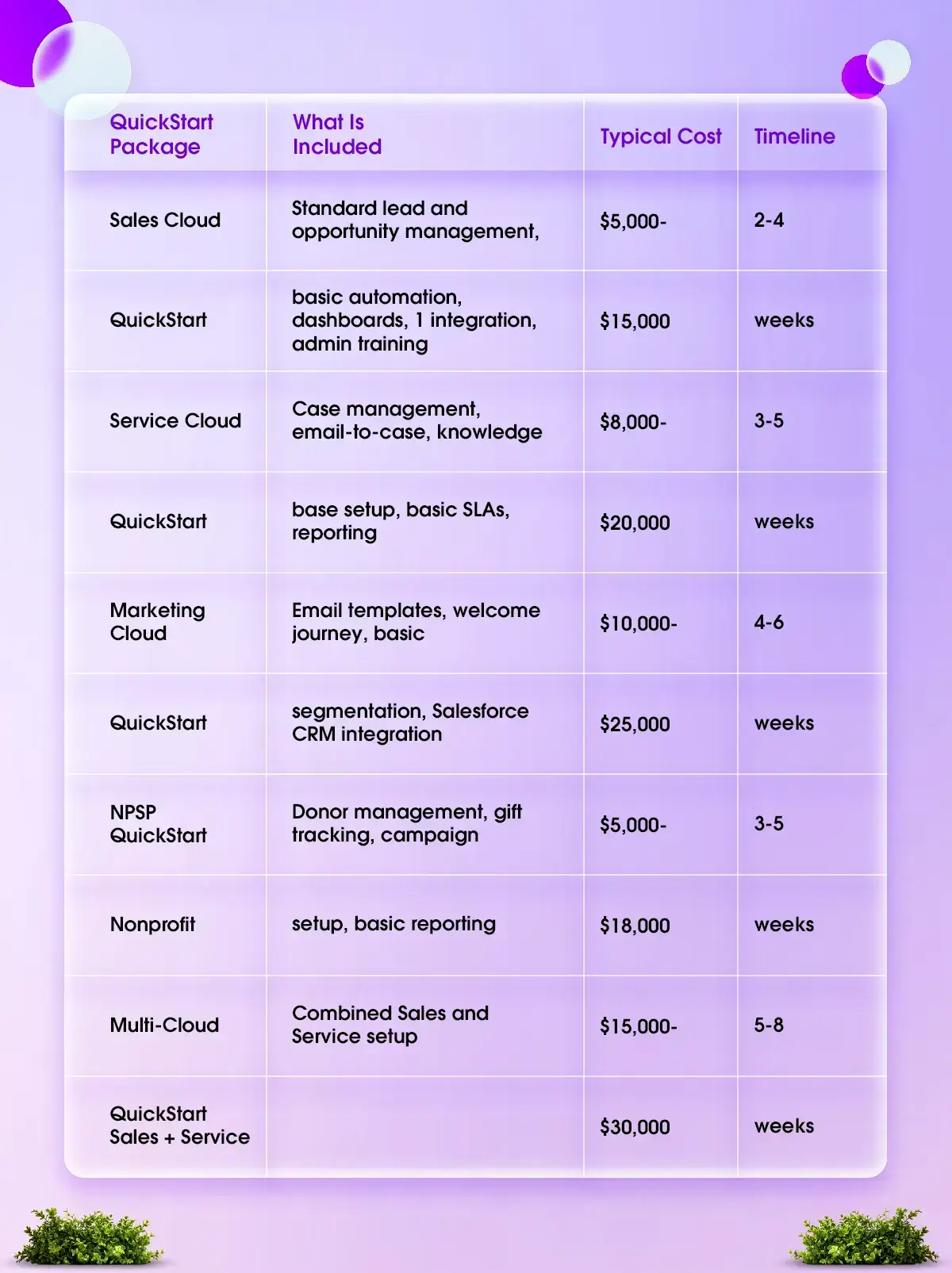
QuickStart packages are right for businesses that:
-
Have 5–25 users
-
Have a relatively straightforward sales or service process.
-
Have reasonably clean data or a small volume of records to migrate
-
Need to be live within 4–6 weeks.
-
Want to learn Salesforce before committing to heavy customization.
Who QuickStart is NOT right for:
-
Organizations with more than 25 users
-
Complex multi-department processes
-
Legacy data that needs significant cleanup
-
Multiple system integrations
-
Industry-specific compliance requirements
-
Heavy customization requirements
In-House vs Partner Implementation — Real Cost Comparison
Many organizations consider implementing it themselves to save money. Here is an honest breakdown of what that actually costs:
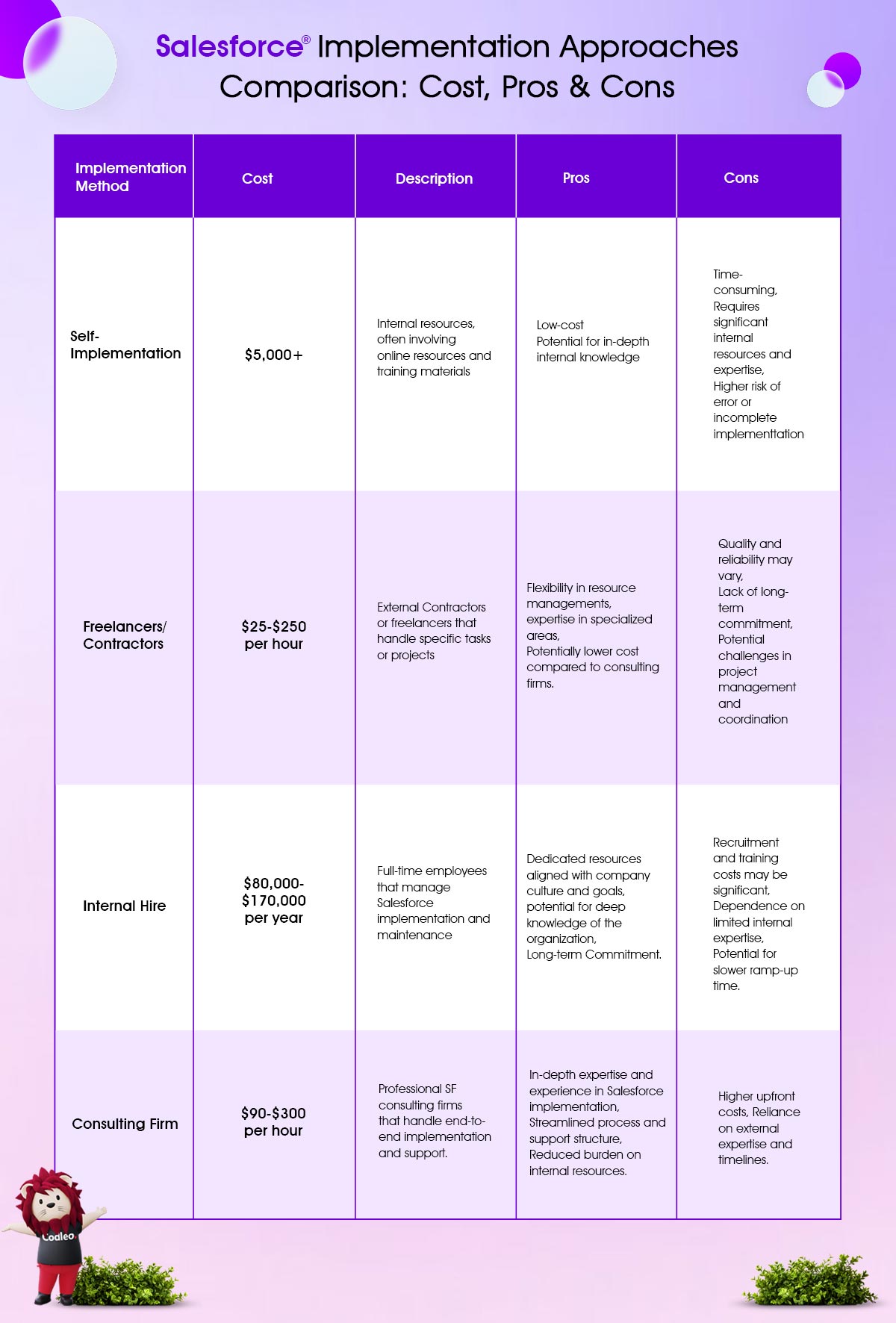
In-House Implementation
Apparent costs:
-
Internal team time (often under-counted because salaries are already being paid)
-
Salesforce training and certification for internal staff
-
Potentially one or two Salesforce Admin or Developer hires
Real costs:
-
Slower implementation timeline — internal teams have other responsibilities
-
Higher risk of architectural mistakes that require expensive rework later
-
Limited exposure to best practices and industry-specific implementation patterns
-
No accountability structure — delays and scope changes are harder to manage internally
-
Technical debt that accumulates when business users make ad-hoc configuration changes without governance
When in-house makes sense: Your organization has an existing certified Salesforce Admin, a simple use case (standard Sales Cloud, minimal integrations), and a small user base. Even then, a light-touch consulting engagement for architecture review is worth considering.
Partner-Led Implementation
-
Costs more upfront. A partner-led implementation for a 30-user Sales Cloud project might cost $40,000–$60,000 versus $15,000–$25,000 for an internal effort.
-
Costs less overall. Partner-led projects — with experienced architects, structured methodology, proper testing, and formal training — consistently deliver faster ROI, fewer post-launch issues, and lower long-term maintenance costs.
What to look for in a partner:
-
Salesforce Summit or Crest tier certification (Summit is the highest tier)
-
Industry experience relevant to your business
-
A structured discovery and methodology — not just "we'll build what you ask for"
-
Strong Clutch.co or AppExchange reviews from clients in your size range
-
Post-launch support options
How to Reduce Your Salesforce Implementation Cost
These are practical levers, not vague advice:
-
Start with one cloud. Resist the temptation to implement Sales Cloud, Service Cloud, and Marketing Cloud simultaneously. Start with the highest-priority use case, get adoption, then add. Phased implementations cost less upfront and succeed more often.
-
Use standard features before custom code. Salesforce's native tools — Flow Builder, standard reports, standard objects — can solve the vast majority of business requirements without a single line of Apex code. Every custom Apex class or Lightning Web Component you add costs development time now and maintenance time forever. Choose a partner who respects this principle.
-
Clean your data before the project starts. This is the highest-ROI action you can take before an implementation begins. Deduplicate your contact and account records. Standardize phone number and address formats. Delete records you have not touched in five years. Remove test data and sandbox artifacts. Every hour you invest here saves multiple hours of partner billing.
-
Standardize your processes before implementing them. Salesforce implements your process — if your process is undefined or inconsistent across your team, Salesforce will automate the inconsistency. Run a process alignment workshop before your discovery phase begins. Get agreement on how your team will use Salesforce. This single action prevents the most expensive category of project rework.
-
Be realistic about the Day 1 scope. Everything does not need to be in version one. Work with your partner to define what must go live on launch day and what can come in phase two. A focused, well-executed phase one beats an overscoped, delayed, and over-budget project every time.
-
Invest properly in discovery. Discovery feels like you are paying for documents, not software. But the ratio holds consistently: every dollar invested in proper discovery saves three to five dollars in rework. Do not negotiate discovery down.
How to Evaluate a Quote from a Salesforce Partner
When you receive implementation proposals from multiple partners, here is how to evaluate them meaningfully:
-
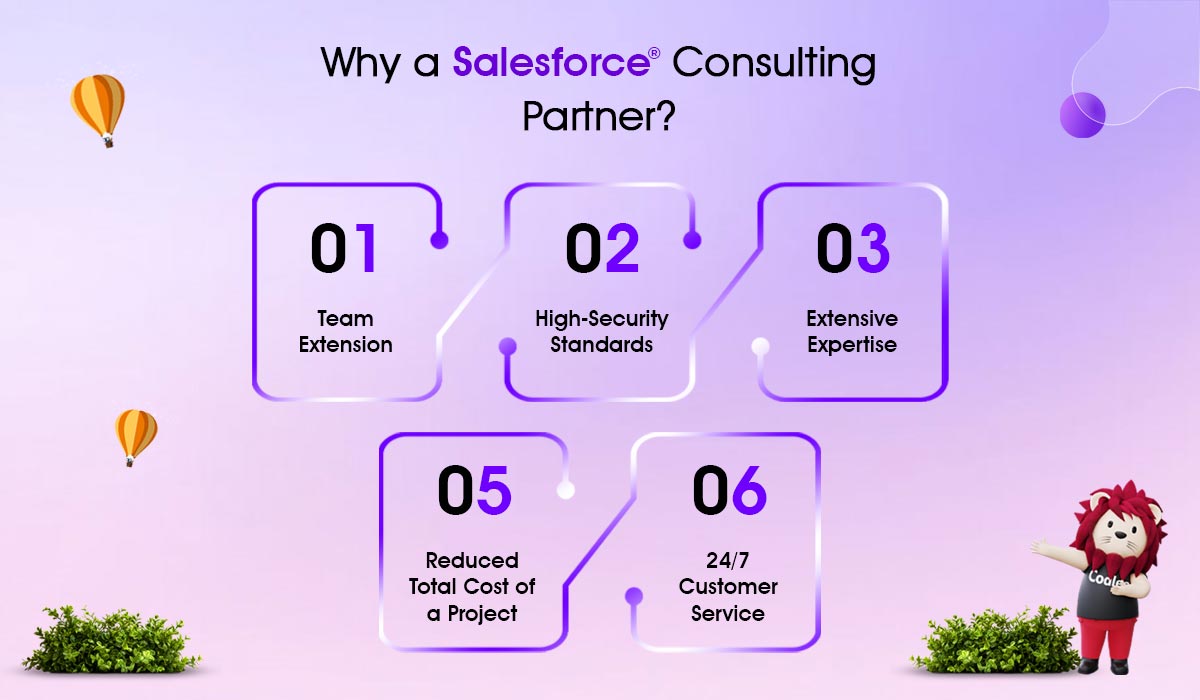
Ask for a detailed scope document, not just a price. A good quote will break out hours and deliverables by phase — discovery, configuration, data migration, integrations, training, and support. A lump-sum quote with no breakdown is a risk signal.
-
Check the discovery allocation. If a partner's quote includes less than 10% of the total project budget for discovery, they plan to start building before fully understanding your requirements. This is where most overruns and rework originate.
-
Ask specifically about data migration. How many records? From how many sources? What format is the source data in? Has the partner done a data assessment? A partner who cannot answer these questions specifically has not accurately priced this phase.
-
Understand the change request process. What happens when you ask for something that was not in the original scope? Every project has change requests. Know upfront what the process and billing structure are.
-
Check the partner's tier and track record. The Salesforce partner tier is publicly available on the AppExchange. Summit is the highest tier, earned through a combination of certifications, client satisfaction scores, and delivery track record. Check AppExchange reviews and Clutch.co reviews — read the details, not just the star rating.
-
Ask for references from clients of a similar size in your industry. A partner who has implemented Salesforce for a 30-person SaaS company in Texas will serve your similar project better than one who primarily works with 500-person healthcare organizations.
What Is Your Implementation Actually Going to Cost?
After reading this guide, you have a much clearer framework for estimating your Salesforce implementation cost. But the actual number for your specific situation depends on details that require a conversation.
At Codleo, we offer a free Salesforce Cost Assessment — not a sales pitch, but an actual working session with a certified Salesforce consultant. We review your current systems, process complexity, data situation, and business goals, and provide a realistic cost range and a recommended approach.
Codleo is a Salesforce Summit Partner with offices in Delaware and Dallas, USA. We have delivered 200+ Salesforce implementations across the USA, UAE, UK, and India. Our 4.9/5 CSAT score and 80% repeat client rate reflect what we believe: a well-scoped, well-executed implementation is the only kind worth doing.
Salesforce Implementation Consultant Cost Models Breakdown
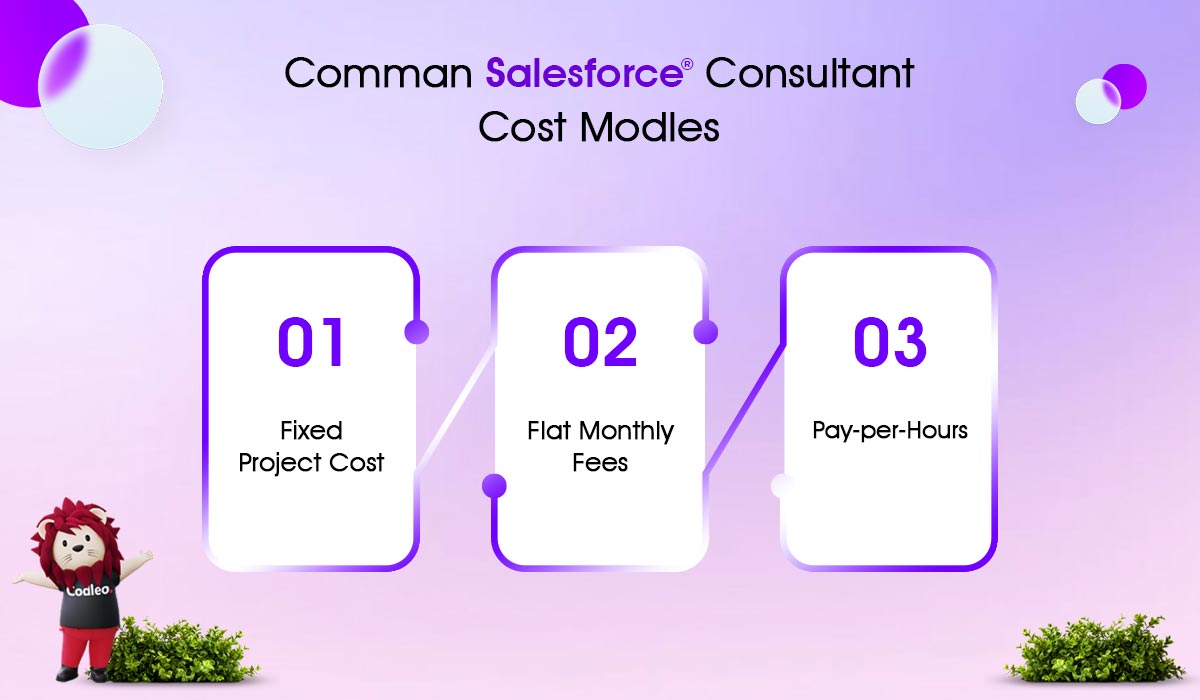
Fixed Project Cost
This pricing model offers a set project cost that is decided after looking at the project's details and timeline. Salesforce consulting agencies typically use this model, which includes the consultant's fee in the total amount.
The main benefit is that you know the cost and timeline upfront, so there are no surprise expenses.
Clients can still discuss new requirements during the project and adjust the final cost.
Flat Monthly Fees
Many outsourced Salesforce services, such as CRM maintenance or standard project management, use a flat monthly fee for billing.
Consulting partners and independent contractors usually charge this fee for several hours. The main benefit is that it can offer a lower hourly rate compared to a fixed pricing model.
Fractional Team
The Salesforce fractional team model allows companies to hire part-time Salesforce experts for projects. Instead of having full-time Salesforce employees like administrators, developers, or consultants, companies can use fractional teams to access the specialized skills they need when they need them.
Pay-Per-Hour
This pricing model is very flexible. Freelance Salesforce consultants often use it for short-term projects that don’t require detailed business or industry knowledge.
Data Migration Cost
Data migration is an essential step in implementing Salesforce. It involves several key tasks before you can import data. First, you need to:
-
Check the data for accuracy.
-
Clean up any errors.
-
Map the data to your Salesforce organization.
Additionally, automated processes for regular data transfers should be created. Depending on your company's specific needs, these activities can cost from $5,000 to $50,000.
Salesforce Customization Pricing
Salesforce is a flexible CRM solution you can adapt to fit your business needs. You can use free resources on Trailhead to create a customization plan or hire professional Salesforce consultants to train your team for in-house changes.
The cost of customization depends on how complex your business processes are and the methods used.
Fundamental changes with point-and-click tools are cheaper than custom-coded changes. You will need a Salesforce developer if you need complex automation for essential business processes. The hourly rate for a skilled Salesforce developer can range from $25 to $300, depending on the complexity of the changes.
Customization costs can range from $5,000 to $100,000 based on the complexity of the work.
Salesforce Integration Cost
Salesforce is well-known for its ability to connect with many other systems and has the most built-in connectors. However, some situations may require extra integrations with Salesforce.
The cost of these integrations depends on:
-
The number of systems that need to sync,
-
The methods of integration (such as third-party apps, API tokens, or custom code),
-
The complexity of changing the user interface.
Integration costs generally range from $3,000 to $50,000. However, some projects could be cheaper. Talk to your Salesforce partner for a personalized estimate.
User Training and CRM Adoption Cost
Your team needs proper training to use Salesforce successfully. Training is essential for effectively rolling out and adopting your CRM system.
Training costs depend on three factors:
-
The method you choose (onsite or remote, self-learning or instructor-led),
-
The number of users being trained,
-
User roles (end-users, administrators, or both).
Training can cost up to $5,000 for a mid-sized company with sales, marketing, and customer service teams.
After-launch Salesforce Support Cost
Once you complete a Salesforce implementation and training, you may need ongoing support, usually up to three months after deployment. The cost for CRM support depends on the provider's hourly rate and how long you need the service, ranging from $5,000 to $45,000 per project.
Salesforce implementation prices vary and should be customized to fit each business’s needs and budget.
Salesforce Implementation Cost Optimization Tips
Plan carefully and make wise choices to reduce the costs of implementing Salesforce. Here are some tips to help you save money:
-
Set clear goals for what you want to achieve to prevent extra costs later.
-
Select the most budget-friendly way to implement the CRM.
-
Focus on the most critical Salesforce features and use built-in solutions when possible.
-
Train your staff to handle basic tasks on their own.
-
Negotiate prices and contracts with Salesforce and consultants.
-
Take advantage of Salesforce Quick Start programs.
-
Look for pre-built apps on the AppExchange to enhance Salesforce's features.
-
Use a phased approach to implement CRM gradually and manage costs better.
-
Regularly check and improve processes to save more money.
Budget-Friendly Salesforce Implementation Option: QuickStart Packages
QuickStart Packages from Salesforce vendors help businesses quickly set up popular products like Sales or Service Clouds at a lower cost. Prices range from $2,500 to $15,000, depending on the vendor's location, services offered, and hours needed. Implementations take anywhere from 10 hours to 12 weeks.
However, some managed services from Salesforce are not included in QuickStart Packages and must be bought separately. These services include:
-
Custom workflows
-
Setting up custom sales processes
-
Complex dashboards
-
App installations
-
System integrations
Basic Salesforce Quick Start Packages
The basic QuickStart package typically covers:
-
Discovery sessions,
-
Basic Salesforce Sales Cloud implementation,
-
Configuration of up to 5 user profiles,
-
Enhancing standard functionalities.
Implementation usually takes 10 hours and 2 weeks and may involve a team, including consultants and quality assurance specialists. Services may include fine-tuning Email and Events, providing end-user training, and offering updates after implementation.
The cost of the Salesforce QuickStart Package varies by location:
-
In the USA, it ranges from $3,000 to $8,500, with an average price of $5,750.
-
In the UK, it costs between $4,000 and $10,000, with an average of $7,000.
-
In India, the price ranges from $2,000 to $5,000, averaging $3,500.
Overall, the average cost in the UK is 21% higher than in the USA, while the price in India is nearly half.
Medium Salesforce QuickStart Packages
Medium Quick Start Packages offer:
-
Configuration for up to 10 user profiles,
-
Enhanced Sales or Service Cloud setup,
-
Improved lead tracking,
-
Limited data cleansing,
-
Advanced reporting setup,
-
Basic user training.
Typically, these projects last 2 to 4 weeks. Their cost varies by location:
-
USA: $3,500-$7,000 (average: $5,250)
-
UK: $4,500-$11,000 (average: $7, 750)
-
India: $3,000-$5,500 (average: $4, 250).
Thus, the UK’s medium packages are about 47% pricier than the USA’s.
Maxi Salesforce Quick Start Packages
The Maxi Quick Start Suite includes the following:
-
Setup for Sales/Service Cloud for up to 15 users,
-
Improved lead and customer management,
-
Advanced reporting setup,
-
Increased data transfer,
-
Training for end-users.
On average, Salesforce implementations take 3 to 12 weeks and cost:
-
USA: $5,000 to $15,000 (average: $10,000)
-
UK: $7,000 to $14,000 (average: $10,500)
-
India: $4,500 to $7,000 (average: $5,750)
Codleo offers two affordable packages for setting up Salesforce: the Quick Start Package and the Quick Start Plus Package.
The Basic Quick Start Package includes:
-
Training for 1 class for up to 10 users
-
Setup for 10 Salesforce users
-
20 custom fields
-
Import of one data file with up to 2,000 records
-
5 hours of support after launch for 3 weeks
This package provides the value of a mid-size package for the price of a basic one and supports 10 users instead of the usual 5.
The Quick Start Plus Package includes:
-
Training for two classes of up to 10 people each and 1 class for administrators
-
Setup for up to 20 Salesforce users
-
30 custom fields across main objects like Accounts and Contacts
-
5 hours dedicated to building custom reports and one dashboard with three simple reports
-
Basic Salesforce integrations and importing a data file with up to 3,000 records.
Setting up specific features like Revenue (CPQ & Billing) will take 3 to 12 weeks and cost between $5,000 and $15,000. You need to add the CPQ system to the main features.
Setting up the Marketing Cloud Quick Start Package typically takes 1 to 4 weeks and costs between $3,500 and $9,000. This package includes:
-
Lead mapping
-
Connector setup
-
Brand building
-
Automating marketing campaigns
-
A UI/UX designer might also be needed.
The average cost for Account Engagement (Pardot) implementation is up to $7,000 and takes about 2 weeks. This setup includes:
-
Designing email templates
-
Installing the Pardot Salesforce connector
-
Enabling marketing analytics
-
Integrating with platforms like Google AdWords
-
Activating features to improve email deliverability.
For non-profit organizations, the Salesforce setup averages 1 to 4 weeks and costs between $2,600 and $3,000. This setup focuses on fundraising, marketing communication, and analytics.
How Much Does a Salesforce Partner Charge?
The cost of implementing Salesforce depends on several factors. We have already discussed these. Additionally, the price varies depending on the services offered by the partner.
Select a partner that offers a comprehensive range of Salesforce services, including customization, integration, configuration, data migration, training, and maintenance. Select a company that not only provides these services but also consistently delivers high-quality results.
Codleo is a leading Salesforce partner with over 200 experts. They work closely with you and your teams to understand your goals and business processes. It helps them create solutions that meet your needs.
With managed Salesforce services, you get ongoing updates, support, and help with managing changes to meet market needs.
From implementation to managing AppExchange apps, Codleo is your trusted Salesforce consulting partner!
Vital Salesforce Stats and Facts for 2026 Implementation
-
For small businesses, implementing Salesforce typically costs between $5,000 and $15,000 for a basic setup.
-
Mid-sized companies can expect to invest between $25,000 and $75,000 for a more comprehensive Salesforce implementation.
-
Large enterprises often spend $150,000 or more to roll out Salesforce at scale with full customization.
-
Salesforce powers over 150,000 businesses worldwide, securing its place as a leading CRM solution.
-
Holding over 18% of the CRM market share, Salesforce is the dominant player in this space.
-
Customer satisfaction with Salesforce is high, boasting a 97% satisfaction rate.
-
In fiscal year 2022, Salesforce earned $25.6 billion, marking a 23% increase compared to the previous year.
By understanding these key figures, businesses can better plan and budget their Salesforce implementation projects in 2026, avoiding surprises and maximizing ROI.
Need Help with Salesforce?
Our experienced Salesforce consultants can assist you with:
-
Assessing and auditing your Salesforce Org
-
Setting up Salesforce for the first time or fixing a CRM project
-
Moving your data from other CRMs to Salesforce
-
Improving your current Salesforce Org to get the most out of your investment
-
Connecting Salesforce with other systems
-
Switching from Salesforce Classic to Lightning Experience
-
Providing virtual administration and support for Salesforce
-
Quickly setting up CRM with our Salesforce QuickStart packages.
Why Choose Codleo? We have 6 years of Salesforce experience and over 200 happy clients across diverse industries. Our global reach allows us to offer competitive prices. If you have questions, book a free CRM consulting call.
Schedule Your Free Salesforce Cost Assessment →
consult@codleo.com | US Office: Delaware & Dallas
 0
0
About the Author

FAQ
The cost of a Salesforce implementation typically ranges from $10,000 to more than $200,000. This price depends on several factors, including the consultant�s expertise, the amount of data to be migrated, the complexity of the project, the level of customization required, integration requirements, and the level of support desired. Generally, more complex CRM setups are more expensive.
The cost of Salesforce licenses depends on the edition you choose and any extra services. Prices start at $25 per user per month for the Essentials edition and can go over $300 for advanced licenses like the Unlimited edition. If you want to use the Einstein 1 platform for Sales and Service Clouds, it costs $500 per user per month. Keep in mind that implementation and customization costs are additional and depend on your specific business needs.
The timeline for a Salesforce implementation varies based on project complexity, the size of the organization, and the level of customization required. A simple Salesforce CRM setup usually takes between 4 and 10 weeks. For larger and more complex projects, the process can take several months to up to a year. This longer timeline is affected by factors like planning, customization, data migration, system integration, and user training.
Salesforce�s pricing reflects its wide range of features, ability to grow with your business, and options for integration. It also offers constant updates and strong customer support. While the initial cost may seem high, the value and customization options often make it worth the investment for businesses of all sizes.
As a small business, implementing these advancements can cost between $10,000 and $200,000, depending on the specific technology or solutions chosen. Salesforce has two options for small businesses: the Starter Suite at $25 per user each month and the Pro Suite at $100 per user each month. For medium-sized companies, the total cost can range from $50,000 to $180,000.
If your business needs change during the project, it can result in extra costs. It may require reconfiguring or customizing the system, which can also delay the project�s completion.
Here is a list of factors that can increase the cost of Salesforce implementation:
-
Customization
-
Number of users
-
Data migration
-
Integration with other systems
-
Cost of a consulting firm
-
Ongoing support and maintenance
-
Implementation methods
Data migration is an essential step in setting up Salesforce. It means moving data from old systems or other sources into Salesforce.


 603 D-Mall Netaji Subhash Place, Delhi 110034 IND


