


Publish date:
Let's be honest about something most companies get wrong: they buy Salesforce, set it up, and then hope it runs itself. It doesn't. In fact, the gap between a Salesforce instance that costs you money and one that actively generates revenue often comes down to one single person — the Salesforce Administrator.
Salesforce is the leading CRM platform, used by over 150,000 companies worldwide. However, many businesses are only using a small part of what they pay for. Workflows that could save your sales team three hours a day are not set up. Reports that could help your leadership make better decisions are never created. User adoption remains low. The system becomes a storage space rather than a tool for growth.
The right Salesforce Admin fixes all of that. The wrong hire — or no hire at all — drains your investment month after month.
This guide is written for business owners, operations leaders, and hiring managers who want to make the right decision. Whether you are hiring your first admin, replacing someone who left, or deciding between in-house and outsourced support, this is the only guide you will need.
What Does a Salesforce Admin Actually Do?
There is a lot of confusion around this role — even among tech professionals. Many business owners assume a Salesforce Admin is basically a data entry person or someone who resets passwords. That could not be further from the truth.
A Salesforce Administrator is the person responsible for making your CRM work for your business — not the other way around. They sit at the intersection of technology and business strategy. They talk to your sales team in the morning to understand their pain points, and by the afternoon, they have built an automation that eliminates that pain.
The Day-to-Day Reality
On any given week, a capable Salesforce Admin might be configuring lead assignment rules so that inbound leads automatically route to the right rep based on territory and industry. They might be creating custom dashboards for your sales leadership to track pipeline health in real time. They could be managing user permissions so your new hires get access to exactly what they need—and nothing they shouldn't see.
They also act as the internal Salesforce consultant for your team. When a sales manager says, "I wish Salesforce could do this," a good admin either makes it happen with declarative tools (no-code configuration) or tells you honestly when it requires a developer. That distinction — knowing when to build it themselves and when to call in extra help — is one of the marks of an experienced admin.
Core Responsibilities at a Glance:
-
User Management: Creating and managing profiles, roles, and permission sets. Ensuring the right people have access to the right data.
-
Data Quality and Integrity: Cleaning duplicate records, setting up validation rules, managing data imports and exports, and maintaining overall data hygiene.
-
Workflow and Process Automation: Building flows, process builder automations, and approval processes that reduce manual work and eliminate human error.
-
Reports and Dashboards: Creating the visibility tools that help leadership make faster, smarter decisions based on real CRM data.
-
System Configuration: Customizing objects, fields, page layouts, and record types to match how your business actually operates.
-
User Training and Adoption: Running onboarding sessions, creating documentation, and making sure your team actually uses Salesforce — not their old spreadsheets.
-
AppExchange and Integrations: Evaluating, installing, and managing third-party apps and overseeing integrations with tools like email platforms, marketing automation, and ERP systems.
-
Security and Compliance: Managing org-wide security settings, field-level security, sharing rules, and ensuring your setup meets data compliance requirements.
-
Release Management: Keeping up with Salesforce's three annual releases and implementing relevant new features that benefit your team.
Notice that none of that is basic data entry. This is a genuinely skilled, strategic role — and the salary market reflects it.
Salesforce Admin vs. Developer vs. Consultant: Know the Difference
One of the most expensive hiring mistakes companies make is failing to understand the type of Salesforce professional they actually need. These three roles are distinct, and hiring the wrong one wastes money on both sides.
The Salesforce Administrator
This person works entirely within Salesforce's declarative (no-code/low-code) environment. They use configuration, not code, to customize the platform. They build flows, create custom fields, set up automation, and manage users. A great admin can accomplish a great deal without writing a single line of code. For most small to mid-sized businesses, a strong admin is all you need for day-to-day Salesforce management.
The Salesforce Developer
Developers write Apex code (Salesforce's Java-like programming language), build Lightning Web Components, and handle complex API integrations. You need a developer when your requirements cannot be met solely through configuration — for example, a custom integration with a proprietary system, complex trigger logic, or a fully custom front-end experience. Developers cost significantly more than admins and are overkill if your needs are primarily administrative.
The Salesforce Consultant
Salesforce Consultants are typically brought in for large implementations, strategic architecture decisions, or specialized cloud expertise (such as Marketing Cloud or CPQ). They tend to be project-based rather than ongoing, and often have admin or developer skills beneath them. If you are just getting started with Salesforce or running a major revamp, a consultant can set the foundation — but you will still need an admin to manage the system after the consultant leaves.
When Is the Right Time to Hire a Salesforce Admin?
This question has a short answer and a long answer—the short answer: earlier than you think.
Most companies wait until something breaks. They wait until their sales team is complaining loudly, until duplicate data has become unmanageable, until no one actually trusts the reports anymore. By that point, a new admin is not just maintaining a system — they are spending weeks fixing a mess that accumulated over months of neglect.
Key Signals That You Need to Hire Now
-
Your Salesforce instance was set up by an implementation partner who has since moved on, and no one internally owns the platform.
-
Your team is using workarounds—maintaining separate spreadsheets because Salesforce does not reflect reality.
-
You have had a significant increase in users, teams, or business complexity since Salesforce was first configured.
-
Leadership cannot get reliable data from Salesforce because the reporting is poorly configured or nonexistent.
-
You are launching a new product line, entering a new market, or going through any major business change that Salesforce needs to support
-
New hires are being onboarded without proper Salesforce training, leading to inconsistent usage.
-
Your current admin (or the person wearing that hat alongside three other jobs) is leaving.
-
You are paying for Salesforce features — like Marketing Cloud, CPQ, or Service Cloud — that no one is actually using.
If more than two of those apply to your business right now, you are already behind. The cost of waiting is real — it shows up in low adoption rates, poor data decisions, and a CRM investment that isn't returning what it should.
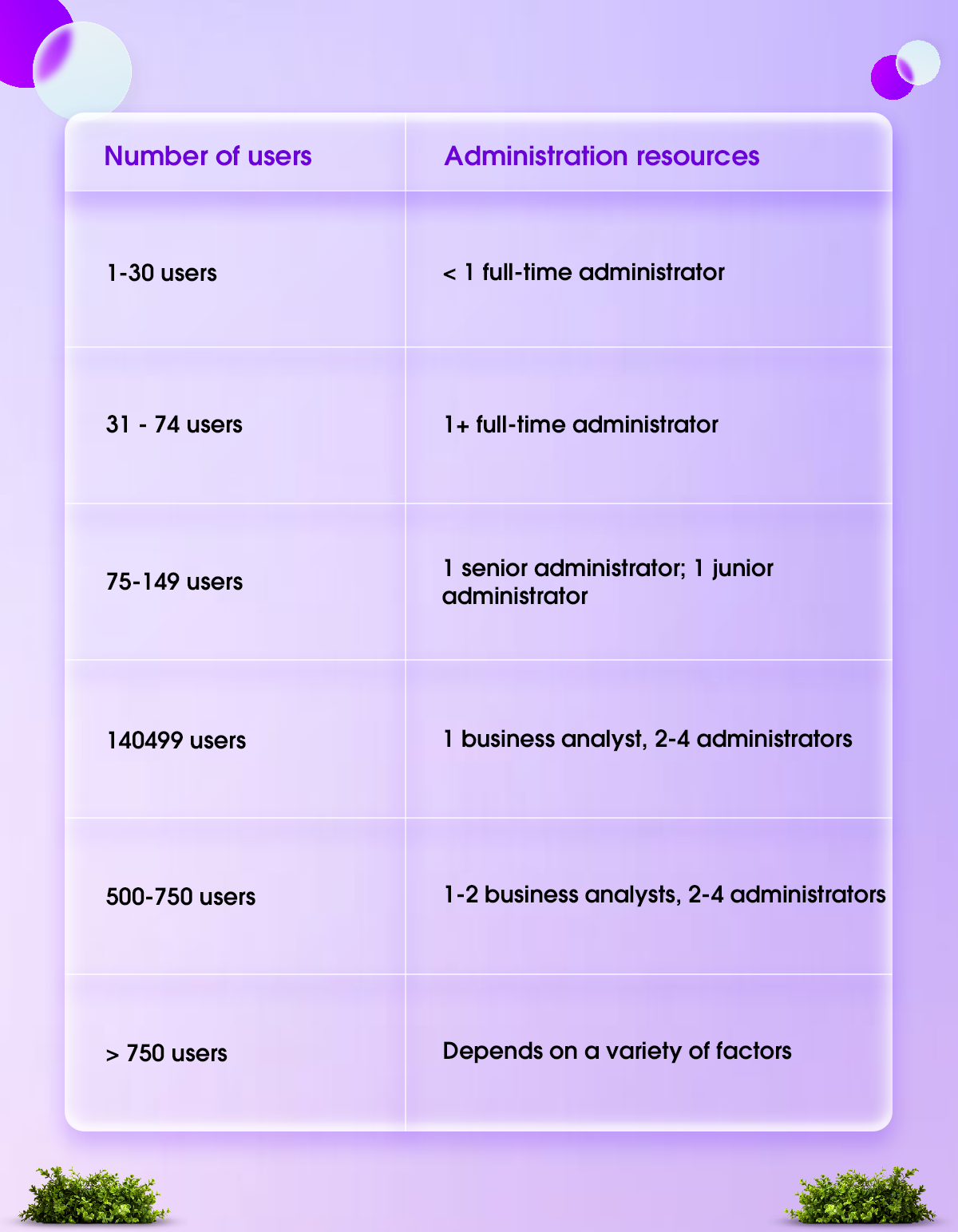
Company Size as a Guide
-
1–50 users: A part-time admin or a junior certified admin can typically manage this workload. Many small companies start with a hybrid hire — someone who also handles operations or business analysis.
-
50–200 users: You need at least one dedicated mid-level admin. At this scale, the complexity of permissions, workflows, and data management justifies full-time attention.
-
200–500 users: A senior admin or an admin team of two. You will also benefit from someone with experience in release management, change management, and possibly a sandbox/production workflow.
-
500+ users: An admin team, likely including a Salesforce Manager or COE (Center of Excellence) lead, multiple admins specializing in different clouds, and close collaboration with developers.
What Certifications Should a Salesforce Admin Have?
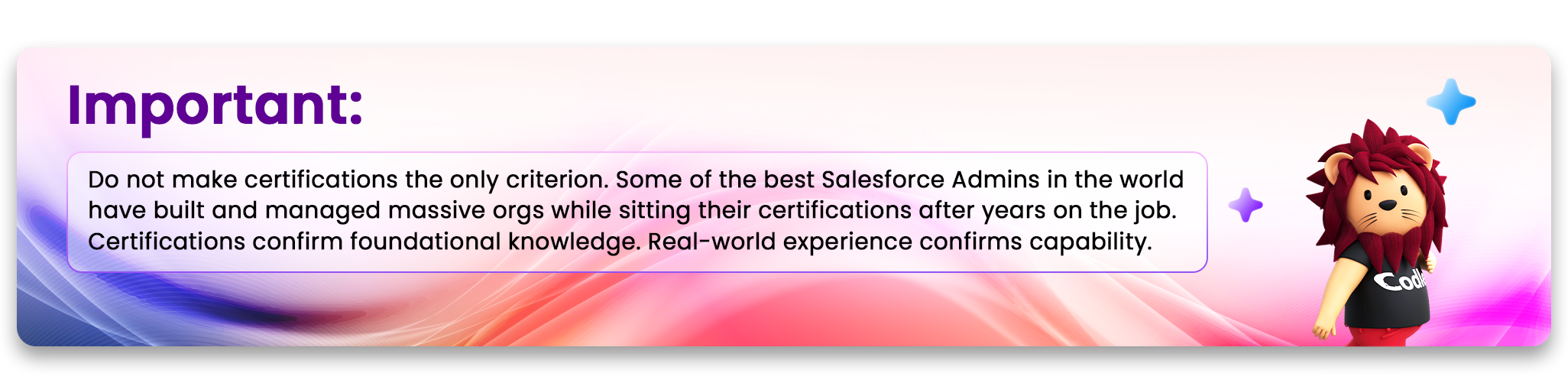
Certifications are Salesforce's own way of validating that someone knows what they are doing on the platform. They are not everything — a brilliant admin with real-world experience will always outperform a certified admin who has only studied in theory — but they are a meaningful baseline, especially when you do not have Salesforce expertise in-house to evaluate candidates yourself.
The Salesforce Administrator Certification
This is the foundation. Formally known as the Salesforce Certified Administrator credential, it covers user management, data management, reports and dashboards, workflow automation, security and access, and core platform features. Any admin you consider seriously should have this. It signals that the candidate has invested in formal training and passed a rigorous Salesforce-administered exam.
Advanced Administrator
This certification goes deeper into complex automation, advanced reports, and more nuanced platform configuration. An admin with this credential has moved well beyond the basics and is capable of handling genuinely complex environments. For mid-to-large businesses, this is a strong differentiator.
Platform App Builder
This certification demonstrates the ability to design and build custom applications on the Salesforce platform using declarative tools. Admins with this credential can go beyond standard configuration to build purpose-built solutions for specific business needs.
Cloud-Specific Certifications
If your business runs specific Salesforce clouds, certifications in those areas are highly valuable. For example, a Sales Cloud Consultant certification is relevant if sales operations are the core focus. A Service Cloud Consultant certification matters if you run customer support on Salesforce. CPQ (Configure Price Quote) expertise is critical for companies with complex pricing and quoting needs. Marketing Cloud certifications are essential if your marketing team operates through Salesforce's marketing tools.
The Real Skills That Separate Good Admins from Great Ones
Here is something the certification list does not tell you: the Salesforce Admins who create the most business value are not necessarily the most technically advanced. They are the ones who combine solid platform knowledge with excellent judgment, communication, and problem-solving.
Technical Skills That Matter Most
Flow Builder Mastery
Salesforce has been deprecating older automation tools, such as Process Builder and Workflow Rules, in favor of Flow. An admin who cannot build complex flows in 2025 is already behind. Ask specifically about their experience with screen flows, record-triggered flows, and scheduled flows.
Data Architecture Understanding
A good admin understands how Salesforce data is structured — objects, fields, relationships, record types — and can make decisions about custom data architecture that will serve the business for years, not create technical debt.
Reports and Dashboards at Depth
Basic reporting is table stakes. Look for admins who understand the matrix and joined reports, can build role-based dashboards, and can translate business questions into CRM visibility.
Declarative Security Model
Managing profiles, permission sets, permission set groups, sharing rules, OWD (org-wide defaults), and field-level security is genuinely complex. A weak security setup creates both compliance risks and user frustration.
Sandbox and Release Management
Any admin managing a business-critical org should be comfortable with sandbox environments, change sets, and the discipline of testing changes before deploying them to production.
Integration Awareness
Even if a developer handles actual integrations, an admin who understands how Salesforce connects to other systems is far more effective at troubleshooting and managing those connections day to day.
Non-Technical Skills That Are Equally Critical
-
Business Analysis Mindset: Great admins do not just execute requests — they ask why. They question assumptions, deeply explore requirements, and suggest better solutions. When a sales manager says, 'I need this field added,' a good admin asks what business problem the field is solving and whether there is a better way.
-
Communication Across Audiences: An admin talks to your CEO in the morning and walks a junior sales rep through a new feature in the afternoon. They need to translate technical concepts into plain language and business needs into technical requirements — in both directions.
-
Prioritization and Project Management: Salesforce admins often manage multiple requests simultaneously. The ability to triage, prioritize, communicate timelines, and deliver reliably is what separates high-performing admins from those who always seem behind.
-
Documentation Discipline: The admin who documents what they build creates an org that can survive their departure—the one who does not create chaos. Ask candidates about how they document configurations, automations, and decisions.
-
Proactive Improvement Orientation: The best admins don't wait to be told what to do. They are attending Dreamforce, following the Trailhead learning platform, watching Salesforce release notes, and proactively bringing ideas to the business on how to use the platform more effectively.
In-House Hire vs. Outsourced Admin: The Honest Breakdown
This is a decision every company faces, and the right answer depends entirely on your specific situation. Let's be direct about the real trade-offs rather than the oversimplified comparison you find in most articles.
The Case for Hiring In-House
A full-time in-house admin becomes deeply embedded in your business. They understand your processes, culture, team's quirks, and long-term goals in a way an external resource never quite achieves. They are available in real time — when a sales rep hits a workflow error at 9 am on a Tuesday before a big demo, the in-house admin can fix it within minutes.
In-house admins also develop institutional knowledge over time. They remember why certain decisions were made, what was tried before, and where the bodies are buried (metaphorically). That context has genuine business value that is nearly impossible to replicate with rotating external resources.
The trade-off is cost and breadth. A good in-house admin commands a competitive salary — typically between $70,000 and $120,000 per year in the US market, depending on experience and location. And one person has natural limits: they can become a bottleneck, take a vacation, or lack expertise in every specialized area of Salesforce.
The Case for Outsourced or Managed Salesforce Administration
Outsourcing Salesforce administration to a managed services partner gives you access to a team rather than an individual. When something falls outside one person's expertise, the team has someone who covers it. Managed services partners also typically offer flexible engagement models — you might pay for 20 or 80 hours a month, scaling up or down with your needs.
For companies that do not have a constant, full-time admin role, this model can be significantly more cost-effective. A small business using Salesforce Sales Cloud with 20 users does not necessarily need 40 hours a week of administrative attention. Paying for 15-20 hours through a managed services provider makes more financial sense.
The trade-off is intimacy and response time. A managed services team juggling multiple clients will never know your business as well as a dedicated in-house person does. Emergency response may follow SLA schedules rather than being immediate. And building the kind of proactive relationship where someone is thinking about your Salesforce strategy all the time requires real effort from the partner.
A Practical Framework for Deciding
-
Situation: Fewer than 30 users, simple use case → Recommendation: Outsourced/part-time admin
-
Situation: 30–100 users, growing complexity → Recommendation: Consider a junior to mid in-house hire or a strong managed services partner
-
Situation: 100–300 users, multi-cloud → Recommendation: Dedicated in-house admin, possibly with specialist support from a partner
-
Situation: 300+ users, enterprise complexity → Recommendation: Admin team in-house; use partner for specialized projects
How to Write a Salesforce Admin Job Description That Attracts Real Talent
Most Salesforce Admin job descriptions are written by HR teams who have never worked in Salesforce. The result is a generic list of requirements that either undersells the role (attracting candidates who are too junior) or sets unrealistic expectations (demanding 10 certifications for a $60k salary). Neither outcome serves you.
What Great Job Descriptions Include
-
A clear scope of responsibility: Be specific about which Salesforce products you use. 'Managing our Salesforce Sales Cloud instance with Sales Cloud, CPQ, and a HubSpot integration' tells a candidate far more than 'maintaining our CRM.'
-
The actual user count and org complexity: Experienced admins use this to self-select appropriately. Hiding it wastes everyone's time.
-
What success looks like in the role: Not just responsibilities but outcomes: 'Within 90 days, you will own the lead management process and have rebuilt our primary sales dashboard.'
-
Honest certification requirements: Distinguish between required and preferred. If you genuinely need a Salesforce Certified Admin, make it a hard requirement. If everything else is a bonus, say so.
-
Growth potential: The best admins are ambitious. Tell them where this role can go — into an architect track, a COE leadership role, or a developer path. Salesforce careers offer clear progression, and good candidates consider them.
-
Your actual tech stack: List the third-party apps integrated with Salesforce. Candidates who have worked with similar integrations are more likely to hit the ground running.
Red Flags in Your Own Job Description
If your job description requires 5+ years of experience but posts a salary below $65,000, qualified candidates will not apply—they will assume you do not understand the market. If you list 20 responsibilities with no priority order, you signal that this is a dumping ground for everyone's Salesforce needs rather than a considered role. If you require developer skills from an admin candidate, you either need a developer (and should hire one) or you will end up overpaying for capabilities you rarely need.
Where to Find Strong Salesforce Admin Candidates
The Salesforce talent market is competitive. The platform's global growth has kept demand for skilled admins consistently ahead of supply. Knowing where to look — and how to look there — is a real competitive advantage in hiring.
Salesforce Trailblazer Community
This is Salesforce's official community platform, where serious Salesforce professionals spend their time. You can post jobs, engage with local user group communities, and find candidates who are demonstrably active in the ecosystem. Regularly contributing to Trailblazer Community discussions signals genuine engagement with the platform.
LinkedIn with Salesforce-Specific Filters
Search for 'Salesforce Administrator' and filter by the certifications you need. Salesforce certifications show up on LinkedIn profiles as credentials, and you can use them as search filters. Go beyond the job title — many strong admins carry titles like 'CRM Manager,' 'Salesforce Business Analyst,' or even 'Revenue Operations Analyst.'
Salesforce-Specialized Recruiters
General IT recruiters often cannot evaluate Salesforce candidates meaningfully. Salesforce-specialist staffing firms have networks of pre-screened talent and the technical knowledge to assess candidates before they reach you. The fee is worth it if it means hiring one strong candidate rather than going through four poor fits.
Getting to that one strong candidate faster often comes down to the tools behind the search. For recruiters and staffing agencies handling Salesforce searches, Jarvi centralizes candidate sourcing and outreach, pulling profiles from job boards and professional networks and automating follow-ups across channels like LinkedIn and email. It won't replace the judgment that goes into picking the right fit, but it helps agencies build a stronger pipeline before they even start evaluating candidates.
Ohana Slack Groups and User
Salesforce has hundreds of official and unofficial user groups organized by region, cloud, and specialty. These communities are full of practitioners looking for new roles and happy to refer colleagues. Posting a job opportunity in a relevant Slack workspace or local user group meeting can surface candidates you would never find on LinkedIn.
Trailhead Leaderboards and Superbadges
Salesforce's Trailhead learning platform ranks users by achievement. Candidates who have earned Superbadges — advanced scenario-based assessments — have demonstrably worked through complex real-world challenges on the platform. You can ask candidates to share their Trailhead profiles during the application process.
Referrals from Your Implementation Partner
If you worked with a Salesforce implementation partner, ask them for referrals. They know good admins in the market and often have former team members or colleagues who are available or will be soon.
How to Interview a Salesforce Admin: Questions That Actually Work
Most Salesforce Admin interviews fail because the interviewer asks questions that can be answered by someone who has read the Salesforce documentation. You want questions that require real experience to answer well. Here is a set of questions that consistently reveal whether a candidate genuinely knows their craft.
Technical Interview Questions
Q: Walk me through how you would build a complex approval process in Salesforce for a multi-step discount approval workflow.
What to look for: You are looking for an understanding of approval processes, steps, entry criteria, and how to handle exceptions. A strong answer also addresses what happens when an approver is out of the office.
Q: We have 50,000 duplicate lead records. How do you approach this problem?
What to look for: You are looking for: knowledge of Salesforce duplicate rules, matching rules, Data Loader, external tools like Cloudingo or DemandTools, and — critically — a process to prevent future duplicates.
Q: Explain the difference between a role and a profile in Salesforce and give me a real-world example of where each controls access.
What to look for: precision. Profiles control what users can do. Roles control what records they can see. Weak answers conflate the two. Strong answers give clear, concrete examples.
Q: How do you decide between a flow, a process builder, and a workflow rule for a given automation requirement?
What to look for: Awareness that Process Builder and Workflow Rules are being deprecated and that Flows are now the standard. A 2026-ready admin should build exclusively in Flow.
Q: Describe a time you found a serious data quality issue in Salesforce and walk me through how you resolved it.
What to look for: You are looking for: a real story with specifics — what the problem was, how they discovered it, what tools they used, how they fixed it, and what they put in place to prevent recurrence.
Strategic and Situational Questions
Q: You have just joined us and have 30 days to understand the org. Walk me through what you do in your first month.
What to look for: a structured approach. Documentation review, stakeholder interviews, org health assessment (ideally using Salesforce's free Health Check tool), understanding of current pain points, and a prioritized list of quick wins.
Q: Our sales team keeps reverting to spreadsheets instead of using Salesforce. What would you do?
What to look for: You are looking for empathy and problem-solving, not just technical fixes. A good admin asks why. Is Salesforce not reflecting its process? Are there too many required fields? Is it slow? They do not just mandate use — they fix the underlying friction.
Q: How do you stay current with Salesforce's three annual releases?
What to look for: You are looking for: a real answer. Trailhead release modules, Release Readiness Live sessions, Salesforce admin blogs, and communities. Anyone who says, "I update when the release comes out, " is not proactively managing the platform.
Q: Tell me about the most complex thing you have built in Salesforce. Take me through it as if I know nothing.
What to look for: technical depth AND communication clarity. Can they explain complex systems? Do they understand what made it complex? Do they show appropriate pride without arrogance?
Consider a Practical Test
For senior roles, many companies now ask candidates to complete a scenario-based practical test in a Salesforce Developer Edition org (which is free and available to anyone). You give them a realistic business problem — for example, 'Configure an opportunity approval process where deals over $50,000 require VP approval, with a notification to the manager if the VP does not respond within 24 hours' — and ask them to build it and walk you through it. This separates people who know Salesforce from people who know how to talk about Salesforce.
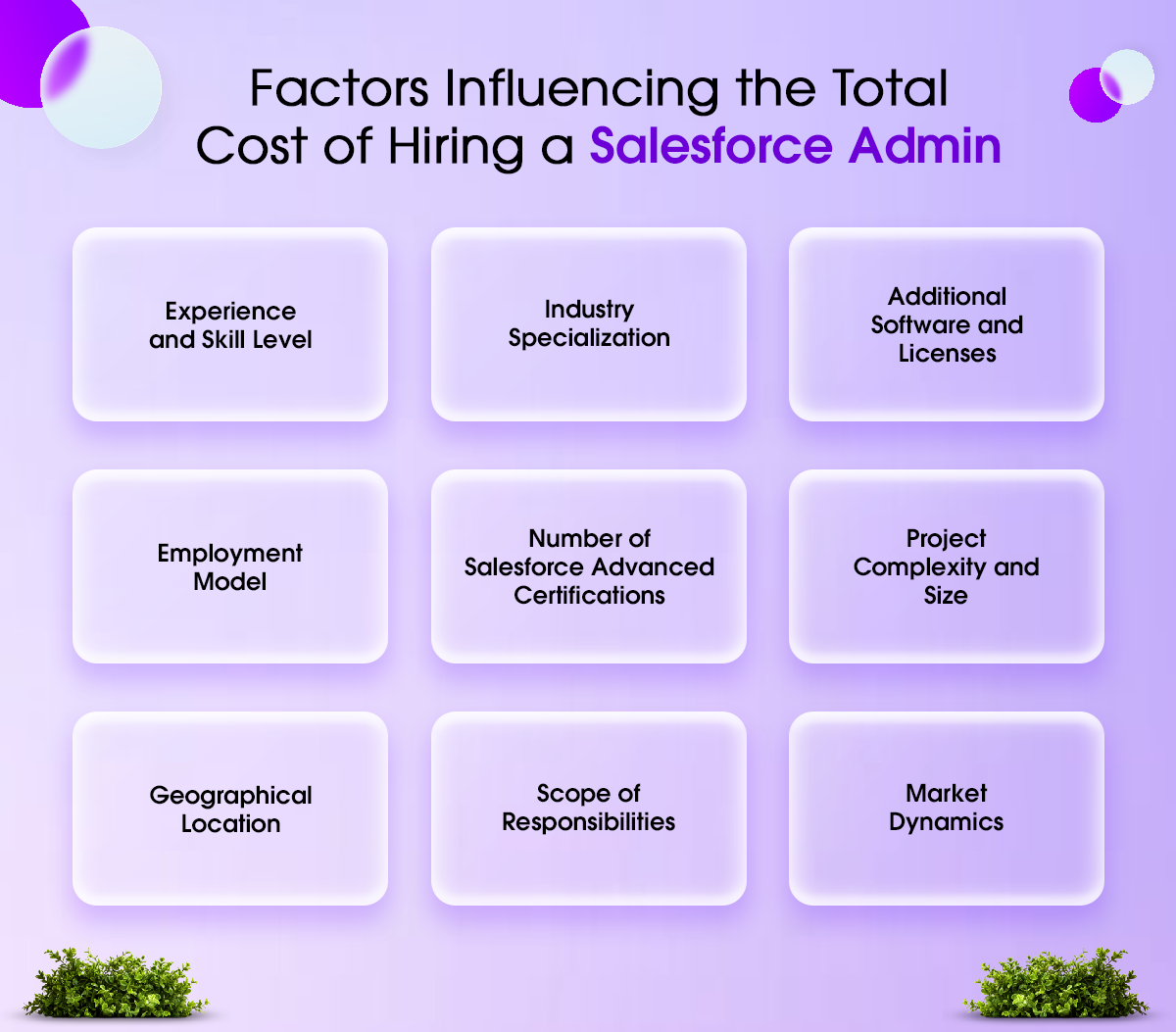
Salesforce Admin Cost Guide for 2026
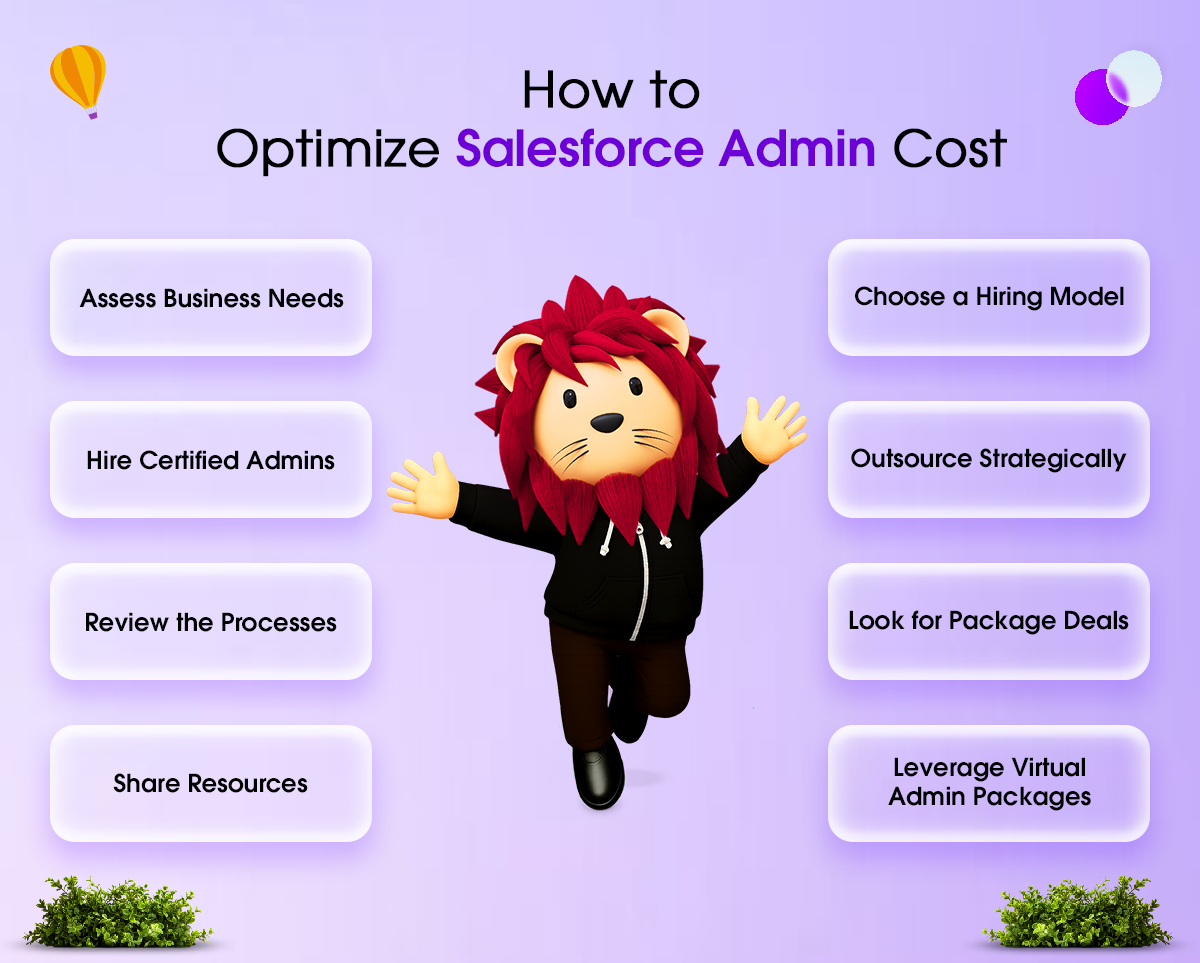
Understanding the market rate is essential for making a competitive offer — and for avoiding the trap of underpaying, losing your hire to a competitor, and starting the search all over again.
United States Market
-
Entry-Level (0–2 years, Salesforce Admin cert): $55,000 – $75,000
-
Mid-Level (2–5 years, multiple certifications): $75,000 – $100,000
-
Senior (5+ years, complex orgs, specialty clouds): $100,000 – $135,000
-
Salesforce Manager / COE Lead: $120,000 – $160,000+
UK Market
-
Junior Administrator: £35,000 – £45,000
-
Mid-Level Administrator: £45,000 – £65,000
-
Senior Administrator: £65,000 – £85,000
-
Salesforce Manager: £85,000 – £110,000+
Contract rates are typically 30–50% higher than equivalent permanent salaries on a day-rate basis. Remote work has also partially normalized salaries across geographic markets — a remote-first company in Kansas is now competing with San Francisco employers for the same candidate pool.
What Else Matters to Top Candidates
Money is not the only factor. Top Salesforce Admins — especially at the mid-to-senior level — care about access to Salesforce learning resources (Trailhead credits, conference attendance at Dreamforce or World Tour), a clear growth path, meaningful and complex work, a team that respects technical expertise, and the autonomy to make real decisions about the system they manage. If your offer is competitive on salary but positions the admin as purely reactive support staff, you will lose strong candidates to employers who offer more strategic ownership.
Onboarding Your New Salesforce Admin for Maximum Impact
Hiring well is only half the battle. The way you onboard a new Salesforce Admin directly determines how quickly they become productive — and whether they stay.
Before Day One
Before your new admin walks through the door (or logs into Slack for the first time), have a few things ready. They need access to any documentation available on the current Salesforce configuration — even if it is incomplete or out of date. They need introductions scheduled with the key stakeholders they will be serving: sales managers, marketing ops, customer success, and finance. And they need a clear sense of what you want them to focus on first.
The First 30 Days: Discovery Mode
The best admins spend their first month listening more than building. They run the Salesforce Org Health Check to understand security posture. They review existing automations and custom code (if any). They interview stakeholders from every department that uses Salesforce. They create their own assessment of the biggest problems and opportunities in the org. Resist the temptation to push them to 'just fix things' in week one — a new admin who makes changes without full context can create new problems.
Days 31–90: Quick Wins and Foundation Building
By this point, a good admin has their roadmap. They should be delivering visible wins — a critical dashboard that leadership has been asking for, an automation that saves the sales team significant time, and a cleanup of the data quality issue causing the most pain. These early wins build credibility and trust with the team, which makes everything that follows easier.
Building a Salesforce Roadmap Together
One of the most valuable early conversations is building a Salesforce roadmap—a living document that captures where Salesforce is today, what the business needs it to do over the next 6–12 months, and how the admin will prioritize getting there. This document becomes the shared frame of reference for all future admin work. It prevents the 'can you just quickly...' culture that destroys admin productivity and morale.
Common Mistakes Companies Make When Hiring a Salesforce Admin
These mistakes are remarkably common, and each one costs real money. Learn from the companies that have made them so you do not have to.
Mistake: Hiring a Developer When You Need an Admin
Developer-level Salesforce talent costs significantly more and approaches problems with a code-first mindset that can create maintenance headaches in a system that should be primarily declarative. Unless you genuinely have requirements that cannot be met without code, hire an admin.
Mistake: Posting a Salary Below Market and Wondering Why Applications Are Weak
The Salesforce talent market is well-informed. Candidates know their worth. A job posting that offers significantly below-market compensation does not attract experienced candidates — it attracts people who do not yet know they can earn more, or people who are hiding something.
Mistake: No Salesforce Roadmap or Strategy to Hand Over
Throwing a new admin into a poorly documented org with no strategic direction is setting them up to fail. Before you hire, know what you want Salesforce to do for your business. If you do not, figure that out first.
Mistake: Hiring Purely on Certifications
A 5-certification admin who has spent two years in small, simple orgs is less capable than a 1-certification admin who has managed a complex enterprise environment for five years. Use certifications as a filter, not a deciding factor.
Mistake: Treating the Admin Role as IT Support
When admins become a help desk — resetting passwords, answering basic how-to questions, fixing data entry errors — their capacity for strategic work evaporates. Set expectations clearly about what the role is and is not. Train users so the admin is not the first line of support for everything.
Mistake: Not Involving the Admin in Business Planning
Your Salesforce Admin needs to know where the business is going. New product launches, market expansions, team restructures, and reporting changes all have implications for Salesforce. An admin who is included in planning can prepare for these changes. One who is not will be perpetually reactive and overwhelmed.
Red Flags to Watch for When Evaluating Candidates
Not every strong-on-paper Salesforce Admin will be right for your business. Here are the warning signs that should give you pause — even when someone looks impressive on their resume.
-
They cannot explain why they made specific configuration decisions in past roles — suggesting they followed instructions without genuine understanding
-
They have no answer for how they stay current with Salesforce releases — a significant concern given how rapidly the platform evolves
-
They struggle to communicate technical concepts in plain language — a major problem for a role that requires constant stakeholder communication
-
They talk only about what Salesforce 'can do' without demonstrating judgment about what it should do in a given context
-
They have never worked in a sandbox environment, or do not understand why testing before production deployment matters
-
Every answer to a problem is 'build something new' — strong admins also know when to simplify, remove, or not build
-
They cannot discuss a time something they built failed or caused a problem, and what they learned — everyone has these stories, and the absence suggests either limited experience or lack of self-awareness
-
Their Trailhead profile shows certifications but no completed Superbadges or advanced content — suggesting study-to-test rather than genuine skill-building
The Bottom Line: What This Investment Is Really Worth
A mediocre Salesforce Admin costs you roughly their salary in underutilized platform potential, ongoing inefficiencies, and the time your team wastes on manual work that should be automated.
A great Salesforce Admin is one of the highest-ROI hires a growing business can make. They take your single largest revenue-facing software investment and make it actually work. The automations they build save your sales team hours every week. The dashboards they create change how leadership allocates resources. The data hygiene they maintain makes your marketing and sales efforts measurably more effective.
Salesforce reports that companies using their platform optimally see an average 45% increase in lead conversion and a 29% increase in sales productivity. The keyword there is 'optimally' — and optimal does not happen without someone who owns the platform.
Take the hiring process seriously. Define your requirements clearly. Look in the right places. Ask questions that reveal real skill. Pay competitively. Onboard thoughtfully. Give your admin the strategic ownership and resources they need to do excellent work.
Get this right, and your Salesforce investment will finally return what it was always capable of delivering.
Why Codleo Is the Right Partner to Find Your Salesforce Admin
Most companies spend weeks searching for a Salesforce Admin, only to interview candidates who look great on paper but cannot handle real-world complexity. Codleo eliminates that problem.
Codleo is a Salesforce Summit Partner — the highest tier in the Salesforce partner ecosystem, awarded only to organizations that have demonstrated exceptional Salesforce expertise, consistent customer success, and deep platform knowledge across multiple clouds. Less than 1% of Salesforce partners globally hold Summit status. When you work with Codleo, you are not working with a generalist IT firm that happens to know Salesforce — you are working with a team whose entire identity is built around the Salesforce ecosystem.
Whether you need a dedicated Salesforce Administrator to own your org day to day, a senior Salesforce Consultant to guide your CRM strategy, or a full managed services team to handle everything from user management to complex automation builds — Codleo has the right person ready.
Every professional Codleo place has been rigorously vetted for both technical depth and communication ability. They understand that a great Salesforce Admin is not just someone who knows the platform — they are someone who can translate your business goals into Salesforce outcomes. That combination is rare, and Codleo has built a bench of exactly that caliber of talent.
You get the confidence of working with a Summit-level partner, the flexibility to scale your Salesforce support up or down as your business evolves, and the peace of mind that comes from knowing your CRM is in the hands of people who live and breathe Salesforce every single day.
If your Salesforce investment isn't delivering what it should—or if you are ready to ensure it does—the conversation starts with Codleo.
Get in touch with Codleo today and let us match you with the right Salesforce talent for your business.
 0
0
About the Author


 603 D-Mall Netaji Subhash Place, Delhi 110034 IND


