


Publish date:
Let's be honest. Your sales and support teams are spending way too much time doing things that should happen automatically.
A customer calls, and the agent struggles to locate their record. After the call, the interaction is not logged, and the follow-up is missed. When the customer calls the following week again, they must repeat their information. This isn't a people problem. It's a systems problem — and Salesforce CTI integration solves it.
CTI means Computer Telephony Integration. It helps your phone system work with your Salesforce CRM. This means calls are logged automatically. Customer records show up before your agent answers the call. Follow-ups are created without anyone needing to do anything.
This guide breaks down everything you need to know about Salesforce CTI integration in 2026 — how it works, what it costs, which tools are worth using, and how to actually get it right.
No jargon overload. No filler content. Just the stuff that matters.
What is Salesforce CTI Integration? (And Why Should You Care?)
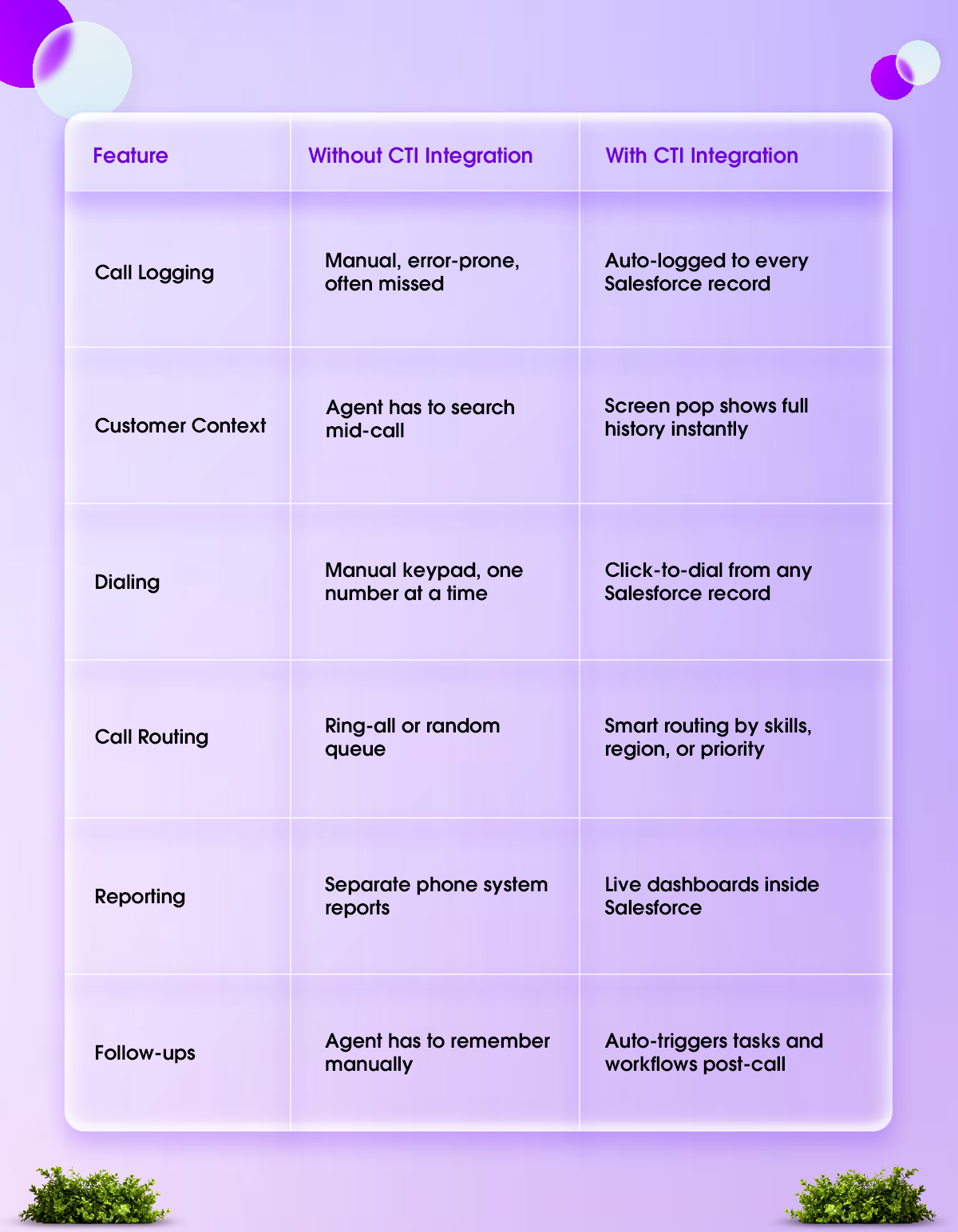
Salesforce CTI integration connects your telephony system — whether it's a cloud-based VoIP tool or a traditional phone setup — directly into Salesforce.
The result? Your agents handle every call from inside Salesforce. They see who's calling before they pick up, manage the call with on-screen controls, and have everything logged automatically when the call is over.
Think of it as removing the gap between your phone and your CRM. When that gap disappears, a lot of other problems disappear with it — missed logs, wrong records, delayed follow-ups, frustrated customers.
How Does Salesforce CTI Actually Work?
Most people assume CTI integration is some complicated backend wiring project. It's actually more elegant than that — especially in 2026.
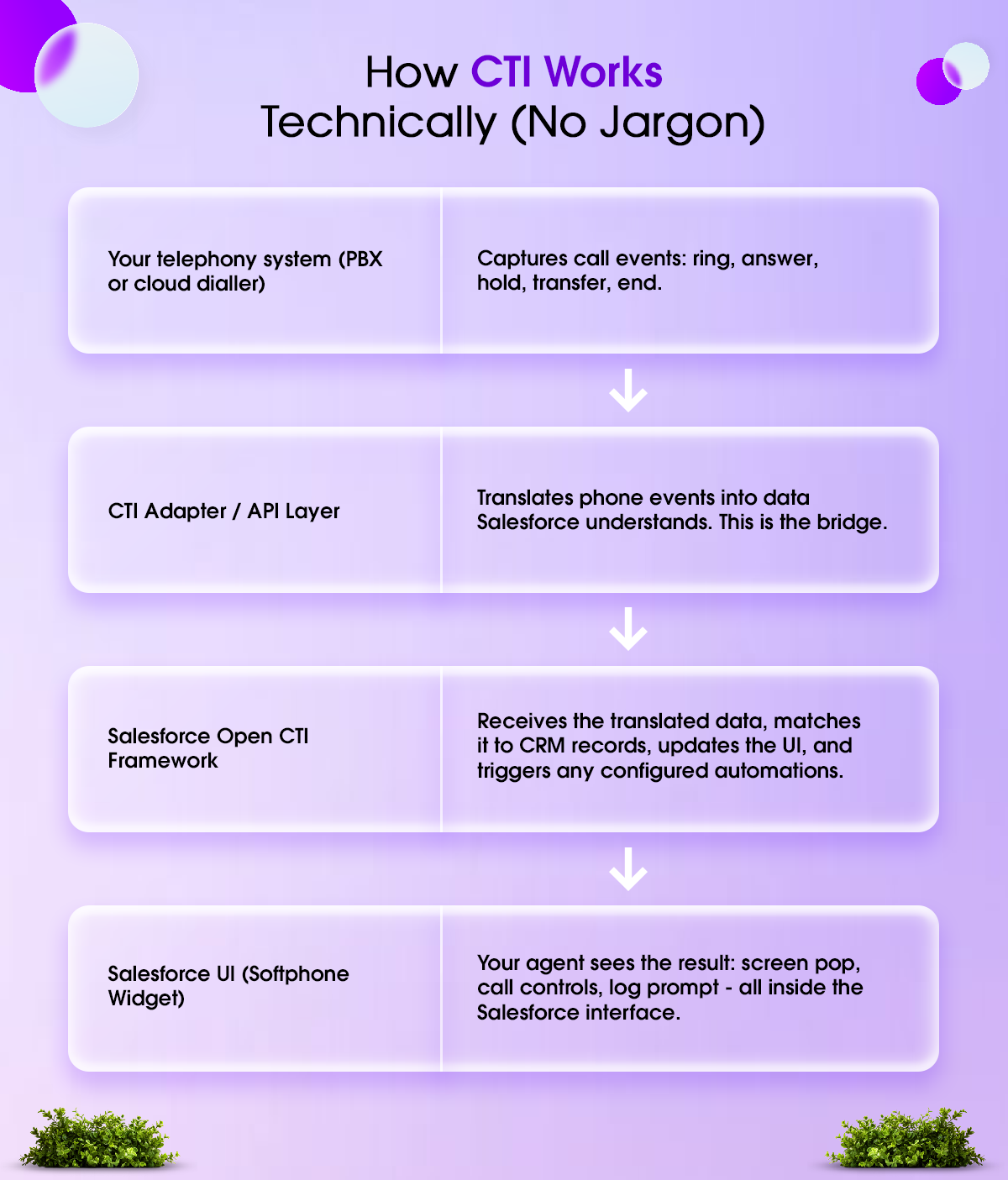
Here's the simple flow of what happens during a call:
Step 1 — Call comes in (or goes out)
When a call hits your phone system, the CTI layer intercepts it and checks the caller's number against Salesforce data.
Step 2 — Screen pop appears
If there's a match, a screen pop appears on the agent's screen, displaying the Contact record, Case history, open Opportunities, or the record type most relevant to the match. This happens before the agent even answers.
Step 3 — Agent handles the call from inside Salesforce
The agent uses an embedded softphone — a digital phone interface inside Salesforce — to mute, hold, transfer, or conference the call. No separate phone app. No window switching.
Step 4 — Call ends, logging happens automatically
Once the call wraps up, CTI logs it as an activity tied to the record — capturing duration, time, outcome, and any notes the agent added. If a follow-up is needed, a task is automatically created.
Step 5 — Workflows kick in
Depending on how you've set things up, the call outcome can trigger Salesforce Flows that send a follow-up email, update a lead status, create a new Case, or notify a manager.
The whole thing runs in the background. Your agents don't manage the process — they have conversations.
The Features That Actually Make a Difference
CTI platforms come with long feature lists. Here are the ones that actually move the needle for sales and support teams:
1. Click-to-Dial
Agents can click any phone number in Salesforce—whether it’s on a Lead, Contact, Account, or Case—and the call starts right away. There’s no need for manual dialing or worrying about wrong numbers. This feature saves teams that make many outbound calls many hours each week.
2. Screen Pop with Full Context
When a call comes in, the right information appears automatically. The agent can see the customer's name, past interactions, open cases, and recent purchases before answering. This helps make personalization feel natural instead of forced.
3. Automatic Call Logging
Every call, whether incoming or outgoing, automatically logs to the correct Salesforce record. This includes details such as the duration, timestamp, outcome, and notes. As a result, you can trust your CRM data.
4. Intelligent Call Routing
Calls are directed based on information from your customer relationship management (CRM) system. This includes details such as customer level, preferred language, the last agent they spoke with, and the priority of their open cases. This is not random routing; it uses what your CRM already knows.
5. Call Recording with Record Linkage
Call recordings attach directly to the Salesforce record. This way, managers can easily review calls for coaching or compliance without having to search another system.
6. Live Reporting and Dashboards
Call volume, average handle time, missed calls, and agent availability — all visible inside Salesforce dashboards in real time. No more waiting for weekly exports from a separate phone system.
7. Post-Call Automation
When a call ends with a specific outcome, Salesforce Flows can trigger automatically — send a follow-up email, update the lead stage, create a task for the next rep, or escalate a case: human decisions, automated execution.
4 Ways to Integrate CTI with Salesforce
Not every integration approach suits every business. Here's an honest breakdown of your options:

Option 1: Salesforce Open CTI (Most Flexible)
Open CTI is Salesforce's native JavaScript-based framework that lets developers embed a telephony interface directly inside the Salesforce UI — no desktop app required. It runs in the browser, works across operating systems, and is fully customizable.
This is the backbone of almost every modern CTI integration. It's what AppExchange tools and custom builds are typically built on.
-
Best for: Organizations with technical resources that want full control over how the integration behaves.
Option 2: AppExchange CTI Connectors (Fastest to Deploy)
Companies like Amazon Connect, RingCentral, Five9, and Genesys offer pre-built connectors on the Salesforce AppExchange. You can quickly install the package, follow the setup steps, and get started much faster than if you built a custom solution.
These connectors package Open CTI as a managed solution that includes a ready-to-use softphone interface, logging templates, and helpful documentation.
This is ideal for mid-sized businesses that need a reliable CTI system without making a large investment in development.
Option 3: Custom CTI via Salesforce APIs (Maximum Control)
For organizations with specific needs—such as using multiple CRMs, AI-supported call training, complex call routing, or distributing calls based on language—a custom CTI built with Salesforce REST and Streaming APIs offers the greatest flexibility.
This method uses tools like MuleSoft or AWS Lambda to modify data before it syncs with Salesforce. It works best for large companies with global teams, those that must follow compliance rules, or those that need telephony solutions that standard tools do not provide.
Option 4: Desktop Adapter (Legacy)
Older CTI systems used a special desktop adapter, which is software installed on each agent's computer. While this setup is still used in industries with strict rules or on-site operations, it is becoming less common. Updating the software must be done manually; it often has compatibility issues during Salesforce updates, and agents find it difficult to use because the softphone opens in a separate window.
-
Best for: Teams with legacy on-premise phone systems and no near-term plans to move to cloud telephony.
Top CTI Tools for Salesforce in 2026
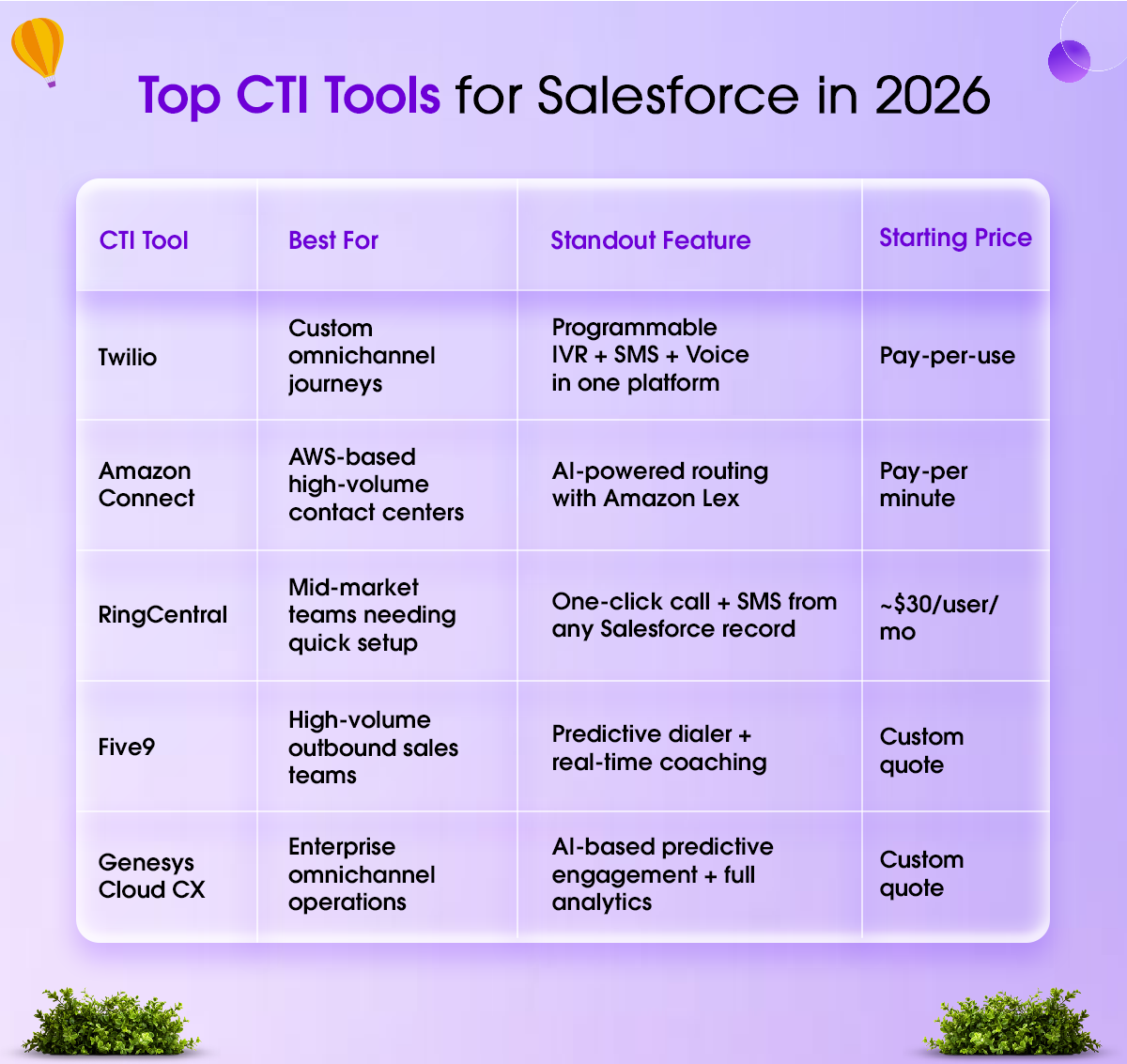
Choosing the right CTI tool depends on your team size, how you manage calls, and your goals. Here are the five most popular options.
A note on choosing:
Don't pick a tool based on its feature list. Pick it based on how well it fits the way your team actually works today — and how much it can scale with you. A complex enterprise platform is wasted on a 10-person sales team. A lightweight plug-and-play connector will choke under enterprise call volumes.
If you're unsure, start with a pilot. Test it with a small group of agents before rolling it out organization-wide.
Real Benefits — What Changes After You Integrate
Here's what teams actually report after a successful Salesforce CTI integration:
Agents stop dreading the phone.
When the CRM does the administrative work — logging, populating records, creating tasks — agents can focus on the actual conversation. Call handling feels lighter. Energy goes toward the customer, not the keyboard.
First-call resolution goes up.
When agents have full customer context before the call starts, they resolve issues faster. No, let me check your account while the customer waits on hold—no transferring to three different people.
Sales teams move faster.
Click-to-dial from a Lead list means reps can work through more contacts in less time. Auto-logged calls mean they're not spending 15 minutes at the end of the day filling in activity records they barely remember.
Managers finally have visibility.
Real-time dashboards show what's happening on the floor right now — not what happened last week in a report nobody reads. Coaching becomes specific and timely instead of general and delayed.
Customer experience actually improves.
When customers call back, agents see the history. They don't make the customer repeat themselves. They reference past conversations. That's the difference between 'we have your account on file' and 'I see you spoke with Sarah last Tuesday about your renewal — let me pull that up.'
Before You Integrate: A 5-Step Readiness Checklist
The biggest failures we've seen at Codleo with CTI weren't about technology. They happened because teams skipped important discovery steps. Before talking to any vendor, go through this checklist:
1. Audit your current phone system
Is your phone system cloud-based (SIP/VoIP) or still an on-premises PBX? Cloud telephony works well on its own. On-premises systems often need an extra layer to connect.
2. Map your call flows
Where do calls start? How are they directed today? What happens when a call ends? Document this before you set anything up.
3. Check your Salesforce data quality
CTI connects callers to records using their phone numbers. If your CRM has messy or duplicate phone numbers, screen pops may not work properly. Make sure your data is clean before making connections.
4. Define what 'success' means
Reduction in after-call work? Faster first response? Higher outbound volume? Pick 2-3 specific metrics. This drives your configuration decisions.
5. Plan agent training alongside the tech
A perfectly configured CTI that agents ignore is worthless. Adoption planning is as important as the integration itself.
Common Mistakes That Derail CTI Integrations
Most CTI projects that struggle don't fail because of the technology. They fail because of these avoidable mistakes:
Mistake 1: Treating it as a pure IT project
CTI touches how your agents work every day. If sales ops, support leads, and frontline reps aren't involved in defining how the softphone should behave, you end up with a technically functional system nobody actually uses.
Mistake 2: Assuming AppExchange = done
Installing a CTI connector from AppExchange is step one, not the finish line. You still need to configure softphone layouts, set up routing rules, define call dispositions, connect automation flows, and train agents. Skipping these steps gives you a half-working integration.
Mistake 3: Ignoring data quality
Screen pops and click-to-dial only work if your Salesforce records have accurate, up-to-date phone numbers. If your CRM is full of duplicates and outdated contacts, CTI will surface the wrong record or nothing at all. Clean your data before you go live.
Mistake 4: Building for today, not tomorrow
A CTI setup that works perfectly for 20 agents might crumble at 200. Build with scale in mind — especially around call routing logic, recording storage, and user permission structures.
Mistake 5: Skipping compliance
Call recordings, PII in activity logs, and agent notes can all create compliance exposure if not handled correctly. GDPR, HIPAA, and local telecom regulations have specific requirements around recording consent, data retention, and access control. These need to be part of the design, not an afterthought.
What Does Salesforce CTI Integration Cost in 2026?
Pricing varies depending on what you're building. Here's a realistic breakdown:
Salesforce-Native Options
-
Salesforce Contact Center (all-in-one): ~$150/user/month — includes Service Cloud, CTI, Omni-Channel, and AI Voice
-
Service Cloud Voice add-on (partner telephony): ~$50/user/month
-
Service Cloud Voice with Amazon Connect: $75–$200/user/month, depending on included minutes
Third-Party CTI Connectors
-
Entry-level tools (e.g., Squaretalk, Talkdesk): $10–$15/user/month
-
Mid-range tools (e.g., CloudCall, RingCentral): $30–$50/user/month
-
Enterprise platforms (Five9, Genesys): Custom pricing based on volume and features
Implementation Costs
Most businesses underestimate this part. Even a straightforward CTI integration requires planning, configuration, testing, and user training. Budget for this separately — a well-implemented setup pays for itself quickly, but a rushed one creates more problems than it solves.
Working with a certified Salesforce partner like Codleo means you get the integration done right the first time, with proper routing logic, clean automation, and documentation your team can actually use.
How to Know If Your Business Is Ready for CTI Integration
You're probably ready if any of these sound familiar:
-
Your agents handle more than 30-40 calls per day, and manual logging is eating into their time
-
Your call data lives in your phone system, and your customer data lives in Salesforce — and never the two shall meet
-
Customer complaints include 'I had to repeat myself three times.'
-
You have no real visibility into call volume, resolution rates, or agent performance
-
Your follow-up process depends on individual agents remembering to do things
If two or more of those are true, CTI integration isn't a nice-to-have. It's a business efficiency problem with a clear solution.
Quick Implementation Checklist
If you're planning to move forward, here's what a solid CTI project looks like end-to-end:
-
Audit your current telephony setup — cloud or on-premise, provider, volume
-
Define what 'success' looks like — reduced handle time, better logging, smarter routing
-
Choose the right CTI tool based on team size, use case, and budget
-
Map telephony data to Salesforce objects before configuration starts
-
Set up and test in a Sandbox environment before touching production
-
Design softphone layouts by role — sales agents need different views than support
-
Build call logging templates, disposition codes, and post-call workflows
-
Run a pilot with 5–10 real agents for 2–3 weeks
-
Train the full team with use-case-specific examples, not generic walkthroughs
-
Monitor KPIs for 4–6 weeks post-launch and optimize where needed
Final Thoughts: CTI Is an Operations Decision, Not Just a Tech Decision
Every time a customer has to repeat their story to a new agent, trust erodes. Every time a rep forgets to log a call, pipeline data becomes unreliable. Every time a manager can't see what's happening in real time, coaching becomes guesswork.
Salesforce CTI integration doesn't fix culture or strategy. But it removes the friction that prevents good teams from doing their best work.
In 2026, phone-CRM silos are a solvable problem. The technology is mature, the tools are well-supported, and the ROI is measurable. The only thing standing between your team and a smarter way of working is deciding to do it properly.
Ready to Connect Your Phone System with Salesforce?
Most businesses lose time and deals because their phone system and CRM never talk to each other. Codleo's Salesforce CTI experts set up the integration the right way — so your team spends less time on manual work and more time on what actually matters: conversations that convert.

Here's what you get with Codleo:
-
End-to-end Salesforce CTI setup — from planning to go-live
-
Seamless integration with tools like Twilio, RingCentral, Amazon Connect, Five9, and more
-
Custom softphone layouts, smart call routing, and automated logging built for your team
-
Ongoing Salesforce support so your CTI keeps working as your business scales
How Codleo Implements Salesforce CTI
We've delivered Salesforce CTI integrations across industries — financial services, real estate, BFSI, EdTech, and e-commerce. Here's what our engagement looks like:
Phase 1 — Discovery & Audit (Week 1)
-
Map current telephony infrastructure and call flows.
-
Audit Salesforce org: data quality, existing automations, and user profiles.
-
Define success KPIs with business stakeholders.
-
Shortlist 2-3 CTI tools and evaluate fit.
Phase 2 — Design & Configuration (Week 2–3)
-
Configure CTI adapter and Salesforce Call Center settings.
-
Design softphone layouts per team/role.
-
Set up screen pop logic, routing rules, and log templates.
-
Build post-call workflow automations in Flow or Process Builder.
Phase 3 — Testing & Pilot (Week 3–4)
-
Full UAT with real users on real call scenarios.
-
Test edge cases: missed calls, transfers, conference calls, duplicate numbers.
-
Resolve issues. Refine based on agent feedback.
-
Train pilot group — not just on the tool, but on the new workflow.
Phase 4 — Full Rollout & Hypercare (Week 4–6)
-
Phased rollout by team or region.
-
2-week hypercare period: daily check-ins, rapid issue resolution.
-
Set up Salesforce dashboards to monitor CTI adoption metrics.
-
Handover documentation and admin training.
📞 Book a FREE Salesforce CTI Consultation with Codleo
👉 Talk to a Codleo Salesforce Expert Today
 0
0
About the Author




 603 D-Mall Netaji Subhash Place, Delhi 110034 IND


