


Publish Date
AI CRM SOFTWARE COMPARISON 2026 Quick Answer: The best AI CRM tools in 2026 are Salesforce (Agentforce), Microsoft Dynamics 365, HubSpot, Zoho CRM, and Creatio, each with AI built directly into sales and service workflows. Newer AI sales copilots, such as SalesWorx.ai, layer on top of these CRMs. The right choice depends on your tech stack, budget, and how much autonomous AI your team needs. Most growing companies already use a CRM. Far fewer use AI inside it in a way that actually changes how sellers and service agents work. That's changing quickly. In 2026, "AI CRM" no longer just means a lead score in the corner of a screen. It means AI that drafts emails, summarizes calls, answers customers, updates records, and, increasingly, acts on its own within the rules you set. THE EVOLUTION OF AI CRM Score leads, forecast sales, and identify customer patterns. Draft emails, summarize conversations, and generate customer responses. Complete permitted tasks and coordinate workflows with defined guardrails. That shift makes choosing a CRM harder. Every vendor now claims to be "AI-powered," but the depth of that AI varies enormously, and so do pricing models, setup effort, and the amount of control you keep. This guide compares 20 AI CRM tools on what their AI actually does, what they cost, and which teams they suit best. Our evaluation draws on product documentation, verified G2 and Capterra reviews, and Codleo's hands-on experience delivering CRM consulting and implementation services, including Salesforce Einstein and Agentforce deployments, for organizations across the USA, UK, Europe, the Middle East, and Asia. Here are five leading platforms to consider before exploring the full comparison. Agentforce: autonomous AI agents and deep customization. Copilot capabilities across sales, service, and operations. Breeze AI agents and assistant for growing teams. Zia AI lead scoring and sales insights. AI-assisted process automation and no-code agent building. On smaller screens, swipe horizontally to see all comparison columns. *Prices change frequently and vary by region, billing cycle, plan, and AI usage. Confirm current pricing and feature availability on each vendor's official website before purchasing. Listed prices and capabilities are based on the supplied comparison and have not been independently verified. Start with your existing technology stack, sales and service processes, implementation budget, and the level of AI autonomy you actually need. A CRM with powerful autonomous agents isn't automatically the best choice for a team that mainly needs email assistance, lead scoring, and simple automation. FIND THE RIGHT CRM Codleo's CRM consulting team will review your processes, existing tools, and budget, and give you an honest recommendation before you commit to any platform. UNDERSTANDING AI-POWERED CRM An AI CRM is customer relationship management software with artificial intelligence built into its core workflows. It uses AI to predict outcomes (e.g., which leads will convert), generate content (e.g., emails and call summaries), and, in newer agentic platforms, take actions (e.g., answering customers, qualifying leads, and updating records automatically). A traditional CRM stores information. Sales reps enter data, managers run reports, and people decide what to do next. An AI CRM does more of that thinking and doing for you. It spots patterns in your data, suggests the best next step, writes first drafts, and in many cases completes routine work on its own. AI-powered CRM platforms generally use three types of artificial intelligence, each supporting a different part of the customer journey. Analyzes past data to forecast what's likely to happen. Lead scoring, deal win probability, churn risk, and sales forecasting. Creates new content from data and prompts. Drafts sales emails, summarizes calls and cases, and writes knowledge articles. Understands a goal, decides what to do, and takes action within set guardrails. AI agents that qualify leads, resolve support cases, or book meetings automatically. Most leading AI CRMs now combine all three. The biggest change in 2026 is the move from AI that suggests to AI that acts. Different departments benefit from AI CRM in different ways, but they all work from connected customer information. Prioritizes leads, flags at-risk deals, drafts follow-ups, summarizes calls, and coaches reps. Answers routine questions 24/7, summarizes cases, suggests replies, and routes work to the right agent. Segments audiences, personalizes content, and predicts the best time and channel to reach each customer. Delivers more accurate forecasts and answers plain-language questions about pipeline and performance. The biggest difference is how much work the software can do beyond storing and organizing customer data. Not all AI CRMs are built the same way. Native AI is designed into the CRM's data model and workflows, so it understands your records, permissions, and processes. Bolted-on AI is added through a separate tool or plugin and often works with limited context. One integrated environment AI works directly with CRM records, permissions, and business processes. AI connects through integrations and may have limited access to customer context. Native AI can offer more direct access to CRM context and built-in controls, making it an important factor in our evaluation. However, a well-integrated external AI solution can also be effective and secure. The deciding factors are data access, permissions, integration quality, and how well the AI fits your workflows. OUR EVALUATION METHODOLOGY We evaluated each AI CRM on seven criteria: how deeply AI is built into the product, the range of AI capabilities, integrations, pricing transparency, ease of deployment, verified user reviews, and data governance. Our hands-on experience implementing Salesforce Einstein and Agentforce helped us separate real AI depth from marketing claims. 7-POINT EVALUATION FRAMEWORK Is AI part of the CRM's core data and workflows, or added through a separate layer? Does the platform offer predictive, generative, and agentic AI, and how mature is each? How well does the CRM connect with email, ERP, marketing, support, and collaboration tools? Are costs clear and predictable, including AI add-ons and usage-based fees? How quickly can a typical team deploy the CRM and start using its AI features? What do recent, verified reviews on G2 and Capterra say about usability, support, and results? How does the vendor protect customer data, and is it used to train external AI models? As a Salesforce Summit Partner providing CRM consulting and implementation services, Codleo has deployed Einstein and Agentforce in live client environments. That experience shaped how we assessed the Salesforce entries in particular. For every other platform, we compared vendor documentation with independent reviews rather than relying on vendor claims alone. IMPORTANT NOTE ABOUT THE LIST Each one suits different teams, budgets, and tech stacks, so use the "Best for" line on each profile to find the options that match your needs. These AI CRM platforms are relevant across a wide range of industries, including: Best for: Enterprises and growing companies that need deep customization and are ready to use agentic AI. Salesforce remains one of the most comprehensive AI CRM platforms on the market. Its AI works on two layers. Einstein provides predictive and generative AI across Sales, Service, and Marketing, including lead scoring, forecasting, email drafting, and call summaries. Agentforce, Salesforce's autonomous agent platform, succeeded the earlier Einstein Copilot experience and uses Salesforce's reasoning and orchestration capabilities to plan and complete tasks such as qualifying leads, resolving service cases, and coaching reps within guardrails you define. Thousands of organizations have adopted Agentforce since its 2024 launch. SALESFORCE AI CAPABILITIES Lead scoring, forecasting, content generation, recommendations, and summaries. AI agents that execute permitted sales, service, commerce, and employee workflows. Data 360 • CRM Context • Permissions • Governance Agentforce agents for sales development, service, commerce, and employee support. Einstein lead and opportunity scoring, forecasting, and next-best-action recommendations. Email drafting, call and case summaries, and knowledge article generation. Grounding in connected customer information through Data 360, formerly Data Cloud. Data masking, supported zero-retention arrangements with model providers, and toxicity checks. Per Agentforce conversation Per 100,000 Flex Credits; roughly $0.10 per action Per user/month for selected AI add-ons Per user/month for Agentforce 1 editions Sales Cloud licenses are listed from $25/user/month. Prices are indicative and require verification against current Salesforce plans, billing terms, and usage rules. Unmatched customization, a large partner and AppExchange ecosystem, and mature AI governance capabilities. Pricing and licensing can be complex. Implementation often requires specialist support and may take six weeks to six months or more, depending on scope. Codleo, a Salesforce Summit Partner, helps you choose the right Salesforce products and AI use cases, prepare your data, and implement Agentforce safely. Best for: Organizations already standardized on Microsoft 365, Teams, and the Power Platform. Dynamics 365 pairs CRM (customer engagement) with ERP (operations) under one AI layer. Copilot inside Dynamics 365 Sales summarizes lead and opportunity updates and drafts email responses; Customer Service Copilot resolves tickets across chat, email, and voice; Customer Insights lets marketers segment audiences and build targeted campaigns from unified behavioral data. Supply Chain Management even flags external risk factors, such as weather disruptions. If you need to customize these CRM features, you can work with a Reputed Dynamics CRM Development company to fit Dynamics 365 into their existing processes. Meeting briefs and email drafting Case resolution assistance Segmentation and journeys AI-supported business workflows Outlook • Teams • Excel • Power Automate Varies by Dynamics 365 app and plan; many Copilot features are included in premium tiers. Seamless Microsoft integration and strong CRM-plus-ERP unification. A steep learning curve and licensing across apps that can be difficult to compare. A side-by-side Salesforce comparison can help clarify the fit. Best for: Small and mid-sized businesses focused on inbound marketing and fast adoption. HubSpot's AI layer, Breeze, sits on top of a free CRM tier, which is why HubSpot remains a popular first CRM for growing companies. Breeze includes an AI assistant that drafts content and answers questions about your CRM data, AI agents for tasks such as customer support and prospecting, and data enrichment that fills in company and contact details automatically. Draft emails, blog outlines, landing page copy, and reports. Support customer service, prospecting, and content tasks. Enrich contact data and help prioritize leads. Free CRM available; paid plans start at around $20 per user per month, with advanced AI and reporting in higher tiers. Very user-friendly, a strong free tier, and excellent inbound marketing tools. Advanced AI, reporting, and customization are in higher-priced tiers. Costs can increase as contacts and seats grow. Best for: Cost-conscious SMBs that want a broad suite of connected business apps. Zoho's AI assistant, Zia, has grown from a simple chatbot into an increasingly agentic layer that can update records, send follow-ups, and schedule calls. Zia is available in Zoho CRM's Enterprise and Ultimate plans, while the Zoho One bundle extends connected business capabilities across apps including Desk, Analytics, and Books. Scores based on engagement and firmographic signals. Flags unusual changes in calls, conversions, or response rates. Turns plain-language questions into charts and reports. Helps create emails and other business content. CRM starting price per user/month Enterprise tier per user/month with advanced Zia features Zoho One starting price per user/month Indicative prices; billing requirements and regional availability vary. Affordable for its feature depth, with strong regional data residency options. The most useful AI features are in higher tiers, and the platform becomes more complex as you scale. Best for: Sales-focused small teams that want a simple, visual pipeline. Pipedrive's AI Sales Assistant learns from your team's own activity to suggest next steps, flag stalled deals, and share tips at each stage of the sales cycle. Smart Contact Data enriches contact profiles automatically using public sources and a prospect's email address, making it quicker to check whether a lead fits your ideal customer profile. Pipedrive also offers AI tools for drafting and summarizing emails. Add useful contact context. Spot stalled opportunities. Review recommended next steps. Draft and summarize emails. Mid-tier per-user plans, with more AI features in higher tiers. Easy to adopt and very strong for pure sales workflows. Limited functionality beyond sales, so marketing and service teams may need additional tools or integrations. Best for: Support-heavy organizations that want AI focused on customer service. Zendesk is built around customer support, and its AI reflects that. AI agents handle first-line conversations across chat, email, and messaging, resolving common questions without a human. For agents, Zendesk's Copilot capabilities, previously sold as Advanced AI, add case context, suggested replies, and macro recommendations that cut repetitive work. Semantic search helps both customers and agents find the right help articles faster than keyword search. AI SUPPORT JOURNEY Questions arrive through chat, email, or messaging. AI identifies intent, sentiment, and language. Routine questions can be resolved automatically. Complex cases reach an agent with helpful context. Core AI is included in Zendesk Suite plans; advanced agent assistance and automated resolutions are priced as add-ons. Excellent for service teams and easy to run alongside an existing CRM. Limited sales CRM functionality. Zendesk works best as a service layer rather than a complete CRM. Best for: Teams adopting AI for the first time that want quick, low-friction setup. Freshsales' Freddy AI consistently earns good marks for delivering practical value without heavy configuration. Freddy scores leads and contacts by likelihood to convert, forecasts revenue from historical and current trends, runs a self-service chatbot for website visitors, and answers team questions in plain language without coding. FREDDY AI WORKFLOW Predictive contact and lead scoring. Draft emails and summarize CRM records. Use sales trends to support forecasts. AI chatbots handle website conversations. A free plan is available, with affordable paid plans and more AI capabilities in higher tiers. Affordable and quick to deliver value. More advanced setups, such as custom workflows and integrations, often need technical support. Best for: Process-heavy organizations that want no-code AI and workflow automation. Creatio takes a different approach from most CRMs. Instead of adding AI to fixed features, it builds AI into a no-code platform for designing workflows, apps, and agents. Creatio.ai offers ready-made AI actions, while its no-code tools let business users describe and build their own AI skills and agents in plain language. Recent updates have added AI-assisted landing page creation, governed knowledge retrieval, and native Microsoft Teams integration. NO-CODE AI DEVELOPMENT "Create a workflow that identifies priority leads, assigns follow-ups, and tracks results." Design workflows, configure AI skills, and build business applications. Task-specific capabilities Automated business steps Analysis and visualizations Modular pricing that becomes higher as you add advanced automation and users. Very flexible no-code AI layer and extensive integration options. Costs rise as you scale into advanced automation, and design decisions need strong process governance. Best for: Teams that manage sales and projects in one workspace. ClickUp isn't a dedicated CRM, but ClickUp Brain makes it a strong option for teams that already track their pipeline on ClickUp boards. ClickUp Brain combines an AI Knowledge Manager that answers questions from your docs and tasks, an AI Project Manager that automates standups and progress updates, and an AI Writer tailored to each role. CONNECTED WORKSPACE AI assistance across tasks, documents, dashboards, and team activity. Find answers from connected tasks and documents. Generate standups, progress updates, and task summaries. Draft role-specific emails, documents, and other content. ClickUp Brain is available as an add-on or in higher-tier plans. Versatile, with strong integrations for sales and project tools. Not a full CRM, and performance can slow in very large, data-heavy workspaces. Best for: B2B teams on Salesforce or another CRM that want an AI sales copilot on top of their existing system. SalesWorx.ai isn't a CRM replacement. It's an AI sales intelligence and SDR automation platform from Worxwide that connects to your existing CRM. It combines two capabilities often sold separately: autonomous outbound, with AI SDR agents that handle prospecting, personalized outreach, and follow-ups, and real-time deal coaching, with a copilot that estimates deal success and recommends next steps. Account intelligence, including firmographic, technographic, and intent data, supports outbound, inbound qualification, and account-based marketing. AI SALES INTELLIGENCE Prospecting, personalized outreach, and follow-up automation. Win-probability insights, coaching, and next-best-action suggestions. Salesforce or another connected CRM retains the underlying customer and opportunity records. VENDOR-REPORTED CUSTOMER RESULT Reported pipeline growth Reported reduction in sales cycle time According to Worxwide, one client achieved these results within a quarter of deployment. These are vendor-reported figures, not independently verified outcomes. Custom pricing, based on a demo and implementation scope. Combines an AI SDR and a sales copilot in one platform, backed by B2B consulting support. Best for teams that already have a CRM in place. It's a layer on top, not a starting point. Pricing, product capabilities, and packaging may change. Confirm current details with each vendor before publishing. SalesWorx.ai performance figures are vendor-reported. Best for: Businesses that want CRM and project delivery in one system. Insightly combines CRM and project management, so teams can move smoothly from closing a deal to delivering the work. Its AI capabilities analyze communication patterns and customer activity to help sales teams understand relationships better and decide where to focus. Workflow automation reduces manual follow-ups and hand-offs between sales and delivery. CONNECTED CUSTOMER JOURNEY Track contacts, leads, and opportunities. Connect successful opportunities to delivery. Reduce manual approvals and follow-ups. Manage linked tasks and project activity. Mid-tier per-user plans. Connects sales and project delivery in one platform. AI capabilities are lighter than in AI-first CRMs, and the interface can feel less intuitive for new users. Best for: Large enterprises already running Oracle applications. Oracle's customer experience suite brings AI into marketing, sales, and service, working closely with Oracle's ERP and database products. It uses machine learning to identify the leads and accounts most likely to engage, generative AI to speed up content creation, and AI agents and chatbots to support customers and employees. AI ACROSS CUSTOMER EXPERIENCE AI chatbots and agents answer common questions, gather information, and resolve routine issues without a human. Connected enterprise data and business applications Enterprise pricing, typically through Oracle sales. Powerful predictive analytics and strong integration with Oracle's back-office systems. Usually requires dedicated IT resources and specialist implementation partners. Best for: Enterprises that run their operations on SAP. SAP's CRM solutions use SAP Business AI and its AI copilot, Joule, to deliver insights and automation grounded in data from across SAP systems. Service teams get AI-generated responses and case summaries, while sales teams get help with discovery questions, emails, and forecasting. Because the AI draws on SAP data from finance, supply chain, and operations, it can give a fuller picture of each customer. CONNECTED ENTERPRISE INTELLIGENCE Customer financial context Fulfillment information Business process data Sales and service records Contextual insights, summaries, drafting, forecasting, and assistance across business processes. Enterprise pricing, typically through SAP or its partners. Comprehensive customer insight connected to SAP back-office data. Customization is complex, and the platform is best suited to companies already invested in SAP. Best for: Teams that want visual, highly customizable workflows. Monday CRM is built on monday.com's flexible work management platform. Its AI features let teams build AI blocks into their boards, such as summarizing updates, extracting information, categorizing leads, or drafting emails, and set up automations that run when specific conditions are met. Deal insights help sales teams spot opportunities that need attention. EXAMPLE AI WORKFLOW A record enters the pipeline or changes status. Condense lead information. Organize incoming records. Prepare follow-up emails. Update the board, notify the team, or trigger a configured workflow. Mid-tier per-seat plans, with AI usage included or charged by credits depending on the plan. User-friendly and very easy to customize visually. AI and automation are less advanced than in dedicated AI CRMs, and complex sales processes may need workarounds. Best for: Marketing-led small and mid-sized businesses. ActiveCampaign combines email marketing, marketing automation, and a built-in CRM. Its AI helps businesses automate and personalize communication across email, SMS, and other channels, choosing the right timing and content for each contact. By identifying promising leads and tailoring messages, it increases engagement and conversions. AI-POWERED MARKETING JOURNEY Group contacts using data and behavior. Generate email copy and subject lines. Send messages when contacts are likely to engage. Coordinate communication across channels. Entry to mid-tier plans based on contacts and features. Precise segmentation and strong marketing automation. The CRM is lighter than full sales platforms, and the automation builder can feel complex for beginners. Best for: Freelancers and small businesses that want a simple, easy-to-learn CRM. Capsule focuses on straightforward contact and sales pipeline management, without the complexity of enterprise platforms. Its AI Content Assistant helps with writing tasks, such as drafting timely emails, preparing client follow-ups, or refining upcoming campaign messages, so small teams can communicate faster and more consistently. AI COMMUNICATION ASSISTANT Prepare a professional message after a sales conversation. Create an email draft that your team can review and personalize. The benefit: More consistent communication without adding unnecessary CRM complexity. Affordable plans, including an option for very small teams. Easy to use and budget-friendly. Reporting and AI capabilities are basic compared with larger platforms. Best for: Solopreneurs and very small businesses that want a website and CRM in one place. Durable is best known as an AI website builder for small businesses, and it includes a lightweight CRM so owners can manage leads and clients alongside their site. Contacts can be imported or created automatically from website form submissions, and AI helps write personalized emails using details from previous interactions. ALL-IN-ONE SMALL BUSINESS WORKFLOW A potential customer submits an inquiry through your business website. The lead becomes a contact record that can be managed in the same platform. Prepare a personalized response using relevant client details. Low-cost plans aimed at very small businesses. Fast setup and an all-in-one tool for small businesses. Limited CRM depth and fewer integrations, so growing teams will likely outgrow it. Best for: Large organizations in complex industries such as telecommunications, utilities, financial services, and healthcare. C3 AI CRM focuses on predictive, industry-specific AI. Rather than replacing your CRM's basic functions, it adds AI models that forecast revenue, predict churn, and flag risks across territories, products, and accounts, helping leaders make more confident decisions. PREDICTIVE ANALYTICS OVERVIEW Predict results by company, territory, product, or account. Flag potential issues affecting open deals. Identify accounts that may be at risk of leaving. Conceptual visualization only; bars are not actual C3 AI CRM data or product screenshots. Enterprise or custom pricing. Strong industry-specific predictive models. Requires specialist implementation and industry data expertise, so it's not suited to smaller teams. Best for: Small businesses that want simple sales and marketing automation without a steep learning curve. GlideCampaign combines CRM and marketing automation around a central analytics dashboard that keeps sales data in one place. Automated lead scoring and predictive analytics help forecast trends, while customer segmentation and sales funnel views help small teams focus on the right prospects. SALES FUNNEL VISUALIZATION Illustrative funnel stages; not a live product dashboard. Entry-level plans for small businesses. Strong email marketing capabilities for the price. Smaller ecosystem and fewer advanced AI features than leading platforms; teams new to marketing automation may need time to learn it. Best for: Startups and modern go-to-market teams that want an AI-native, highly flexible CRM. Attio is a newer CRM built with AI and automation at its core. It automatically builds and enriches records from your email and calendar, lets you add AI-powered fields that research or classify companies and contacts, and offers AI agents that help with prospect research and workflow automation. Its flexible data model makes it easy to adapt to different sales motions. AI-NATIVE CRM WORKFLOW Connect everyday communication and activity. Build and enrich company and contact profiles. Summarize and categorize records using AI. Support research and configured workflows. Adapt records, fields, and workflows to your team's sales process. Free plan available, with paid plans for growing teams. Modern, fast, and highly flexible, with AI built in from the start. A younger platform with a smaller ecosystem than established CRMs, and less suited to complex enterprise requirements. AI CRM is moving from AI that suggests to AI that acts. The biggest shifts in 2026 are agentic AI, usage-based pricing, unified data as the foundation for AI, AI available inside everyday tools, and data governance becoming a key reason companies choose one vendor over another. THE AI CRM EVOLUTION People enter data, review reports, and decide the next step. AI predicts outcomes, recommends actions, and drafts content. AI completes approved tasks within defined rules and guardrails. The shift: From "What should I do next?" to "Get this done." Early CRM AI recommended a next step and left the rest to people. Today, platforms such as Salesforce Agentforce, Microsoft Dynamics 365, Creatio, and SalesWorx.ai can complete multi-step work with limited human oversight: qualifying a lead, resolving a support case, updating records, or booking a meeting. What is changing? The focus is shifting from "What should I do next?" to "Get this done, and tell me when you need me." Traditional CRMs charged per user. AI features increasingly use consumption-based or hybrid pricing, such as per conversation, per action, or credit bundles. That can be cost-effective at low volumes, but costs become harder to predict as usage grows. Forecasting your expected volume is now a key part of choosing an AI CRM. A recurring license fee based on the number of seats. Charges based on actions, conversations, or credits. AI is only as good as the data it can reach. Vendors are investing heavily in unified customer data platforms, such as Salesforce Data 360, that bring together CRM, ERP, ecommerce, and warehouse data, often without copying it. Companies with clean, connected data get far better results from AI than those with scattered records. Connected, governed information for AI to use Better-grounded recommendations, answers, and actions CRM AI is no longer limited to the CRM screen. Agents and assistants are increasingly available in tools like Slack, Microsoft Teams, email, and AI assistants such as Claude, connected through APIs and protocols like MCP. Teams can ask questions and take action without switching apps, while the CRM's permissions and rules still apply. AI ACROSS EVERYDAY WORK TOOLS Connected through: APIs, integrations, and protocols such as MCP, with appropriate authentication and permission controls. Enterprises want clear answers to questions like: Is our data used to train external AI models? Can sensitive fields be masked? Is every AI action logged? Vendors that offer strong, transparent controls, such as Salesforce's Einstein Trust Layer or SalesWorx.ai's no-external-training policy, are winning trust faster. Is customer data used to train external AI models? Can confidential fields be masked or restricted? Can administrators review AI actions and decisions? The most successful AI CRM deployments don't remove people. They hand routine work to AI and keep humans responsible for judgment, relationships, and exceptions. Clear escalation rules, testing, and ongoing monitoring are becoming standard parts of every AI rollout. The next generation of AI CRM is about more than intelligent suggestions. Businesses need connected data, predictable AI costs, secure integrations, clear governance, and human oversight to turn AI capabilities into measurable business value. Choose an AI CRM by starting with your existing tech stack and business goals, not the AI feature list. Then compare how deeply AI is built into each platform, model the real cost of AI usage, decide how much autonomy you want AI to have, and check data governance, integrations, and the support you'll need to implement it well. YOUR AI CRM SELECTION ROADMAP The best AI CRM is usually the one that fits the systems you already use. A business running on Microsoft 365 often gets faster value from Dynamics 365 Copilot. A Salesforce customer should first explore Agentforce, Einstein, and Data 360 before looking elsewhere. Switching ecosystems can work, but it adds migration effort, training, and integration costs. Worth evaluating when your teams already work heavily in Microsoft 365. Explore native AI capabilities before investing in a different CRM ecosystem. Be specific. Do you want faster lead response, more accurate forecasts, fewer repetitive support tickets, or better-personalized marketing? Clear goals make it easier to choose the right platform and to measure whether AI is actually delivering results. Respond to leads faster and improve deal prioritization. Improve the accuracy of pipeline and revenue predictions. Reduce repetitive support tickets and manual case work. Personalize communication and improve campaign relevance. A lead score added onto a legacy CRM isn't the same as AI built into the core data model. Ask vendors for live demos using realistic data, and look for AI that understands your records, permissions, and workflows. The difference usually shows up in accuracy within the first few weeks. Can the AI work with our actual record structure, respect user permissions, understand existing workflows, and produce useful results without constant manual intervention? Look beyond the per-user price. Consider AI add-ons, consumption-based charges, data storage, integrations, and implementation services. Usage-based pricing can be economical at low volumes but expensive at scale, so estimate how many conversations, actions, or records AI will handle each month before committing. Budgeting tip: Estimate monthly AI usage at low, expected, and high volumes before comparing vendor proposals. Some teams want fully autonomous AI agents that act on their own, such as Agentforce or SalesWorx.ai. Others prefer AI that assists, with people approving every message or deal update. Start with lower-risk use cases, build trust, then expand autonomy over time. AI recommends actions; people decide what happens. AI drafts or prepares actions for human approval. AI completes authorized tasks within guardrails and escalation rules. Ask every vendor whether your data is used to train external models, how sensitive data is masked, whether AI actions are logged, and how permissions are enforced. This matters even more in regulated industries such as healthcare and financial services. Understand how the vendor handles customer data. Check controls for confidential or regulated information. Verify that important AI actions can be reviewed. Confirm AI respects user roles and access rules. Even the best AI CRM fails if it's poorly set up or teams don't use it. Factor in data cleanup, configuration, integrations, training, and change management. For complex platforms, an experienced CRM implementation partner can shorten timelines and help you avoid costly rework. The right AI CRM fits your systems, solves a measurable business problem, protects your data, and delivers value at a cost you can sustain as usage grows. You may not need a CRM implementation partner for a simple, single-team setup on a tool like HubSpot or Pipedrive. But for platforms like Salesforce or Dynamics 365, AI agents, data migration, ERP integrations, or multi-team rollouts, CRM consulting and implementation services usually save time, reduce risk, and drive better adoption. On smaller screens, swipe horizontally to view the full comparison. A good partner supports you from choosing the right platform to improving it after launch: We understand your goals, processes, and tech stack, then recommend the right CRM, editions, and AI features. Mapping sales, service, and marketing processes into a clear design, including data model, security, and AI use cases. Configuring the platform, automation, dashboards, and AI capabilities. Clean, map, and move data from spreadsheets or another CRM without losing history. Connecting the CRM to ERP, email, telephony, marketing, and ecommerce systems. Design, test, and launch AI agents with guardrails and human escalation. Role-based training so teams actually use the CRM and its AI features. Release testing, enhancements, and continuous optimization after go-live. For Salesforce, typical costs look like this: Indicative ranges for services only; CRM licenses and AI usage are billed separately. Many companies outgrow their first CRM. Common moves include HubSpot, Zoho, Pipedrive, or Dynamics 365 to Salesforce, often to gain deeper customization, stronger integrations, or more advanced AI. A successful CRM migration includes data cleanup, field mapping, preserving activity history, rebuilding automation, testing, and training, so teams don't lose momentum during the switch. CRM MIGRATION JOURNEY Review and remove data issues. Transfer records and history. Restore required automation. Validate and prepare users. Codleo plans and delivers CRM migrations with clean data, preserved history, rebuilt automation, and minimal disruption to your teams. Codleo Consulting is a Salesforce Summit Partner providing CRM consulting and implementation services to companies in the USA, UK, Europe, the Middle East, and Asia-Pacific. With 500+ Salesforce certifications, 18+ solution architects, CMMI Level 3 delivery, and ISO 27001-certified security, our team helps businesses choose the right CRM approach, implement Salesforce and Agentforce, integrate core systems, and keep improving after launch with 24x7 L1 to L5 support. Increase in team productivity Increase in sales productivity User adoption Talk to Codleo's CRM consultants about your goals, current systems, and budget. We'll recommend the right approach, whether that's a fresh Salesforce implementation, a migration, or adding Agentforce to your existing org. www.codleo.com AI has changed what a CRM can do. The best platforms no longer just store customer data. They predict what's likely to happen, write first drafts, answer customers around the clock, and increasingly take action on their own, while people stay in control of the decisions that matter most. The right AI CRM for your business depends less on which vendor has the longest feature list and more on fit: your existing tech stack, your goals, your budget, how much autonomy you want AI to have, and how well your data is prepared. Leads for organizations that need deep customization and mature agentic AI. A natural choice for Microsoft-centric companies. Fast, affordable starting points for smaller teams. Examples of how quickly the AI CRM category is evolving. No matter which platform you choose, success comes down to the same basics: clear goals, clean data, sensible integrations, strong governance, well-trained teams, and ongoing improvement after launch. Codleo Consulting, a Salesforce Summit Partner, provides CRM consulting, implementation, migration, and Agentforce services for businesses worldwide. Get a free consultation to find the right platform and a practical roadmap for your team. CRM Consulting | Implementation | Migration | AgentforceFrom Predicting Outcomes to Taking Action
Predict
Create
Act
AI CRM Tools at a Glance
Salesforce
Dynamics 365
HubSpot
Zoho CRM
Creatio
Comparison of 20 AI CRM Tools
#
Tool
Best For
Signature AI Feature
AI Type
Starting Price*
01
Salesforce (Agentforce)
Enterprises and growing companies needing deep customization
Agentforce autonomous agents
Predictive, generative, agentic
Agentforce from $2/conversation or $125/user/mo add-on
02
Microsoft Dynamics 365
Microsoft-centric organizations
Copilot across sales, service, and operations
Predictive, generative, agentic
Varies by Dynamics 365 plan
03
HubSpot
SMBs and inbound marketing teams
Breeze AI agents and assistant
Generative, agentic
Free tier; paid from ~$20/user/mo
04
Zoho CRM
Cost-conscious SMBs
Zia lead and deal scoring
Predictive, generative
From $14/user/mo; Zia from $40/user/mo
05
Pipedrive
Sales-first small teams
AI Sales Assistant, contact enrichment
Predictive, generative
Mid-tier
06
Zendesk
Support-heavy organizations
AI agents and semantic search
Generative, agentic
Add-on pricing
07
Freshsales (Freshworks)
Teams new to AI
Freddy AI scoring and forecasting
Predictive, generative
Affordable paid plans
08
Creatio
Process-heavy, no-code teams
Creatio AI and no-code agent builder
Generative, agentic
Higher at scale
09
ClickUp
Hybrid project and sales teams
ClickUp Brain
Generative
Included in higher tiers
10
SalesWorx.ai
B2B teams wanting an AI SDR layer on their CRM
Autonomous outbound and deal coaching
Agentic
Custom / demo-based
11
Insightly
CRM plus project delivery
Workflow automation and AI insights
Predictive
Mid-tier
12
Oracle CX
Oracle-stack enterprises
Machine learning lead and account scoring
Predictive, generative
Enterprise pricing
13
SAP Sales and Service Cloud
SAP-native enterprises
SAP Business AI
Predictive, generative
Enterprise pricing
14
Monday CRM
Visual, customizable workflows
AI blocks and deal insights
Generative
Mid-tier
15
ActiveCampaign
Marketing-led SMBs
Omnichannel automation AI
Predictive, generative
Entry to mid-tier
16
Capsule
Freelancers and small businesses
AI content assistant
Generative
Affordable
17
Durable
Solopreneurs and very small teams
AI email writing and website-to-CRM capture
Generative
Low-cost
18
C3 AI CRM
Telecom, utilities, and complex industries
Revenue and churn prediction
Predictive
Enterprise / custom
19
GlideCampaign
Small-business sales automation
Predictive analytics dashboard
Predictive
Entry-level
20
Attio
Startups wanting an AI-native CRM
AI data enrichment and research agents
Generative, agentic
Free tier; paid plans
Which AI CRM Is Right for Your Business?
Not Sure Which AI CRM Fits Your Business?
What Is an AI CRM?
The Three Types of AI in a CRM
Predictive AI
Generative AI
Agentic AI
What an AI CRM Does for Each Team
Sell More Efficiently
Support Customers Faster
Personalize Engagement
Make Better Decisions
AI CRM vs Traditional CRM
Factor
Traditional CRM
AI CRM
Data entry
Mostly manual
Automated capture, enrichment, and updates
Lead prioritization
Based on rules or gut feel
Based on predictive scoring
Content
Written from scratch
AI drafts emails, summaries, and responses
Customer support
Agents handle every query
AI agents handle routine requests around the clock
Insights
Static reports
Real-time insights and plain-language answers
Next steps
Decided by people
Recommended, and sometimes completed, by AI
Native AI vs "Bolted-On" AI
Built Into the CRM
Added Through a Separate Tool
Why This Matters When Choosing an AI CRM
How We Evaluated These AI CRM Tools
What We Looked for in Every AI CRM
Native vs Bolted-On AI
AI Capability Depth
Integration Ecosystem
Pricing Transparency
Time to Value
Verified User Sentiment
Data Governance
How We Applied These Criteria
Salesforce Einstein and Agentforce
Other AI CRM Platforms
The Tools Are Not Ranked from Best to Worst
1. Salesforce (Agentforce and Einstein)

Intelligence + Autonomous Action
Key AI Features
Salesforce AI Pricing
✓ Pros
✗ Cons
Planning Agentforce or a Salesforce Rollout?
2. Microsoft Dynamics 365

AI Across the Microsoft Business Stack
Key AI Features
✓ Pros
✗ Cons
3. HubSpot

How Breeze Supports Growing Teams
Key AI Features
✓ Pros
✗ Cons
4. Zoho CRM
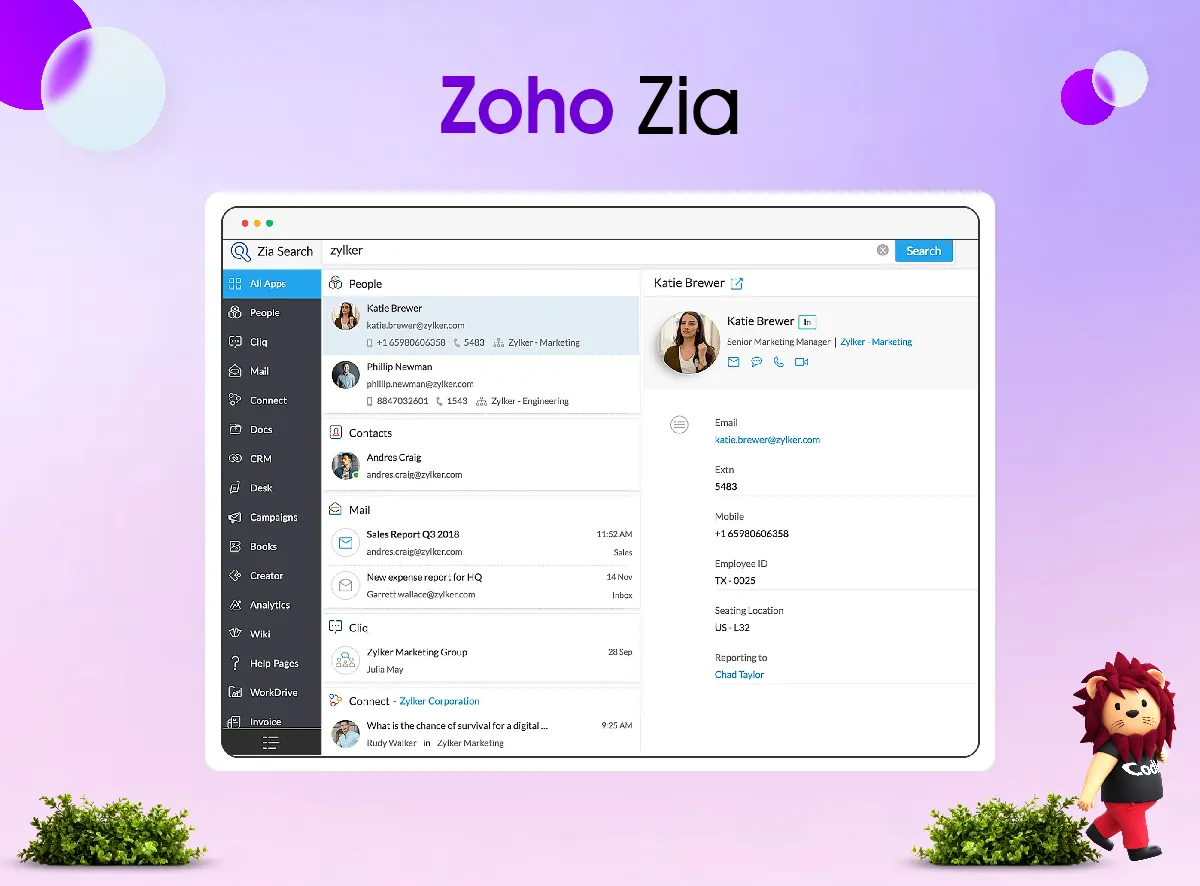
Key AI Features: Zia
Pricing Overview
✓ Pros
✗ Cons
5. Pipedrive
AI-Assisted Sales Pipeline
Key AI Features
✓ Pros
✗ Cons
6. Zendesk

From Customer Question to Resolution
Key AI Features
✓ Pros
✗ Cons
7. Freshsales (Freshworks)
Practical AI Across the Sales Cycle
Key AI Features
✓ Pros
✗ Cons
8. Creatio

Describe, Build, and Automate
Key AI Features
✓ Pros
✗ Cons
9. ClickUp
One Workspace, Multiple AI Assistants
Key AI Features
✓ Pros
✗ Cons
10. SalesWorx.ai
AI SDR + Deal Coaching in One Layer
Key AI Features
✓ Pros
✗ Cons
11. Insightly
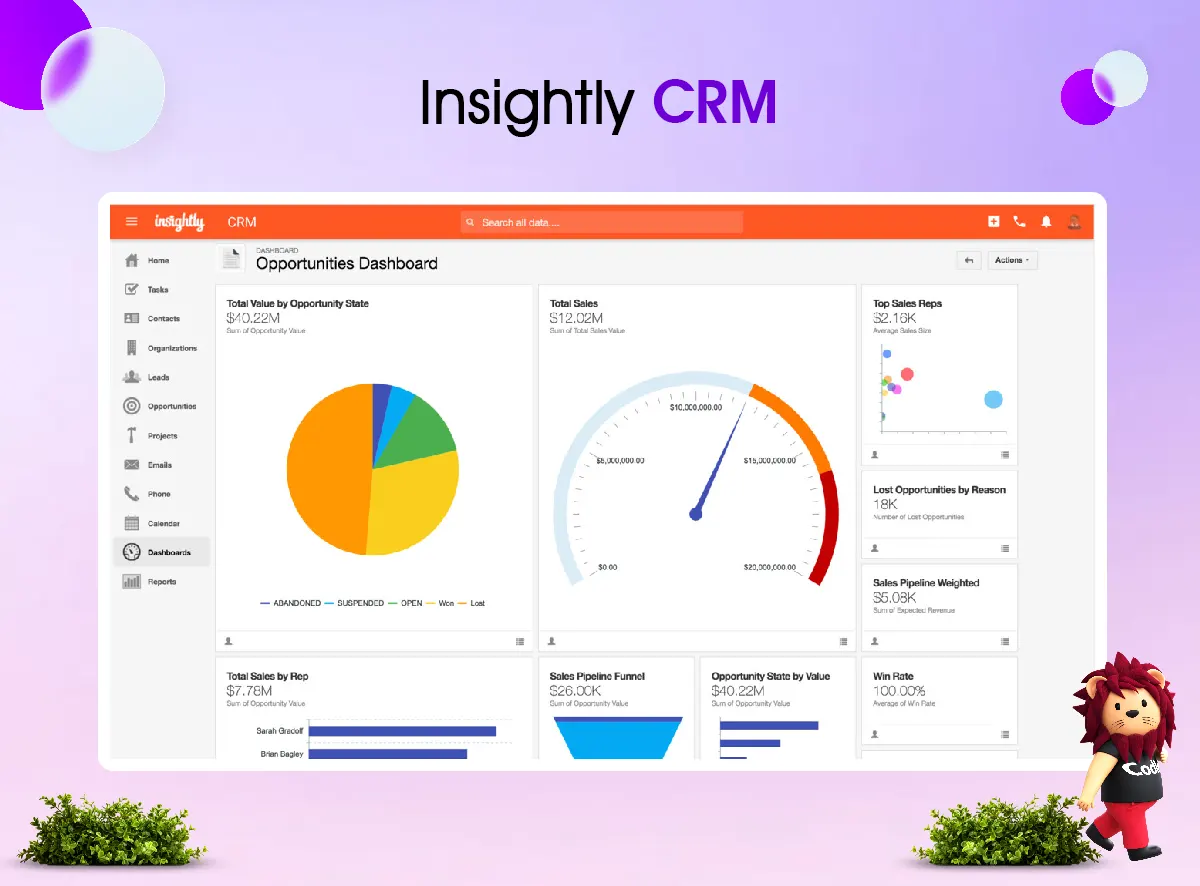
From Closed Deal to Project Delivery
Key AI and Automation Features
✓ Pros
✗ Cons
12. Oracle CX
How Oracle CX Supports Each Team
Smarter Campaigns
Better Deal Intelligence
AI-Assisted Support
✓ Pros
✗ Cons
13. SAP Sales Cloud and Service Cloud

SAP Business Data + Joule AI
Key AI Features
✓ Pros
✗ Cons
14. Monday CRM
How AI Blocks Work in a CRM Board
Key AI Features
✓ Pros
✗ Cons
15. ActiveCampaign
Reach the Right Contact with the Right Message
Key AI Features
✓ Pros
✗ Cons
16. Capsule
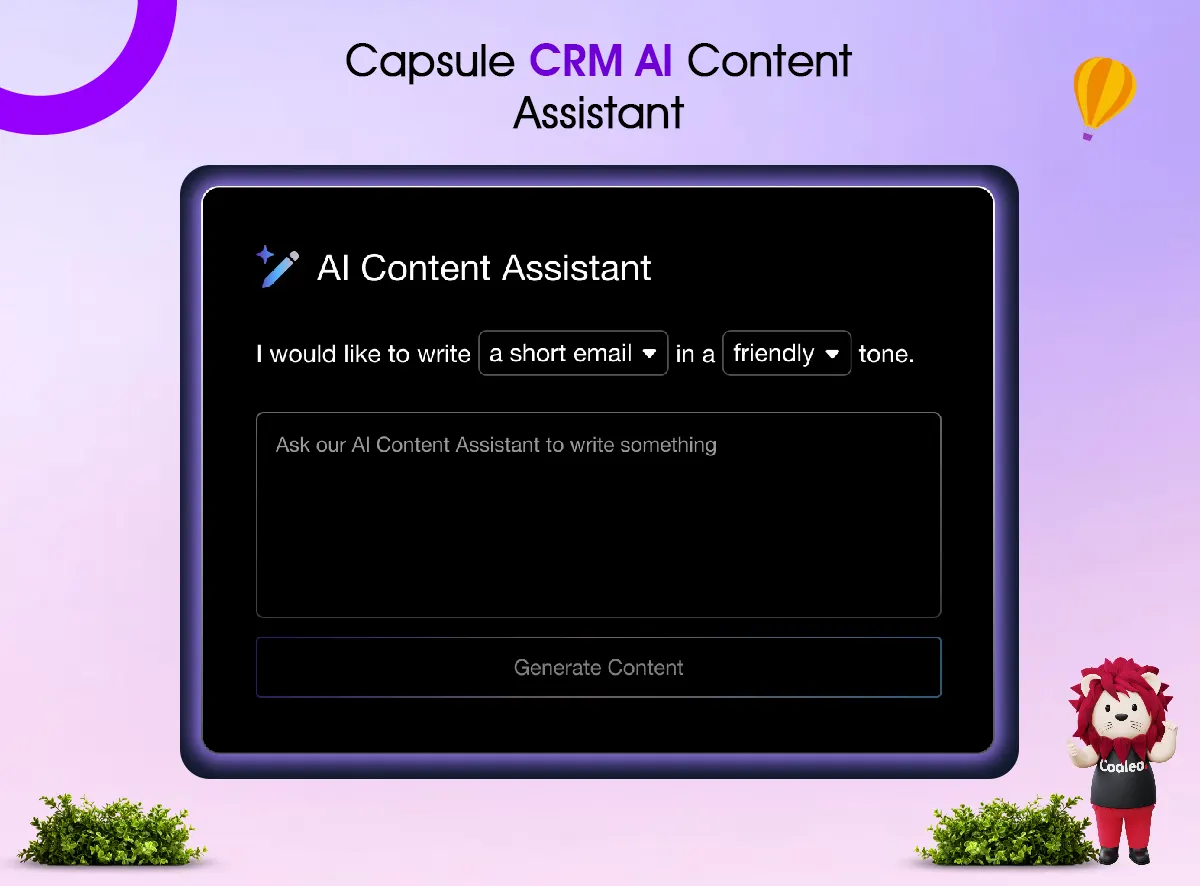
Spend Less Time Writing Follow-Ups
Key AI and CRM Features
✓ Pros
✗ Cons
17. Durable
From Website Inquiry to Client Follow-Up
Key AI Features
✓ Pros
✗ Cons
18. C3 AI CRM
Turning Enterprise Data into Forecasts
Key AI Features
✓ Pros
✗ Cons
19. GlideCampaign
Understand Where Your Leads Stand
Key AI and Automation Features
✓ Pros
✗ Cons
20. Attio
From Connected Data to Smarter Workflows
Key AI Features
✓ Pros
✗ Cons
Where AI CRM Is Heading in 2026
Agentic AI Is Replacing Suggestion-Based AI
Pricing Is Moving Beyond Per-Seat Licenses
Unified Data Is the Real Foundation
AI Is Showing Up Where People Already Work
Data Governance Is a Deciding Factor
Questions to Ask Every AI CRM Vendor
Humans Stay in the Loop
How to Choose the Right AI CRM for Your Business
7 Checks Before You Choose a Platform
Start with Your Existing Tech Stack
Define the Problems You Want AI to Solve
Match AI Capabilities to Business Goals
Separate Real AI Depth from Marketing
Model the True Cost
Decide How Much Autonomy You Want
AI Autonomy: Start Small, Then Scale
Check Data Security and Governance
Plan for Implementation and Adoption
Before You Go Live
Do You Need a CRM Implementation Partner?
When You Can Do It Yourself vs When a Partner Pays Off
What CRM Consulting and Implementation Services Include
CRM Consulting and Platform Selection
Solution Design
CRM Implementation
CRM Migration
Integrations
AI Agent Setup
Training and Adoption
Ongoing Support
How Much Does CRM Implementation Cost?
Migrating from Another CRM
Moving to Salesforce from Another CRM or Spreadsheets?
How Codleo Helps
Business Outcomes from CRM Projects
Planning a CRM Implementation or AI Rollout?
Choosing the Right AI CRM in 2026
Which AI CRM Fits Your Business?
What Makes an AI CRM Implementation Successful?
Need Help Choosing or Implementing Your AI CRM?
 0
About the Author


 16192 Coastal Highway Lewes, Delaware 19958 USA


