


Publish date:
Picture this: a sales rep closes a $200,000 deal on Friday afternoon. By Monday, the quote is buried in one system, the contract is being redlined in another, and finance is asking why the invoice doesn't match what was promised. Three weeks later, the customer is still waiting for their first bill — and already wondering if they made the right choice.
This isn't a rare breakdown. It's the default outcome when revenue operations run on disconnected tools stitched together with spreadsheets, custom code, and good intentions.
Salesforce built an entire platform to fix exactly this problem — first as Revenue Lifecycle Management, then Revenue Cloud Advanced, and now, as of Dreamforce 2025, folded into a broader strategy as Agentforce Revenue Management. If you searched for "Salesforce Revenue Cloud architecture" expecting a static diagram of boxes and arrows, you're already behind — because Salesforce didn't just add features to this platform. It changed how the components talk to each other, then layered AI agents on top.
This guide breaks down exactly how the architecture works today, layer by layer, using only verified information from Salesforce's own documentation and reporting. By the end, you'll understand not just what each piece does, but how to sequence an implementation that doesn't collapse under its own complexity — and when it's worth bringing in outside expertise.
Key Takeaways
-
Salesforce Revenue Cloud is a native, API-first platform that unifies the entire revenue lifecycle — product catalog, pricing, CPQ, contracts, billing, revenue recognition, and analytics — on a single Salesforce data model.
-
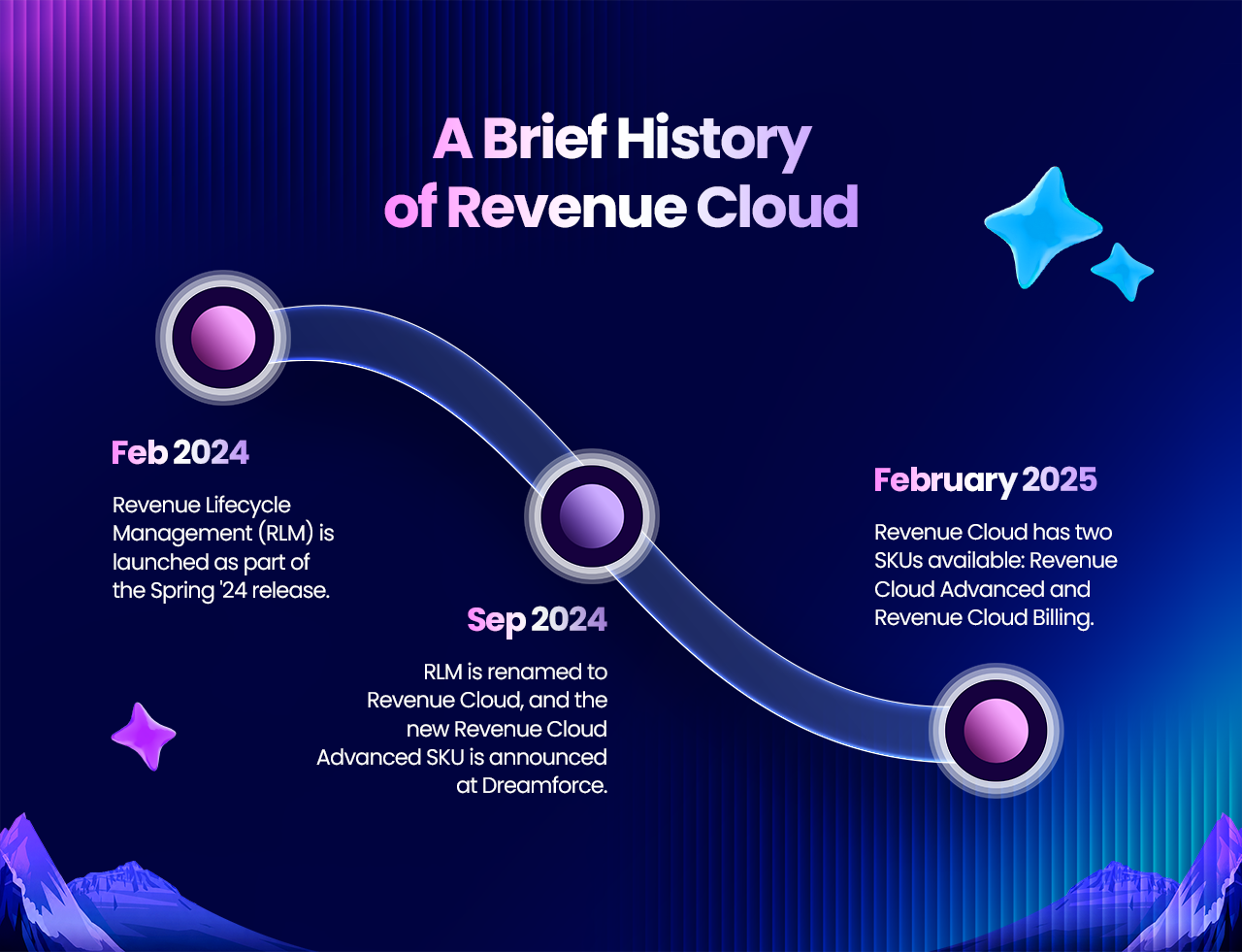
The platform has been renamed three times in under three years: Revenue Lifecycle Management (Spring '24) → Revenue Cloud Advanced (Dreamforce '24) → Agentforce Revenue Management (Dreamforce '25), which added AI agents for agentic quoting and billing.
-
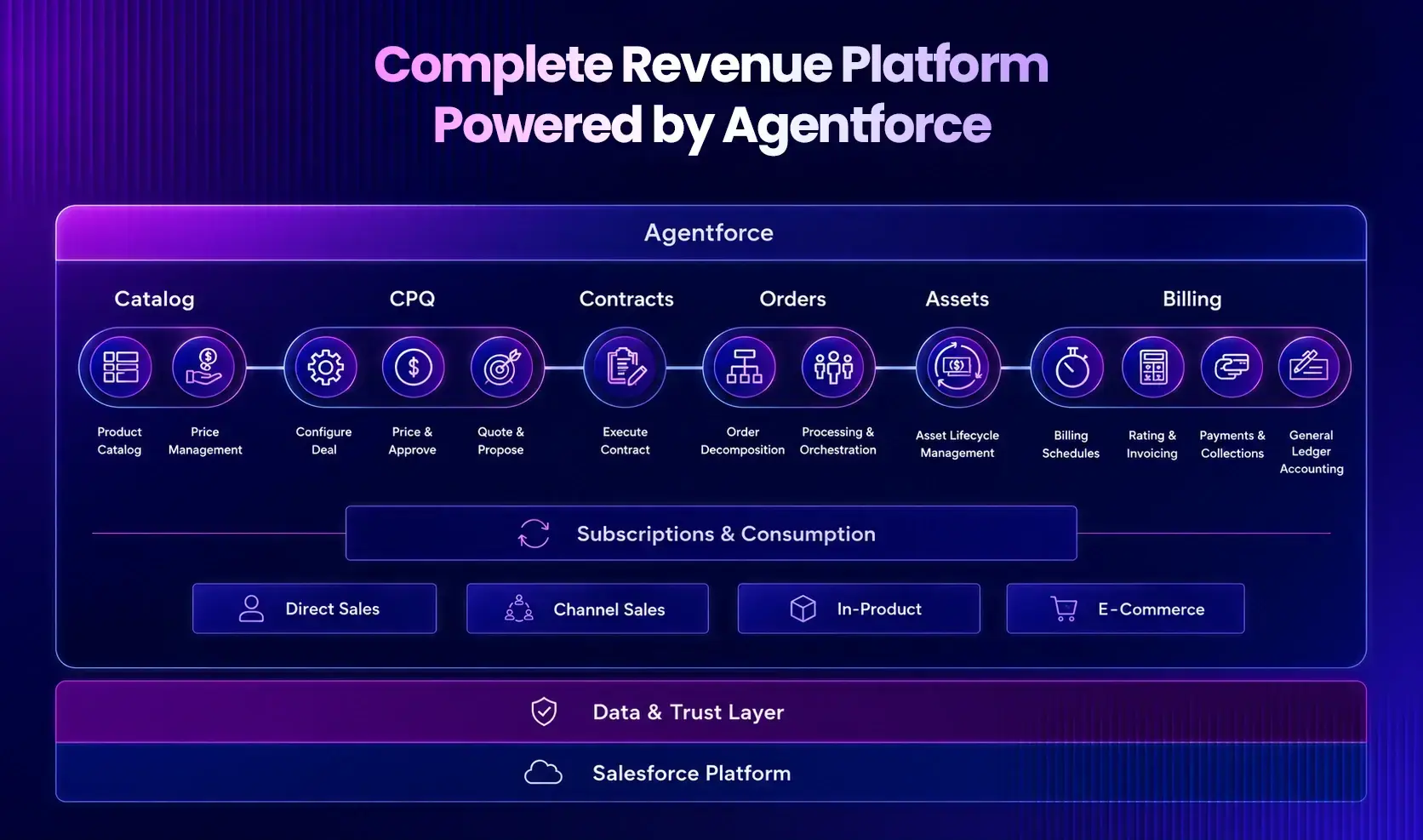
The architecture works best understood as four dependent layers: Foundation (catalog + pricing), Transaction (CPQ + contracts + orders), Financial (billing + revenue recognition), and Intelligence (analytics + AI agents).
-
According to Deloitte research cited by Salesforce, 71% of B2B executives struggle with fragmented sales processes, and 13% of deals are lost purely due to disconnected tools.
-
The most common implementation failure isn't picking the wrong edition — it's building layers out of sequence, especially skipping proper product catalog and pricing design before moving to CPQ.
-
Getting the architecture right from day one is significantly cheaper than fixing it later — which is why most successful rollouts involve a salesforce consulting partner
What Is Salesforce Revenue Cloud, Really?
Salesforce Revenue Cloud is Salesforce's native, API-first platform for managing the entire revenue lifecycle — from the moment a product is defined and priced, through quoting, contracting, order fulfillment, billing, revenue recognition, and renewal — all on a single data model inside the core Salesforce platform, rather than bolted on as a separate managed package.
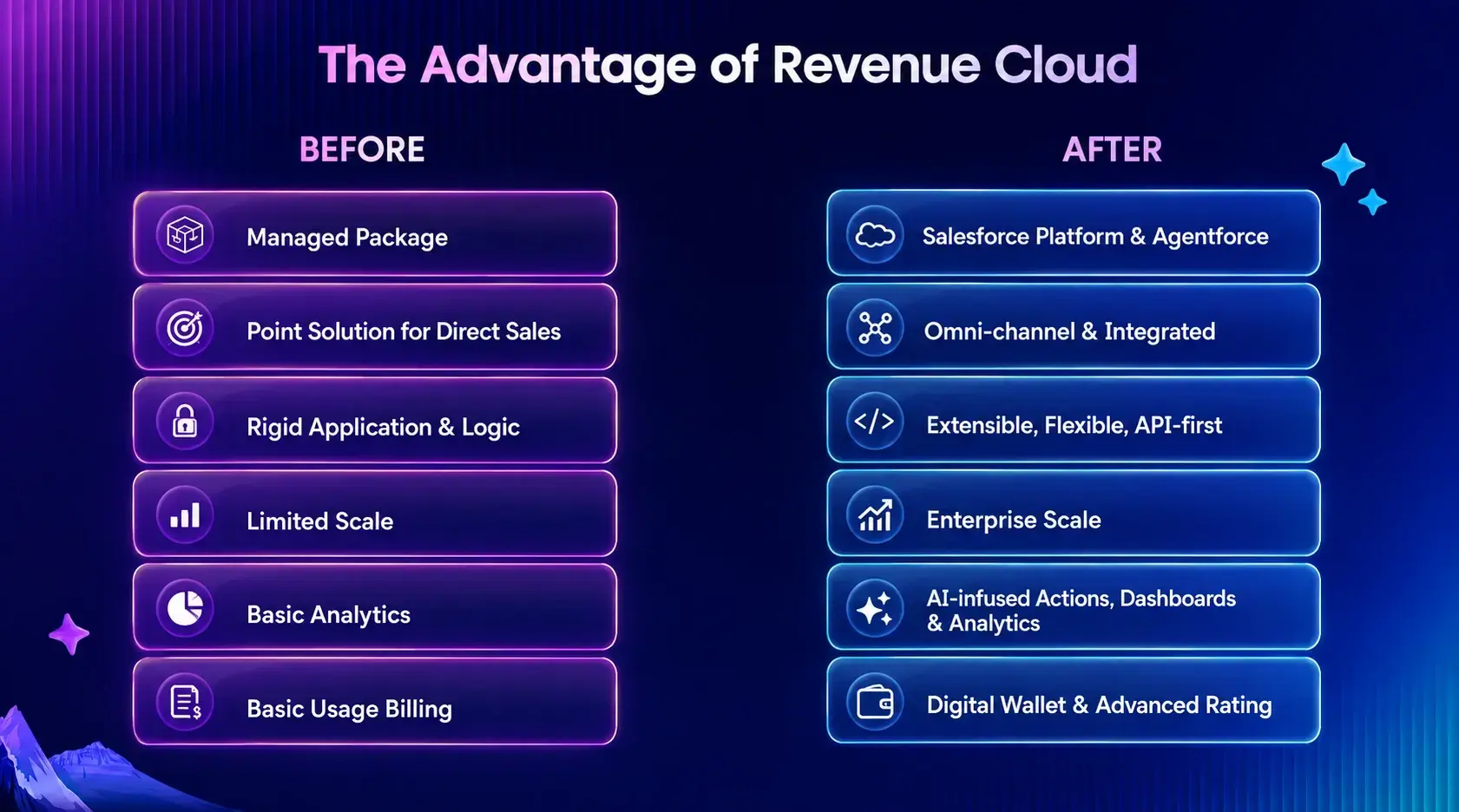
That distinction matters more than most explanations give it credit for. Legacy Salesforce CPQ ran as a managed package on top of Salesforce—powerful, but architecturally separate from the rest of the platform, which is exactly why so many CPQ implementations eventually needed custom integration code just to talk to billing or finance systems.
Revenue Cloud has gone through three names in under three years, and the timeline actually explains the architecture better than any feature list:
-
Spring '24: Salesforce launched Revenue Lifecycle Management (RLM) as the new core offering, rebuilding CPQ and billing as native objects on the Salesforce platform instead of a bolt-on package, according to Salesforce Ben.
-
Dreamforce 2024: RLM was renamed Revenue Cloud Advanced (RCA) — the name most of the ecosystem still defaults to.
-
Dreamforce 2025 (October 13, 2025): Salesforce folded Revenue Cloud into its Agentforce 360 platform strategy and rebranded it Agentforce Revenue Management, adding AI agents capable of agentic quoting, agentic billing, and consumption management directly into the revenue workflow, per Salesforce's own announcement.
Today, Salesforce sells two core SKUs under this umbrella — Revenue Cloud Advanced and Revenue Cloud Billing — according to Salesforce Ben's breakdown, and both are sold on annual contracts without published list pricing, per Salesforce's own pricing page.
The names are marketing. What actually matters to anyone planning a build is the architecture underneath — and that's what the rest of this guide covers.
Why This Actually Matters (Not Just Theoretically)
Before going deeper into the architecture, it's worth being honest about why this platform exists at all.
According to Deloitte research cited directly by Salesforce, 71% of B2B executives say they struggle with manual, fragmented sales processes — and 13% of deals are lost specifically because of disconnected tools, not because of price or product fit.
Sit with that for a second. If your organization closes 200 deals a year, disconnected systems could be quietly costing you around 26 deals annually — not to competitors, but to your own internal friction.
This is the gap Revenue Cloud is engineered to close, and it's also the gap that most Salesforce consulting services engagements around Revenue Cloud exist to solve. The architecture isn't complicated because Salesforce wanted it that way — it's complicated because revenue genuinely touches sales, legal, operations, finance, and customer success, and any platform unifying all five functions will have real depth.
Understanding that depth—instead of skimming a feature list—is what separates organizations that get a smooth Revenue Cloud implementation from those that spend eighteen months untangling a project that started with the wrong assumptions.
Revenue Cloud Growth vs. Revenue Cloud Advanced: Which Edition Do You Need?
Before touching architecture, most buyers hit a simpler question first: which edition do you actually need?
As covered earlier, Salesforce sells this platform under two SKUs — Revenue Cloud Advanced and Revenue Cloud Billing — but on Salesforce's own pricing page, the distinction is framed more simply around use case: one edition is positioned around "streamlined CPQ and subscription management," while the other is built as a "complete quote-to-cash platform for every revenue model," according to Salesforce's pricing page.
In practice, that split maps to company maturity, not company size. A business selling a handful of subscription tiers with straightforward renewals rarely needs the full four-layer architecture described in this guide on day one — the lighter edition covers quoting and subscription handling without the added complexity of full contract lifecycle automation or usage-based billing. Once you introduce multiple pricing models in the same catalog — say, a subscription base fee plus consumption-based overages plus one-time hardware — you cross into territory that needs the complete platform, because the layers genuinely depend on each other at that point.
Neither edition has published per-seat pricing; both are sold on annual contracts, and Salesforce directs prospective buyers to a sales conversation for exact numbers, per the same pricing page.
This is precisely the decision where an outside Salesforce consulting partner earns their keep before a contract is signed — not after. Committing to the lighter edition and discovering six months in that you need contract automation or revenue recognition means re-platforming, not upgrading. A short scoping conversation upfront, ideally as part of Salesforce consulting services you're already evaluating, is far cheaper than that outcome.
The Four-Layer Architecture of Salesforce Revenue Cloud
Most explanations of Revenue Cloud list seven components in a flat sequence. That's not wrong, but it hides something important: the architecture actually stacks in four functional layers, each one dependent on the layer below it. Thinking about it this way makes it obvious where projects usually go wrong — teams try to build layer three before layer one is even stable.
Layer 1: The Foundation — Product Catalog and Pricing
Nothing in Revenue Cloud works until you've defined, with precision, what you sell and what it costs.
The Product Catalog Management layer structures your offerings hierarchically: attributes (individual characteristics like storage limit or user count), classifications (reusable templates that group related attributes), and the products themselves, which can be simple or bundled. Alongside the catalog are qualification rules—the business logic gates that decide when a product should be visible to a rep or customer, such as restricting an enterprise tier to accounts above a certain revenue threshold.
Layered directly on top is Salesforce Pricing, the engine that automates list prices, volume discounts, customer-segment pricing, commitment discounts, usage-based pricing, and regional variations. The critical design principle here: pricing decisions made at the quote stage must survive, unchanged, through contracts, orders, invoices, and revenue recognition. If a 15% volume discount is agreed to in a quote, that exact number has to still be there when the invoice goes out — otherwise you get disputes, credit memos, and a finance team that stops trusting the CRM.
This is usually where an experienced Salesforce consulting partner earns their fee before a single quote is ever generated — catalog and pricing mistakes are nearly impossible to unwind after go-live without a painful data migration.
Layer 2: The Transaction Layer — CPQ, Contracts, and Orders
This is the layer sales reps actually see and touch every day.
Configure, Price, Quote (CPQ) sits at the center — reps select product configurations, the system validates that the combination is even sellable, pricing calculates in real time against the rules from Layer 1, and a quote is generated. Because Revenue Cloud is native and API-first rather than a bolted-on package, every one of those calculations is exposed as an API, allowing a quote to flow forward without anyone re-typing numbers into a different system.
Once a customer accepts, Contract Lifecycle Management (CLM) takes over — generating the contract directly from the quote, routing it through approvals and legal redlines, and capturing e-signatures. Because the contract derives from the quote rather than being drafted separately, the terms a customer actually signs match exactly what they were quoted, which matters enormously the first time a dispute lands on someone's desk.
From there, the signed contract becomes an Order, and Salesforce's Dynamic Revenue Orchestrator (DRO) decomposes that order into fulfillment steps — provisioning, shipping, asset creation, warranty activation, and support onboarding, depending on what was sold. Teams that treat DRO as "just order automation" consistently underestimate it during scoping — it's really an orchestration engine, and it deserves its own design time.
Layer 3: The Financial Layer — Billing and Revenue Recognition
The order has shipped or activated. Now the money has to move, and it has to move in a way that satisfies accountants, not just salespeople.
Revenue Cloud's Billing component automates invoice generation based on the contract terms it inherited from Layer 2 — one-time invoices for perpetual licenses, recurring invoices for subscriptions, or usage-based invoices for consumption models. Alongside billing sits automated revenue recognition, aligned with ASC 606 (US GAAP) and IFRS 15 (international standards), which determines when revenue is actually allowed to hit the books versus when it has to be deferred.
This is arguably the layer with the least room for error. A pricing mistake in Layer 1 is embarrassing. A revenue recognition mistake in Layer 3 can trigger an auditor flag. Because billing and revenue recognition inherit their data directly from the contract and order—rather than being manually re-keyed—the architecture is designed to eliminate the kind of manual journal entries that create compliance risk.
Layer 4: The Intelligence Layer — Analytics and Agentic AI
This is the newest layer, and the one where most existing content on this topic is already out of date.
Historically, this layer was purely descriptive — dashboards, pipeline analytics, renewal-risk flags. That's still part of it. But with the Agentforce Revenue Management rebrand announced at Dreamforce 2025, Salesforce explicitly moved this layer from passive reporting to active participation. According to Salesforce's official announcement, this layer now includes AI agents built for agentic quoting, agentic billing, and consumption management — described by Salesforce as tools that "empower sales, ops, and billing teams" rather than simply reporting to them, a shift also covered in detail by Salesforce Ben's Dreamforce '25 recap.
In practice, this means an AI agent can now generate or adjust a routine quote within defined guardrails without a human touching every field, or handle a consumption-based billing calculation that previously would have needed manual review. For architects, that's not a cosmetic change—it changes where you need to design approval thresholds and human-in-the-loop checkpoints, because the agent is now a participant in the transaction layer, not just an observer.
Real-World Fit: Which Businesses Actually Need This Architecture?
Not every business needs all four layers on day one, and being honest about that upfront saves everyone time.
SaaS and subscription businesses typically feel the pain first in Layers 2 and 3 — a rep quotes a deal, but seat expansions, mid-term upgrades, and proration create exactly the kind of quote-to-invoice mismatches this architecture is built to eliminate. For these businesses, getting Billing and Revenue Recognition connected to CPQ early usually matters more than deep catalog complexity.
Manufacturing and hardware companies with configured products, installation services, and ongoing maintenance contracts tend to lean hardest on Layer 2's order orchestration — a single sale genuinely does decompose into manufacturing, shipping, installation, and a separate maintenance subscription, each needing its own fulfillment and billing logic.
Financial services and other heavily regulated industries usually need Layer 3 to be closest to perfect from day one, since ASC 606 / IFRS 15 compliance isn't optional and audit risk is a board-level concern, not just an operational inconvenience.
Multi-channel and partner-led businesses get the most value from Layer 1 and the MuleSoft/Data 360 extension described above — because the same governed product catalog and pricing rules need to hold up consistently whether a deal comes through a direct rep, a partner, or a self-service digital storefront.
Knowing which profile your business fits before scoping a project is what determines whether you build all four layers simultaneously or sequence them — and it's usually the first real conversation worth having with a Salesforce implementation services team before any configuration work begins.
How Data Actually Flows: Quote to Cash to Renewal
Here's how the four layers connect in a real deal, end to end.
A rep opens Revenue Cloud and searches the product catalog to see what a prospect is even eligible to buy (Layer 1). They configure the deal; pricing calculates automatically with every applicable discount (Layer 1 feeding Layer 2), and it generates a quote. The customer accepts, and a contract is auto-generated from that exact quote data (Layer 2). Legal reviews, the customer signs, and one click turns the signed contract into an order, which the Dynamic Revenue Orchestrator decomposes into fulfillment tasks (still Layer 2). Once fulfillment completes, billing triggers automatically based on the payment terms baked into the contract, and revenue recognition schedules itself according to ASC 606 or IFRS 15 (Layer 3). Every one of those transactions flows into dashboards and forecasting models in real time (Layer 4)—and increasingly, AI agents watch that same data to flag expansion opportunities, renewal risk, or usage overages before a human notices.
The entire point of the architecture is that no one re-types anything at any handoff. The quote is the single source of truth, and everything downstream is a derivative of it.
Where the Architecture Extends Beyond Salesforce: MuleSoft and Data 360
Everything described in the four layers above happens inside Salesforce. But almost no real business runs entirely inside one platform — ERP systems, external billing tools, and marketing platforms usually sit alongside it. This is where the architecture conversation has to extend past Salesforce's own walls.
According to IDC Market Research, cited by Salesforce Ben, disconnected go-to-market systems can cost organizations up to 30% of annual revenue — not through lost deals alone, but through the slower decision-making that comes from sales, marketing, and finance all working off different, unsynchronized data.
Salesforce's answer to this is pairing Revenue Cloud with MuleSoft and Data 360 (the platform formerly known as Data Cloud). MuleSoft provides API-led integration that connects Revenue Cloud to external systems — ERP platforms, legacy billing tools, support systems — in a way that's built to scale as more systems get added, rather than the point-to-point custom integrations that made legacy CPQ implementations so fragile. Data 360 sits alongside it as the unified data layer, giving real-time context across every one of those connected systems, which is also what feeds the agentic AI capabilities described in Layer 4 — an AI agent can only act intelligently on data it can actually see in real time.
It's worth being clear that Revenue Cloud's API-first design does not mean API-only. There's a complete, point-and-click UI for teams that don't need custom development, according to Salesforce Ben's own breakdown — the APIs exist so that the same governed pricing and quoting logic can be reused anywhere it's needed, from a partner portal to a self-service storefront, not to force every implementation into custom code.
For most mid-sized organizations, this integration layer is where a revenue cloud implementation project quietly doubles in scope if it isn't planned for from the start. Scoping MuleSoft and Data 360 requirements alongside the core Revenue Cloud build — rather than as a follow-on project — is one of the clearest markers of an implementation partner who has done this before.
Salesforce Revenue Cloud vs. Legacy CPQ: What Actually Changed
| Legacy Salesforce CPQ | Salesforce Revenue Cloud (Agentforce Revenue Management) | |
|---|---|---|
| Architecture | Managed package layered on top of Salesforce | Native objects built directly into the Salesforce core |
| Integration model | Requires custom code to connect to billing/ERP | API-first — every process exposed as a native business API |
| Billing | Often a separate product or third-party tool | Built-in, using the same data model as the quote |
| Revenue recognition | Frequently manual or spreadsheet-based | Automated, aligned to ASC 606 / IFRS 15 |
| Intelligence layer | Reporting dashboards only | Agentic AI participating in quoting, billing, and consumption management |
| SKUs | Salesforce CPQ (single product) | Revenue Cloud Advanced + Revenue Cloud Billing |
The practical implication: a CPQ migration to Revenue Cloud isn't a version upgrade. It's closer to a re-platforming project, because the underlying data model itself changes, not just the user interface reps click through.
What the Agentic Shift Means for Your Implementation
It's tempting to treat the AI layer as a nice-to-have that gets switched on after everything else is built. That's a mistake.
Because agentic quoting and agentic billing act directly on live transactions rather than just summarizing them, they need the same governance rigor you'd apply to a junior rep with quoting authority — approval thresholds, discount ceilings, and clear escalation paths for anything outside the guardrails. Organizations that design Layer 4 as an afterthought typically end up disabling most of the AI functionality within months of go-live, simply because no one defined what the agent was and wasn't allowed to do on its own.
The organizations getting real value from this layer are the ones treating agent governance as part of the initial architecture conversation — right alongside product catalog design — not as a phase-two enhancement.
Common Pitfalls in Revenue Cloud Implementation
-
Building the catalog and pricing model in isolation. Teams often assign different people to product catalog and pricing, and don't test the connection between them until late in the project — by which point qualification rules and pricing rules quietly contradict each other.
-
Stopping at CPQ and treating the project as done. Getting quoting to work is a milestone, not a finish line. If contracts, billing, and revenue recognition aren't connected in the same phase, the disconnects just move downstream instead of disappearing.
-
Underestimating the Dynamic Revenue Orchestrator. DRO looks like simple order automation until you actually map a real fulfillment workflow with staggered shipments, phased payments, or multi-location delivery. Budget real design time for it.
-
No renewal strategy from day one. Teams that design quote-to-order flawlessly but forget to design the renewal path end up manually re-quoting the moment the first contract comes up for renewal — which defeats much of the original automation investment.
-
Turning on agentic AI without guardrails. As covered above, agentic quoting and billing need defined boundaries before launch, not after an incident forces the conversation.
-
No change management plan for reps used to legacy CPQ. The underlying data model is genuinely different. Reps trained for years on old CPQ habits need structured retraining, not just a new login screen.
How to Approach Your Revenue Cloud Implementation
A realistic revenue cloud implementation roadmap generally moves through five stages:
-
Foundation first. Lock down your product catalog structure and pricing rules before building anything else. Every downstream layer inherits mistakes made here.
-
Transactional core. Build CPQ, then immediately connect it to Contract Lifecycle Management — don't treat these as separate projects with separate timelines.
-
Fulfillment and finance. Design DRO workflows for your actual top use cases, then connect orders to billing and revenue recognition. Test that a signed contract produces an accurate invoice end to end.
-
Intelligence and governance. Stand up analytics and dashboards, and if you're adopting Agentforce Revenue Management's agentic capabilities, define approval thresholds and guardrails before enabling them for live transactions.
-
Pilot, then scale. Launch with a small set of customers or deals, monitor quote-to-cash cycle time and billing accuracy closely, and only then roll out organization-wide.
Most organizations underestimate stage four and overestimate how quickly they can rush stage one. Getting outside Salesforce implementation services involved early — even just for the architecture review before Phase 1 starts — is consistently cheaper than fixing a catalog and pricing model after six months of live transactions have been built on top of it.
Why Partner with a Certified Salesforce Consulting Partner
Salesforce documents everything described in this guide. None of it is secret. What a good Salesforce consulting partner brings to the table isn't access to hidden information—it's pattern recognition from building this exact four-layer architecture across dozens of business models, industries, and edge cases.
The value shows up in the decisions that don't have an obvious right answer on day one: how granular your product classifications should really be, where to draw the line between what lives in Salesforce versus an external ERP, how aggressively to enable agentic AI in the first ninety days, and how to sequence a CPQ to Revenue Cloud migration without disrupting revenue that's already flowing through the legacy system.
If you're evaluating Salesforce consulting services for this project, the single best filter is simple: ask any prospective partner to walk you through how they'd sequence the four layers for your specific business model, before they show you a single slide about their team size or client logos. If they can't do that in the first conversation, they haven't actually built this architecture before — they're learning on your project.
The Bottom Line
Salesforce Revenue Cloud — under whichever name it's wearing this year — isn't a quoting tool, a billing tool, or an AI feature bolted onto your CRM. It's a four-layer architecture where product and pricing form the foundation, transactions and contracts form the core, billing and revenue recognition form the financial backbone, and analytics plus agentic AI form the intelligence layer on top of it all.
Get the foundation right, sequence the layers in order, and treat the agentic capabilities with the same governance discipline you'd apply to a human rep — and quote-to-cash stops being three separate departments fighting each other, and starts being exactly what Salesforce designed it to be: one continuous, connected motion from a customer's first inquiry to their fifth renewal.
 0
0
About the Author




 603 D-Mall Netaji Subhash Place, Delhi 110034 IND


