


Publish date:
✅ Summit Partner 2026 ✅ US Offices: Delaware & Dallas
✅ 12+ Years Experience ✅ AppExchange Verified | 4.8★
You paid for Salesforce. You hired a partner. And somehow, six months later, your team still isn't using it properly.
This is not an uncommon story. Most Salesforce implementations that underdeliver have one thing in common — not the wrong software, but the wrong partner.
The problem is that "Salesforce partner companies" is not a single thing. There are over 2,000 consulting partners listed on AppExchange. Some have deployed Salesforce for Fortune 500 companies. Others have completed three projects and hold a handful of certifications. From the outside, they can look identical.
In March 2026, Salesforce overhauled its entire partner program — retiring the old Gold, Platinum, and tier system that many businesses still rely on when making their decision. If you are currently evaluating partners, or questioning the one you already have, this guide breaks down exactly what the new tiers mean, what separates a Summit Partner from everyone else, and the specific questions you need to ask before signing anything.
If you would rather skip straight to talking with a verified Summit Partner about your project — we are available here →
What Is a Salesforce Partner?
Salesforce controls approximately 23.8% of the global CRM market — and yet most businesses that implement it struggle to extract its full value. The primary reason is not the software. It is the implementation.
A Salesforce certified partner is an organization that deploys, customizes, and manages Salesforce on behalf of businesses. These companies are evaluated and approved by Salesforce directly, listed on the AppExchange marketplace, and carry a tier designation that signals their experience level and delivery quality.
Partners are not just service providers. The right Salesforce partner functions as a strategic advisor — someone who understands your industry, maps your business processes onto the platform, and ensures that what you pay for Salesforce licenses actually translates into measurable outcomes.
In 2026, finding the right partner has become more critical than ever — because the partner program itself has just undergone its most significant restructuring in over a decade.
-
🇺🇸 Working with a US-based business? Codleo's Summit-certified team operates across US timezones. Book a Free 30-Min Strategy Call →
The March 2026 Partner Program Overhaul — What Actually Changed
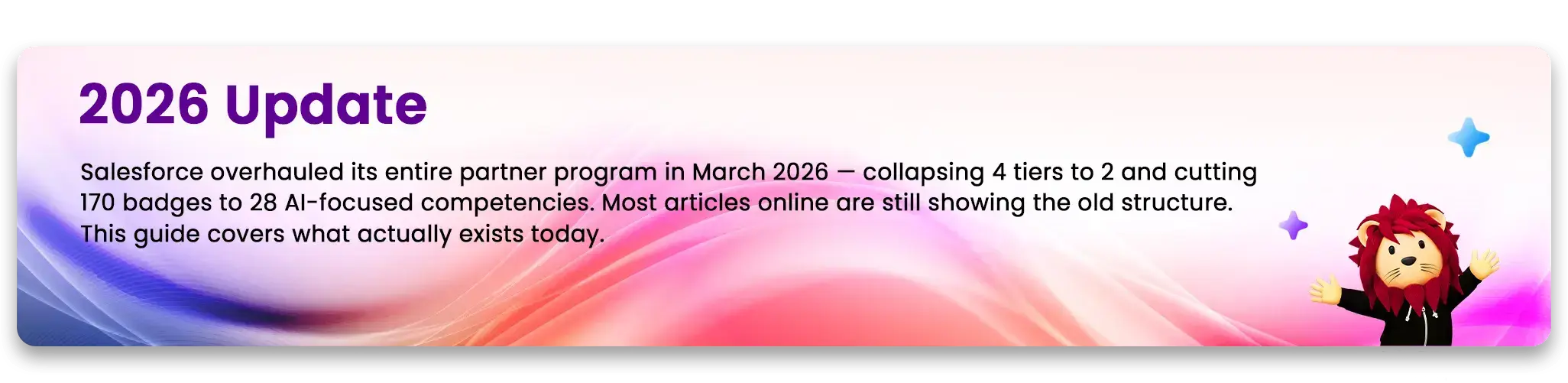
In March 2026, Salesforce announced a sweeping change to its consulting partner program. This was not a routine update. It was a strategic reset.
Here is what changed:
-
Four tiers became two. The old hierarchy of Base, Ridge, Crest, and Summit was retired. In its place, Salesforce introduced just two tiers: Select Partner and Summit Partner.
-
170 badges became 28 competencies. The old credential system had grown to 170 badges covering general Salesforce knowledge across dozens of products. These were consolidated into 28 focused competencies tied to specific products, industries, and AI capabilities — particularly Agentforce and Data Cloud.
-
Outcomes replaced points-based scoring. Previously, partners climbed tiers by accumulating points based on certifications and deal volume. Advancement in the new system is based on clear, measurable results for customers. This includes high customer satisfaction scores, thorough documentation of completed projects, and proven excellence in delivering work within key areas of expertise.
-
Agentforce became central to top-tier status. To achieve or maintain Summit Partner status, partners must demonstrate active Agentforce deployment capability — not just certification, but live deployments with measurable results.
Why did Salesforce do this?
Salesforce's own statement made the direction clear. As Nick Johnston, SVP of Global Consulting Partners and Partner Sales at Salesforce, said at the time of the announcement: "Specialization is the new currency of the agentic era." The goal was to shift the partner ecosystem away from generalist implementation firms toward specialists capable of delivering AI-driven, outcome-focused solutions.

With Salesforce's partner ecosystem already leading 70% of Agentforce implementations globally, the company is investing $1 billion in partner incentives to accelerate this shift. Partners who adapt quickly are positioned to win larger engagements. Those who do not will find themselves competing on price in the lower tier.
Old vs New: Complete Tier Comparison
The Old Four-Tier System (Retired 2026)
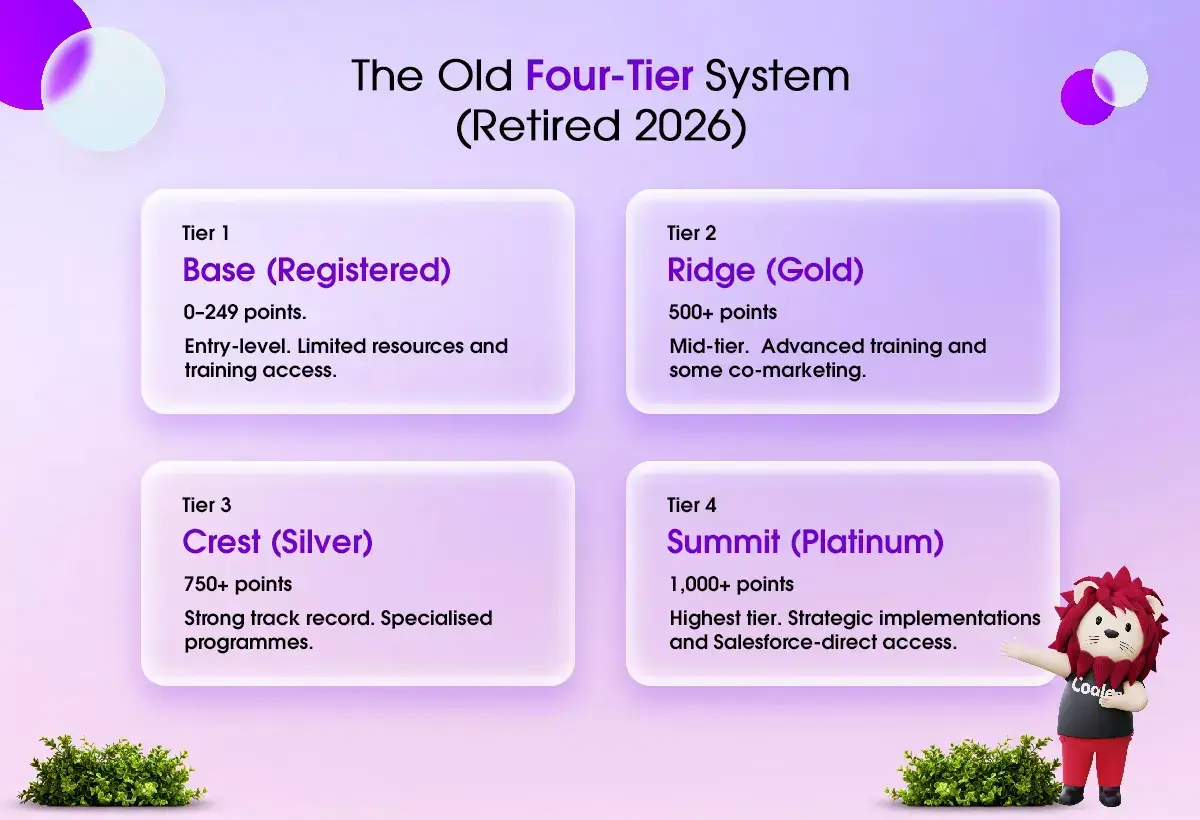
This system had fundamental problems. A partner could accumulate points through certifications and deal volume, even if they don't deliver excellent customer outcomes. Quantity, not quality, drove tier advancement. By 2026, the system had become administratively complex and misaligned with what businesses actually needed from partners.
The New Two-Tier System (Active 2026)
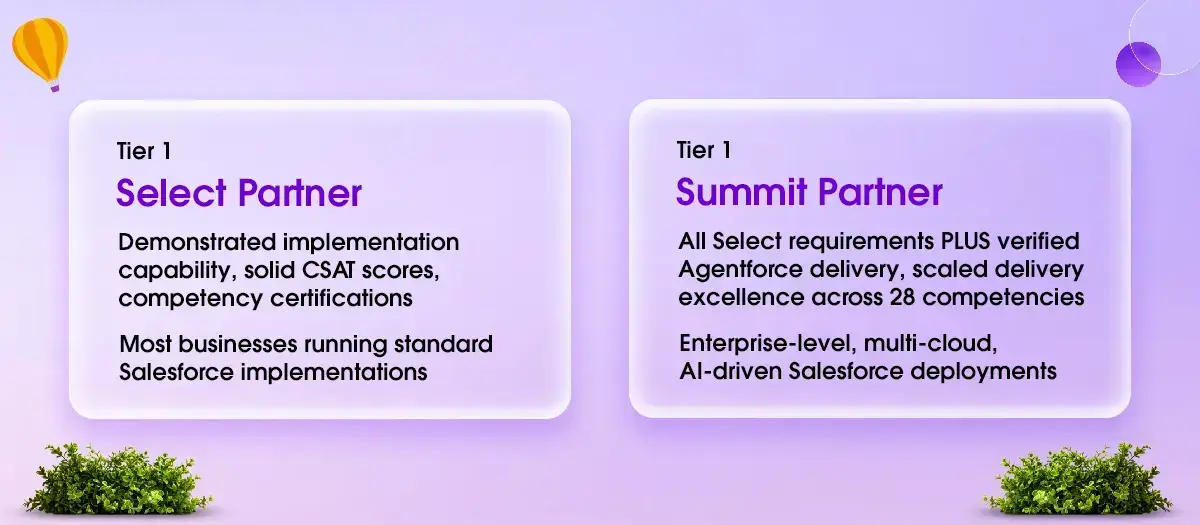
Key structural change: Within each competency, there are now two levels of recognition:
-
Accredited — demonstrated capability in delivering that competency
-
Expert — scaled delivery excellence with multiple verified client outcomes
This means a Summit Partner is not just "bigger." They are specifically verified in the areas in which they claim expertise.
What Happened to Gold and Platinum Partners?
If you are currently working with a partner who describes themselves as a Gold, Silver, or Platinum Salesforce partner, that designation is no longer valid. Those names no longer exist in Salesforce's official program.
Partners previously at Ridge (Gold) and Crest (Silver) levels are being evaluated for placement in the new two-tier system during a phased transition window through 2026. Partners who can demonstrate Agentforce delivery competency are being considered for Summit status; those who cannot are placed in the Select tier by default.
Salesforce Partner Types Explained
The tier structure changed significantly, but the fundamental types of Salesforce partners remain the same. Understanding the difference is essential before you begin evaluating partners.
1. Consulting Partners
Salesforce consulting partner s one of the most common types of Salesforce partners. — building the configuration, customizations, integrations, data migrations, and training that make Salesforce fit your specific business.
A Salesforce implementation partner manages your implementation from kickoff to go-live, and often provides ongoing support and enhancements after launch. Their core value is domain expertise: understanding how Salesforce products work and how to align them with your business processes.
In 2026, the best consulting partners will also bring AI strategy to implementations — helping businesses deploy Agentforce agents that automate customer service, sales processes, and field operations.
2. ISV Partners (AppExchange / Independent Software Vendors)
ISV partners build products, not implementations. They develop applications that extend Salesforce's functionality and sell them through the AppExchange marketplace.
If you need a niche capability — specialized CPQ functionality, industry-specific workflows, or integrations with third-party platforms — an ISV may already have built exactly what you need. Working with an ISV application can be significantly faster and less expensive than building custom functionality through a consulting partner.
ISV partners are also evaluated on the AppExchange by CSAT scores, installation counts, and product compatibility with current Salesforce releases.
3. MSP Partners (Managed Service Providers)
A Salesforce managed services partner provides ongoing Salesforce management rather than project-based implementation. They function as your dedicated Salesforce operations team — handling routine administration, user support, performance tuning, bug resolution, and the incremental enhancements that accumulate after go-live.
For businesses without internal Salesforce administrators, an MSP engagement is often the most cost-effective way to keep their Salesforce environment healthy and up to date with new releases.
In 2026, MSP partners are increasingly expected to understand Data Cloud configuration and Agentforce agent tuning — because AI deployments require continuous optimization, not just initial setup.
New Tier Structure: Select vs Summit Partners — Detailed Comparison
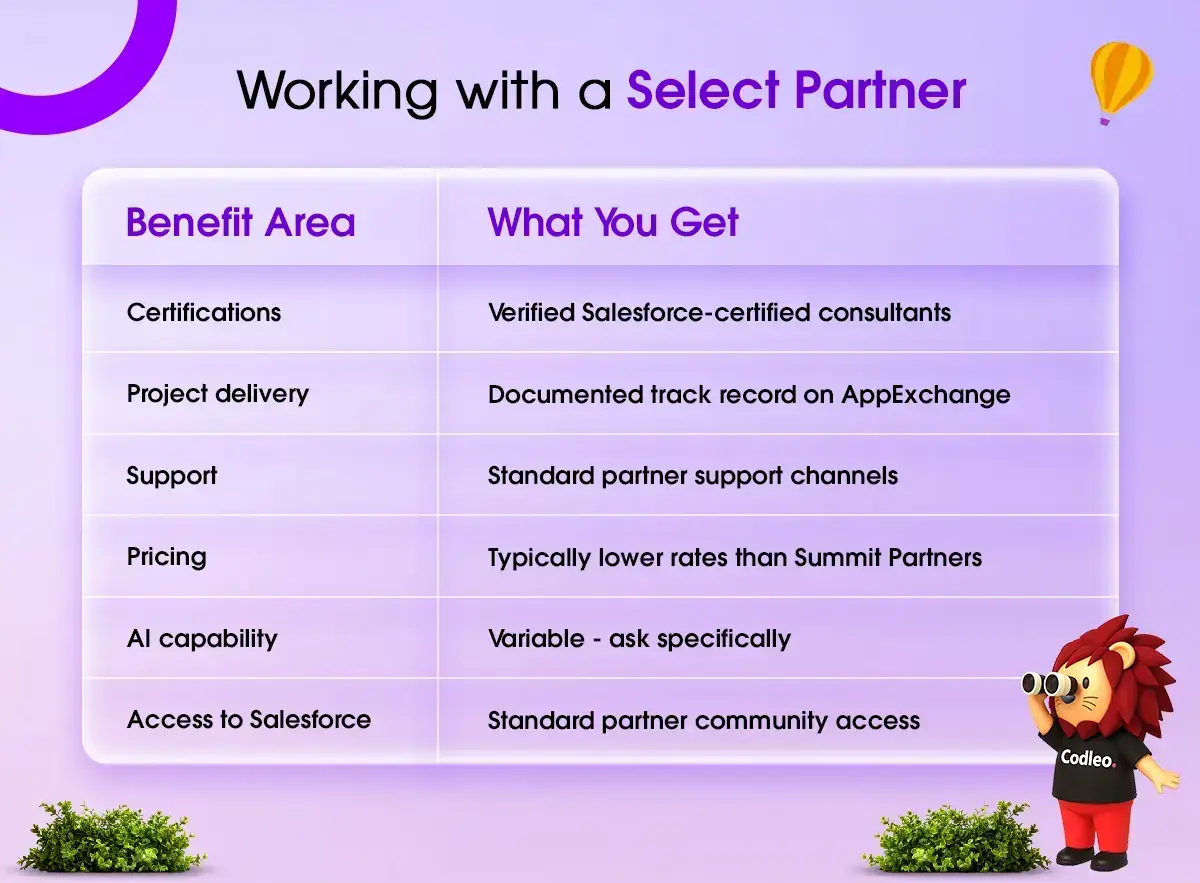
Select Partners
Select is the entry and mid-level tier under the new program. It replaces Base and Ridge from the old system.
What qualifies a partner for Select status:
-
Active Salesforce partnership agreement
-
Minimum number of certified Salesforce professionals on staff
-
Verified project delivery history with completed project records on AppExchange
-
Customer satisfaction scores meeting Salesforce's threshold
-
Competency certifications within their areas of practice
What Select Partners offer:
-
Solid implementation capability across core Salesforce products
-
Access to Salesforce training, partner community, and standard support
-
AppExchange listing with verified reviews
-
Co-marketing opportunities at the base level
Best suited for: Small to mid-sized businesses with clearly defined Salesforce scopes — a single-cloud Sales Cloud implementation, a Service Cloud setup, or a Marketing Cloud onboarding with defined deliverables.
Honest assessment: Select Partners can be perfectly capable for well-scoped projects. The risk increases with complexity. For standard implementations without heavy customization or AI requirements, a Select Partner can deliver excellent results at a lower cost than Summit Partners.
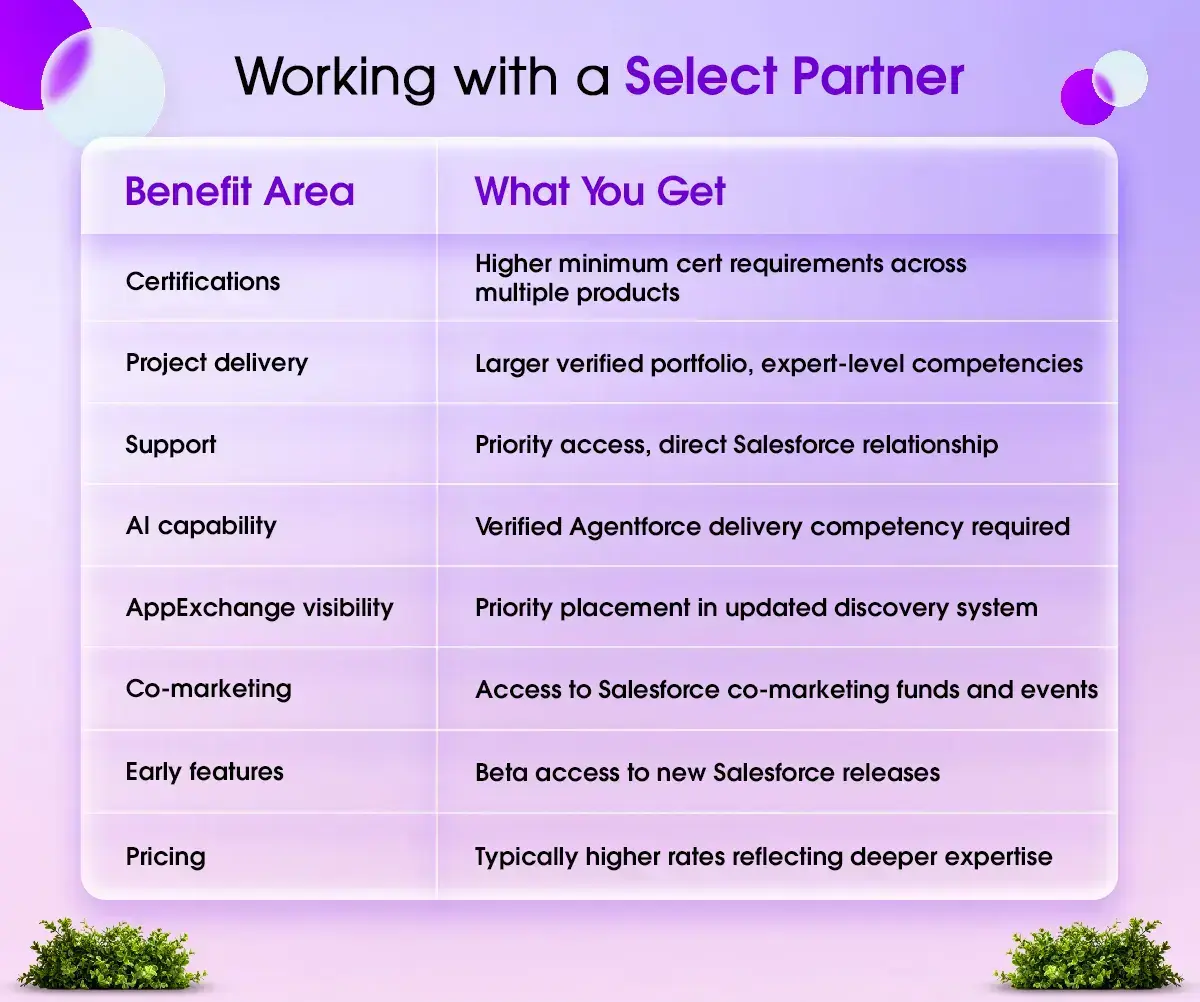
Summit Partners
Summit is the highest tier under the new program. It replaces Crest and the old Summit (Platinum) from the previous system, but with significantly higher requirements.
What qualifies a partner for Summit status:
-
All Select requirements
-
Demonstrated Agentforce delivery competency — verified live deployments, not just certifications
-
Expert-level recognition in multiple competency areas
-
High CSAT scores across a substantial portfolio of completed projects
-
Specific certifications: Certified Agentforce Specialists, Data Cloud expertise
-
Participation in Salesforce's phased Summit application process (voluntary migration in Q3–Q4 2026)
What Summit Partners offers:
-
Deep expertise across multiple Salesforce clouds and products
-
Priority AppExchange visibility in the updated discovery system
-
Early access to new Salesforce features and beta programs
-
Direct relationship with the Salesforce product and account teams
-
Co-marketing funds, lead sharing, and AppExchange promotional support
-
Post-sales implementation subsidies tied to Agentforce agent activation outcomes
Best suited for: Enterprise organizations running multi-cloud Salesforce environments, businesses implementing Agentforce for customer service or sales automation, and organizations with complex data integrations requiring Data Cloud expertise.
Important nuance: Summit Partner status does not automatically mean your project will get senior attention. Large Summit Partners often run projects with junior consultants on day-to-day delivery while senior architects are billable elsewhere. Always ask specifically about who will lead your project, not just what the company's tier is.
The 28 Core Competencies — What They Cover
The shift from 170 badges to 28 competencies is one of the most significant structural changes in the new program. Understanding what the 28 competencies cover helps you evaluate whether a partner's claimed expertise actually matches your needs.

The 28 competencies are organized across three categories:
-
AI & Agentforce Competencies: This area focuses on the ability to design, launch, and manage autonomous agents using Agentforce. Evaluation is based on building secure, compliant solutions that deliver meaningful results, as well as on the successful use of safeguards such as the Einstein Trust Layer to protect sensitive data.
-
Product Competencies: These relate to proficiency with Salesforce offerings—such as Sales Cloud, Service Cloud, Marketing Cloud, Data Cloud, Revenue Cloud (CPQ), Experience Cloud, Field Service, and others. Partners are recognized as Accredited or Expert within each product area based on demonstrated delivery experience.
-
Industry Competencies: These cover sector-specific Salesforce knowledge across financial services, healthcare and life sciences, manufacturing, retail, communications, and the public sector. Industry competencies matter when your implementation requires regulatory knowledge or pre-built industry data models.
-
Why this matters for you: When evaluating a partner, ask them specifically which of the 28 competencies they hold, at what level (Accredited or Expert), and how many verified client projects underpin each competency. A partner claiming general Salesforce expertise without specific competency accreditations is a less reliable signal of actual delivery capability than it was under the old badge system.
Agentforce & AI: Why It Now Defines Partner Quality in 2026
Agentforce is Salesforce's autonomous AI agent platform. It allows businesses to deploy AI agents that handle customer service inquiries, qualify sales leads, schedule field service, and execute complex workflows — without human intervention for each task.
This is not a minor feature update. Agentforce represents a fundamental change in how Salesforce is used: from a system of record that humans operate to an active participant in business processes.
-
Not sure if your current Salesforce partner is Summit-certified? We'll review your setup for free — no pitch, just clarity. Get a Free Salesforce Partner Assessment →
What this means for partner selection:
In 2025, asking your Salesforce partner about AI was optional. In 2026, it is a primary qualification criterion.
Partners who have built and deployed live Agentforce agents for clients bring direct implementation experience that cannot be replicated through certifications alone. They understand the practical challenges: grounding agents in clean, trusted data through Data Cloud; configuring guardrails to prevent hallucination in customer-facing interactions; monitoring agent performance and tuning behavior over time.
Partners who have only traditional implementation experience — Sales Cloud setup, workflow automation, basic customization — are not positioned to deliver the same outcomes on AI-driven projects.
Questions to ask any partner about Agentforce:
-
Can you show me a live Agentforce deployment you have completed, with the client's consent?
-
What measurable outcome did that deployment achieve — reduction in ticket volume, improvement in response time, revenue attributed to AI-qualified leads?
-
How do you handle the Data Cloud foundation required for trusted agent inputs?
-
What governance framework do you use to ensure AI agents remain compliant with data privacy requirements?
-
What is your process for monitoring and tuning agent behavior after go-live?
If a partner cannot answer these questions concretely, their Agentforce competency is theoretical rather than operational.
Benefits by Tier: What You Actually Get
Working with a Select Partner
Working with a Summit Partner
The Real Benefit Beyond Badges
The tangible benefit of a higher-tier partner is not the badge. It is the ecosystem access that comes with it.
Salesforce Summit Partners have direct relationships with Salesforce's internal product teams. When your implementation encounters a genuinely complex technical issue — one that requires Salesforce engineering to resolve — a Summit Partner can escalate more effectively than a Select Partner. For straightforward implementations, this rarely matters. For complex, enterprise-scale projects, it can be the difference between a two-day resolution and a two-week stall.
How to Choose the Right Salesforce Partner in 2026
Salesforce partner tier is one signal among several. Here is the evaluation framework that actually matters:
Step 1: Define your scope before evaluating partners
Before you contact a single partner, write down exactly what you need Salesforce to do for your business. Which cloud or clouds? Which processes are you trying to improve? What integrations do you require? What does success look like in 12 months?
Partners are much better evaluated when you have a defined scope. Without it, you cannot assess whether their experience is relevant to your project.
Step 2: Verify their AppExchange listing
Go to appexchange.salesforce.com and find the partner's official listing. Look at:
-
Their current tier designation (Select or Summit as of 2026)
-
Number of completed projects verified by Salesforce
-
Average CSAT score from clients (4.5+ is a reasonable benchmark)
-
Which competencies they hold and at what level
-
Reviews from clients in your industry or with similar project scopes
Step 3: Assess Agentforce readiness
Even if your immediate project does not involve AI agents, your Salesforce environment will eventually need to support them. A partner with active Agentforce experience will architect your implementation in a way that does not create technical debt when you are ready to deploy AI. Ask about their Data Cloud experience and how they design implementations for AI readiness.
Step 4: Request industry-specific case studies
Ask for two to three completed case studies in your industry or with similar implementation complexity. Specifically ask for the challenges that arose during those projects and how they were resolved. Partners who can only show you success stories without acknowledging complexity are not being fully transparent.
Step 5: Clarify who actually does the work
Ask for the names and certifications of the specific consultants who will work on your project. Confirm that the people you meet during the sales process are the people who will deliver. In larger Summit Partner firms, senior partners run pre-sales, and junior consultants handle delivery. This is not necessarily a problem if you know about it upfront — it becomes a problem when it is a surprise mid-project.
Step 6: Understand post-go-live support
Salesforce releases three major updates per year. Agentforce agents require ongoing tuning. Customizations need maintenance. Ask the partner how they handle post-go-live support: do they offer a managed service model, how is it priced, and who is the escalation contact?
📋 Free Download: Salesforce Partner Evaluation Checklist (2026)
Everything in this guide, condensed into a one-page checklist you can use when interviewing any Salesforce partner.
Download the Checklist → (Sent to your email within minutes)
Red Flags When Evaluating a Salesforce Partner
-
They still describe themselves as a Gold or Platinum partner. These tier names were retired in 2026. A partner using these terms without acknowledging the transition is either unaware of the program changes or is deliberately obscuring their current status.
-
They cannot show a verified AppExchange listing. Any legitimate Salesforce partner has an AppExchange presence. If a partner cannot direct you to their listing with verified project records and CSAT scores, their claimed Salesforce status is unverifiable.
-
They have no Agentforce experience but claim full AI capability. Agentforce certifications exist, but certification alone does not equal delivery capability. Ask for a client reference from a live Agentforce deployment.
-
They propose an unusually short implementation timeline. Rushed Salesforce implementations consistently underperform. A partner who tells you a complex Sales Cloud and Service Cloud implementation will take six weeks is either underscoping your project or overpromising their delivery speed.
-
They do not ask about your data. Clean, well-structured data is the foundation of effective Salesforce — and absolutely essential for any AI deployment. A partner who does not conduct a thorough data assessment early in the scoping process is skipping a step that will cause problems later.
-
They have no plan for user adoption. More Salesforce implementations fail due to poor user adoption than to technical problems. If a partner's proposal does not include a training and change management plan, the technical delivery may succeed while the business outcome fails.
Codleo's Position in the New Salesforce Partner Program
Codleo is a Salesforce Summit Partner — Salesforce's highest tier under the 2026 program — with active operations serving clients across the United States, India, and Australia.
Our US-based engagements cover Sales Cloud, Service Cloud, Agentforce deployment, Data Cloud, Revenue Cloud (CPQ), and Marketing Cloud. We work with businesses in healthcare, financial services, manufacturing, logistics, and technology.

What working with Codleo looks like:
-
Dedicated project lead with 5+ Salesforce certifications
-
US timezone availability (EST/CST/PST)
-
Fixed-scope engagements with defined deliverables — no open-ended billing
-
AppExchange-verified project records and CSAT scores you can check before signing
US clients: We operate from our Delaware and Dallas offices and have served businesses ranging from 50-person growth-stage companies to enterprise teams with complex multi-cloud environments.
If you are evaluating Salesforce partners for a US project, we will match you with the consultant most relevant to your industry and scope — not a generic sales rep.
Schedule a Free Consultation with Our US Team → Response within 4 business hours. No commitment required.
Final Thoughts
The March 2026 Salesforce partner program overhaul changed more than tier names. It changed what it means to be a quality Salesforce partner.
Under the old system, tier advancement was largely a function of scale — how many certifications a firm held, how many deals it had closed. Under the new system, advancement requires demonstrated delivery excellence in specific competency areas, verified by CSAT scores and completed project records, with Agentforce capability as a core requirement for the top tier.
For businesses evaluating Salesforce partners, this shift is genuinely good news. The new system gives you better signals. An AppExchange listing showing Summit tier designation, specific Accredited and Expert competencies, high CSAT scores across a relevant project portfolio, and verified Agentforce deployments tells you far more than a Platinum badge ever did.
The transition is still in progress through 2026. Some partners are still updating their credentials and positioning. If you are starting a Salesforce evaluation now, use the framework in this guide to look past tier labels and assess actual delivery capability. The partner who can show you a live Agentforce deployment, a healthy portfolio of projects in your industry, and a team of certified consultants who will actually work on your project is the one worth talking to.
Ready to Talk to a Salesforce Summit Partner?
You've done the research. Now get a second opinion on your specific situation — free, in 30 minutes.
What we cover in the call:
-
Your current Salesforce setup and gaps
-
Whether your existing or shortlisted partner is the right fit
-
A realistic scope and timeline for your project
Book Your Free 30-Min Call → 🇺🇸 US timezone available | Response within 4 hours | No sales pressure
Codleo is a verified Salesforce Summit Partner with completed projects across the US. Check our AppExchange listing before you call.
 0
0
About the Author

FAQ
Salesforce partner status has four levels: Base, Ridge, Crest, and Summit. Each level shows a different amount of expertise and offers distinct benefits. Higher-level partners, like Crest and Summit, provide the best support and have a proven track record with Salesforce implementations.
The Independent Software Vendor Partner creates custom apps and solutions for Salesforce AppExchange to improve Salesforce's capabilities. On the other hand, a Salesforce Consulting Partner offers expert advice on planning the Salesforce implementation and provides complete customization services.
Look for your partner’s expertise in Salesforce and check if they have a record of successful projects. Also, make sure they understand the latest Salesforce services and products well.
Higher-tier partners, such as Crest and Summit, receive more visibility, chances for co-marketing, access to advanced Salesforce resources, and priority support.

 603 D-Mall Netaji Subhash Place, Delhi 110034 IND


