


Publish date:
With Salesforce app development, you can automate complex tasks, manage your data more easily, and connect different systems in one place. As your business expands, Salesforce can keep up with your needs rather than hold you back.
Standard features and AppExchange apps are helpful at the outset, but as businesses grow, they often face data challenges and difficulty linking different systems. Custom development can help fix these issues.
This guide explains what Salesforce app development is, why businesses choose it, and how to build custom applications that help your company grow and work more efficiently.
If you want Salesforce to fit your business needs rather than work around its limits, this guide can help.
What is Salesforce App Development?
Salesforce App Development focuses on creating custom applications on the Salesforce platform. These applications help businesses run more smoothly, automate tasks, and enhance customer interactions.
Companies can use these apps internally or share them with others through the Salesforce AppExchange.Salesforce makes it easy to build apps in two ways:
-
You can create apps without writing code by using tools like Flow Builder and App Builder.
-
When developers need advanced features, they use Apex, Salesforce’s programming language. They also use Lightning Web Components and Visualforce to create apps with complex functions.
These apps integrate with Salesforce’s leading CRM and other systems, keeping all your data connected. Since Salesforce is cloud-based, your apps are secure, scalable, and accessible from anywhere.
Why Do You Need Salesforce App Development?
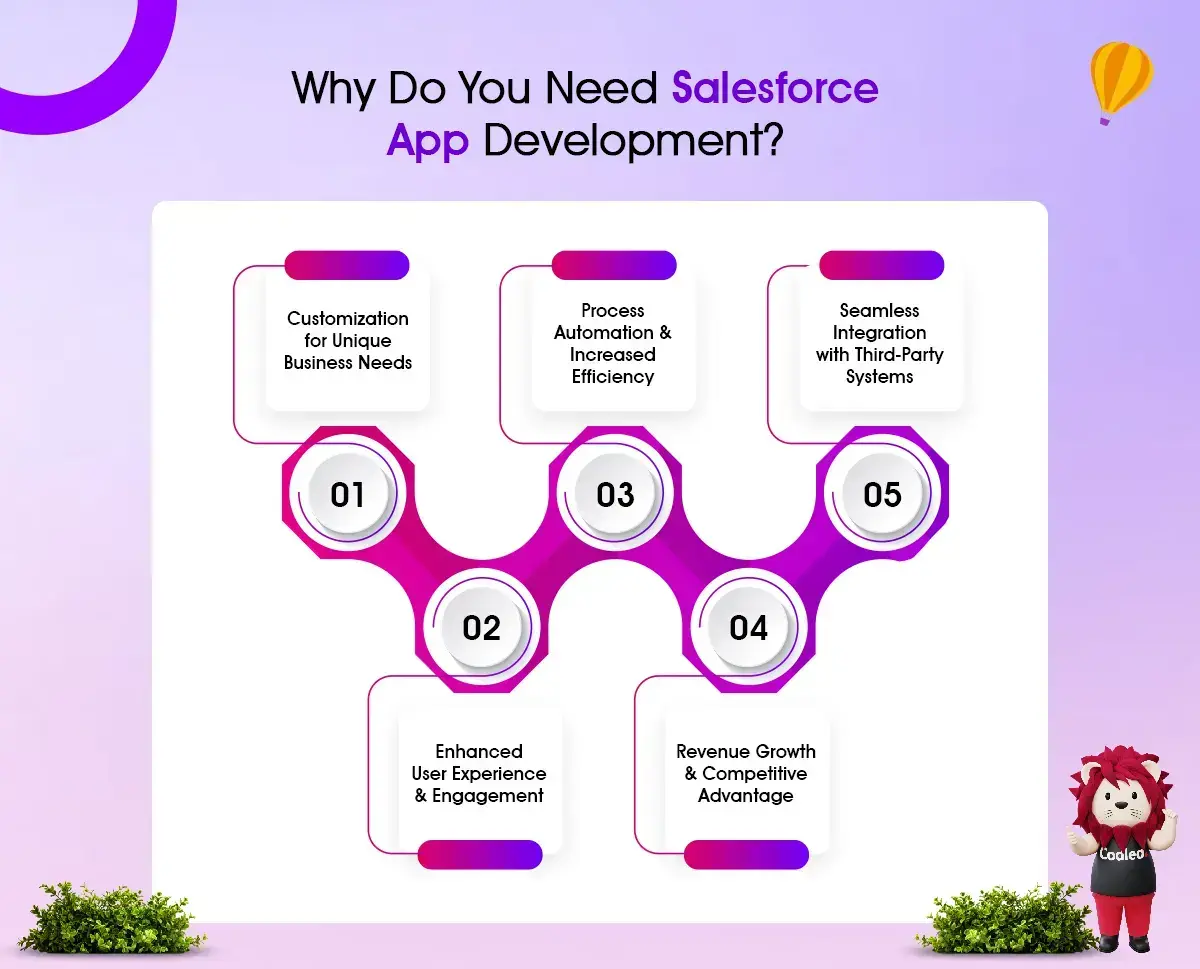
Salesforce is a strong CRM, but every business is different. Custom apps help make sure that processes, workflows, and customer interactions meet each business's unique needs.
1. Tailoring Solutions for Your Business Needs
Every business has unique needs, and standard Salesforce features may not meet them all. Custom Salesforce apps can help companies tailor the platform to fit their specific requirements.
-
Industry-Specific Customization – Different industries have unique challenges. Developing a custom app can address these specific needs with tailored workflows.
-
Customized User Interfaces – Businesses can create dashboards, forms, and reports that fit their employees’ roles and workflows.
-
Bespoke Data Models – Custom objects and fields can store specific data that isn’t available in the standard Salesforce modules.
2. Automation and Efficiency Improvement
Many businesses still rely on slow, manual tasks that can lead to mistakes. Custom Solutions helps automate these tasks, making operations faster and more efficient.
-
Automated Workflows & Approvals: This feature streamlines processes such as order approvals, invoice handling, and contract management.
-
AI-Powered Automation: It uses Salesforce Einstein AI to automate data sorting, lead scoring, and the delivery of helpful recommendations.
-
Task & Notification Automation: This ensures employees won’t miss essential actions such as follow-ups, deal closures, or compliance checks.
With automation, businesses can save employees time, reduce errors, and enable staff to focus on higher-value tasks such as engaging with customers and executing strategic initiatives.
3. Connecting Easily with Other Systems
Many organizations use various software tools alongside Salesforce, like ERP systems, accounting software, marketing automation platforms, and customer service tools. When these systems don’t connect, they create data silos, additional work, and inefficiencies.
-
Integrating ERP and Accounting Software – Connect Salesforce with SAP, Oracle, QuickBooks, and NetSuite to keep financial and customer data in sync.
-
Marketing Automation Integration – Link Salesforce with Marketo, HubSpot, and Google Ads for better campaign tracking and lead management.
-
E-Commerce and Payment Gateways – Create custom apps to integrate Salesforce with Shopify, PayPal, and Stripe to monitor customer transactions.
-
Custom API Development – Businesses can build APIs to link Salesforce with their older systems.
By connecting these external systems to Salesforce, companies create a single source of truth. It means data is combined, leading to smarter decisions and greater efficiency.
4. Improved User Experience and Engagement
A user-friendly, well-optimized Salesforce experience helps employees work more effectively and improves customer interactions. It enhances the user experience (UX) by simplifying processes, reducing complexity, and making important information easier to find.
-
Employees can access real-time insights and key performance indicators (KPIs) relevant to their roles through role-based dashboards and reports.
-
Businesses can create self-service portals where customers can track their orders, request support, and update their information.
-
Custom apps ensure Salesforce is available on smartphones and tablets, so teams stay connected while on the go.
When these tools are easy to use, employees adopt them more quickly and can complete their tasks more efficiently.
5. Revenue Growth and Competitive Advantage
Using custom Salesforce solutions can help improve sales, customer service, and marketing efficiency. It leads to more revenue and a competitive advantage.
-
Predictive Analytics for Sales & Marketing: This helps businesses spot sales trends, forecast revenue, and tailor their customer approach.
-
Customer Retention & Personalization: AI apps analyze customer behavior and suggest products that align with their preferences.
-
Optimized Resource Allocation: Automating manual tasks reduces labor costs and improves operations, allowing businesses to focus on growth.
-
Faster Time-to-Market: Custom Salesforce apps enable businesses to adapt to market changes and launch new projects more quickly than competitors.
Although developing custom Salesforce solutions takes longer than using off-the-shelf tools, these tailored systems can better meet a business's unique needs. Custom development in Salesforce helps ensure the tools work for the company, not against it.
Ways to Create Apps on Salesforce
When organizations build an app on Salesforce, they usually consider four main options: declarative (no-code/low-code), programmatic (code-based), hybrid (a mix of both), and AppExchange-based (pre-built solutions). Each option has its own benefits, and the choice depends on the organization's needs, the app's complexity, and available resources.
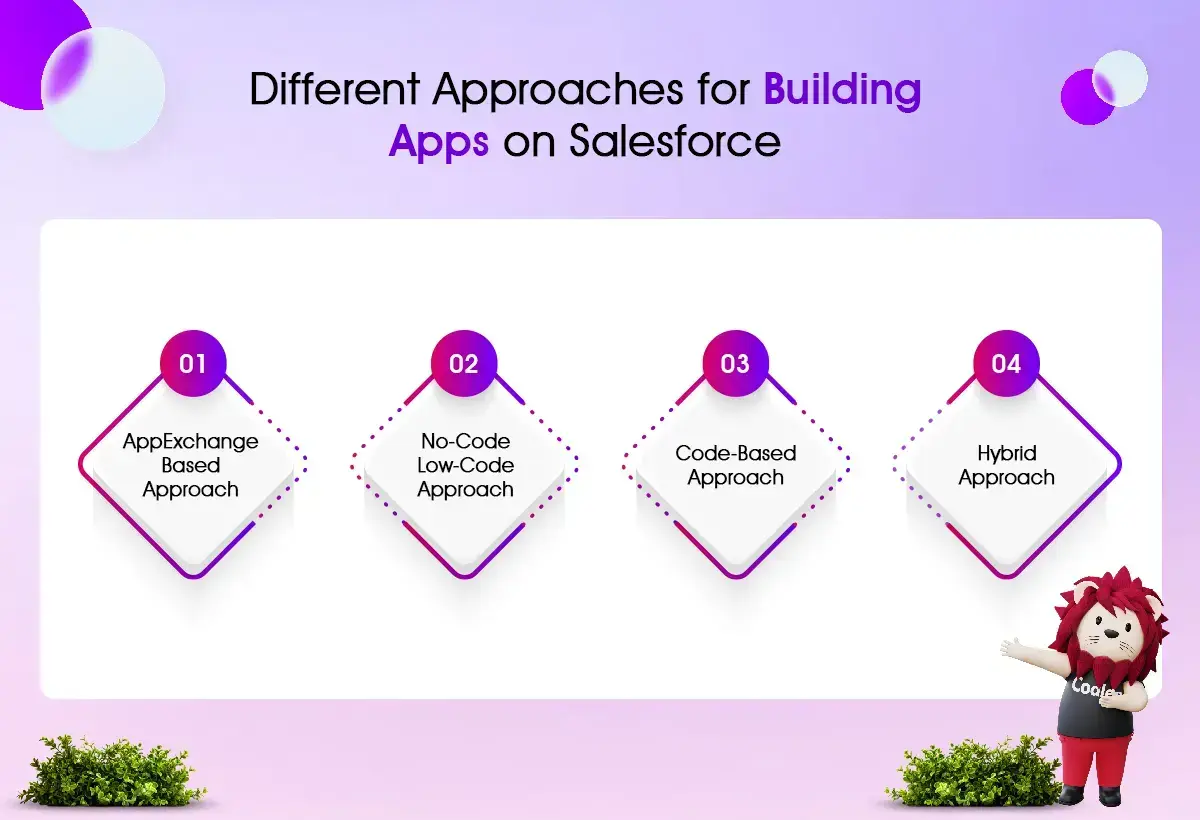
1. App Marketplace Method
Salesforce AppExchange offers ready-made apps from third-party vendors that meet specific business needs. It reduces the need for custom solutions. With these apps, you can deploy quickly with less effort and lower development costs.
These options offer quick solutions. However, it's essential to consider potential customization limitations, licensing fees, and vendor reliance before choosing this method. This approach works well for businesses that need fast solutions without having to start from scratch.
If you are thinking about this approach, read our complete guide on Salesforce AppExchange. It covers the benefits, popular apps, and more.
2. No Coding Required
The declarative approach allows users to build applications in Salesforce without programming knowledge. Tools like Lightning App Builder, Flow Builder, and Object Manager make it easy to create and automate business processes. With Approval Processes and Validation Rules, users can design custom data structures and user-friendly interfaces using simple point-and-click methods.
This method is excellent for quickly developing simple applications. It allows business users without coding skills to easily maintain their projects. However, it may not be well-suited to complex applications that require advanced business logic, deep integrations, or custom user experiences, which often require programming skills.
3. Code-Driven Method
The programmatic approach in Salesforce involves writing custom code to add advanced features. It uses Apex for backend logic, Lightning Web Components (LWC) for modern user interfaces, Aura for older components, and Visualforce for traditional pages. This approach is best for developing custom apps. It is useful for businesses that need tailored solutions beyond what Salesforce offers by default.
4. Hybrid Approach
The hybrid approach combines two approaches to building software: declarative and programmatic. This method balances speed, flexibility, and functionality. You can use declarative tools to set up standard customizations, workflows, and user interface elements. For more complex tasks, such as backend logic, external integrations, or specialized UI components, you can use Apex and LWC.
This approach is among the most common methods for developing custom Salesforce applications. It balances efficiency and flexibility, enabling businesses to scale solutions with minimal disruption. However, it requires effective coordination between administrators and developers to ensure smooth implementation and ease of maintenance.
Essential Features of a Salesforce Application
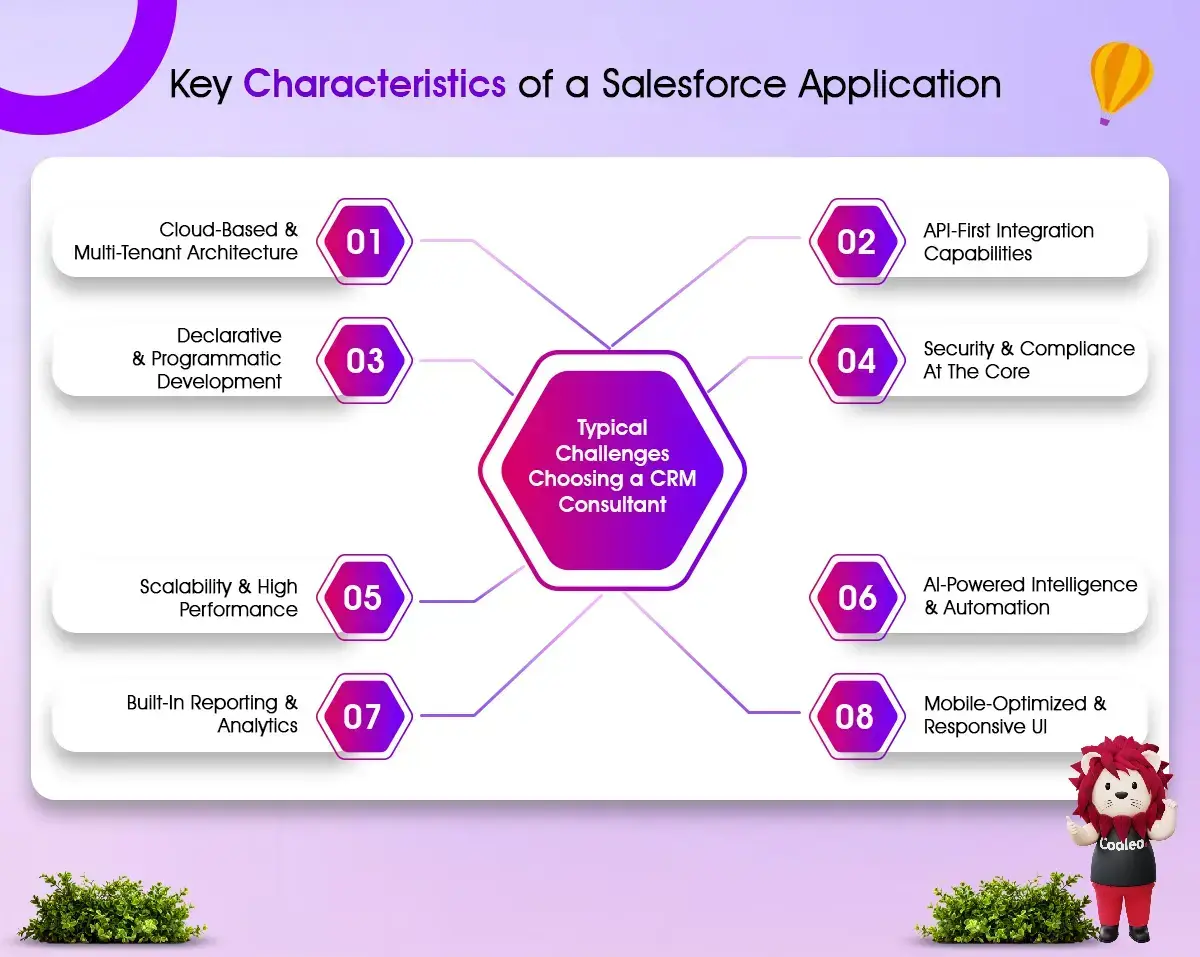
Here are the main features of a Salesforce application:
1. Cloud-Based and Multi-Tenant Design
Salesforce applications run in the cloud, so businesses do not need to buy or maintain costly on-site servers. Many organizations can share the same resources simultaneously, and the system provides reliable service, easy scalability, and robust security.
-
These apps are hosted in the cloud, which means you don’t need to manage any hardware or worry about IT maintenance.
-
Multiple users can access a single version of the software. This setup saves costs and improves performance while maintaining strong security.
-
Salesforce provides three major updates each year. These updates enhance security, ensure compliance, and add new features, all without disrupting your current applications.
-
You can access these apps anytime, anywhere, from any device with an internet connection.
2. Declarative and Programmatic Development
Salesforce offers both no-code/low-code options and custom coding. It gives businesses flexibility tailored to their needs and developers' skills.
I. No-Code/Low-Code (Declarative Development) – Users can create applications using simple point-and-click tools such as:
-
App Builder – Use a simple drag-and-drop tool to create custom applications.
-
App Builder – Use an easy drag-and-drop tool to create custom apps.
-
Object Manager – Helps businesses create custom objects, define relationships, and add fields.
II. Developers can build complex applications by using a custom development method.
-
Apex is Salesforce's programming language for writing object-oriented code.
-
Lightning Web Components (LWC) is a modern framework for creating reusable user interface components.
-
Visualforce is a framework for designing custom user interfaces using a syntax similar to HTML.
III. Hybrid Development – Businesses can use simple tools alongside more complex solutions to improve efficiency and tailor their services.
3. Integrating with APIs First
Salesforce connects easily with other applications, old systems, and enterprise software. It allows for smooth data sharing.
-
Salesforce offers robust APIs, such as REST and SOAP, that enable applications to connect with other systems, including ERP, accounting tools, and HR software.
-
Salesforce also integrates seamlessly with Google Workspace, Microsoft 365, Slack, and other tools via native integrations.
-
For larger IT setups, platforms like MuleSoft and Boomi support Salesforce in connecting with complex systems.
-
Data synchronization ensures that Salesforce and linked applications stay up to date in real time, preventing data silos.
4. Security and compliance are essential.
Security is essential to keep applications compliant with industry standards and protect customer data.
-
Admins can use Role-Based Access Control (RBAC) to specify which users can access specific records, objects, and fields based on their roles.
-
Data is protected with AES-256 encryption, both at rest and in transit, to prevent unauthorized access.
-
Multi-Factor Authentication (MFA) makes sure that only authorized users can log in.
-
Salesforce adheres to global security standards, including GDPR, HIPAA, SOC 2, ISO 27001, and CCPA, to ensure regulatory compliance.
-
Salesforce tracks user activity and data changes with audit and logging capabilities, helping businesses maintain compliance and prevent security breaches.
5. Smart Technology and Automation
Salesforce’s Einstein AI helps improve app development with tools for machine learning, predictive analytics, and automation.
-
Predictive Analytics – It analyzes past data to predict customer behavior, trends, and sales outcomes.
-
Automated Data Processing – AI sorts leads, assigns opportunities, and makes workflows more efficient without manual input.
-
Einstein Bots & Conversational AI – AI-powered chatbots enhance customer interaction by answering common questions and handling support requests automatically.
-
Next Best Action Recommendations – AI offers personalized suggestions for sales representatives and customer service agents based on real-time data.
6. Mobile-Friendly and Responsive Design
Salesforce applications perform well on mobile devices, making them easy to access across platforms.
-
The Salesforce Mobile App lets users check dashboards, reports, and customer data from their phones
-
Users can also work offline, and their data will sync once they reconnect to the internet.
-
The Lightning Responsive UI adapts applications to different screen sizes, providing a smooth user experience.
-
Progressive Web Apps (PWAs) enable web-based apps to behave like mobile apps, enhancing their performance and accessibility.
-
For organizations that want to hire Salesforce mobile app developers, having this expertise helps ensure good performance on all devices.
7. Scalability and High Performance
Salesforce apps can manage large amounts of data and handle many transactions quickly.
-
Cloud Elasticity enables Salesforce to adjust resources based on demand, helping avoid slowdowns.
-
Bulk Data Processing and Batch Apex let you process millions of records efficiently without disrupting operations.
-
Optimized Query Performance uses SOQL (Salesforce Object Query Language) to access and process data quickly.
-
Multi-Org and Multi-Language Support enable large companies to operate multiple business units and regions from one platform.
8. Reporting and Analytics Built-In
Salesforce apps offer reporting and analytics tools that help businesses track performance and measure success.
-
Users can create custom dashboards that provide real-time insights. Salesforce CRM Analytics, formerly known as Einstein Analytics, provides in-depth AI-powered data insights.
-
Users can also create charts, graphs, and data tables to help with decision-making. Businesses can set up scheduled reports to receive updates automatically, without manually running them.
Overall, Salesforce App Development focuses on creating more innovative, flexible solutions that keep your business efficient, connected, and ready to grow.
Plan Your Build the Right Way
Choosing the right way to develop your Salesforce application is just the first step. This step should help you create an app that meets your business goals.
Regardless of whether you choose a no-code, code-based, hybrid, or AppExchange solution, the next step is to turn that choice into a clear development plan. At this stage, it is essential to understand the Salesforce development process. This understanding helps ensure a smooth move from planning to deployment.
Creating a custom Salesforce app involves more than just coding or setting up tools. It requires a clear plan that focuses on your business needs, user experience, scalability, and integration with other systems.
In the next section, we will explain how to build a custom Salesforce app. We will provide an example and outline the key steps for a successful and scalable implementation.
Creating a Custom Salesforce App: A Step-by-Step Development Guide
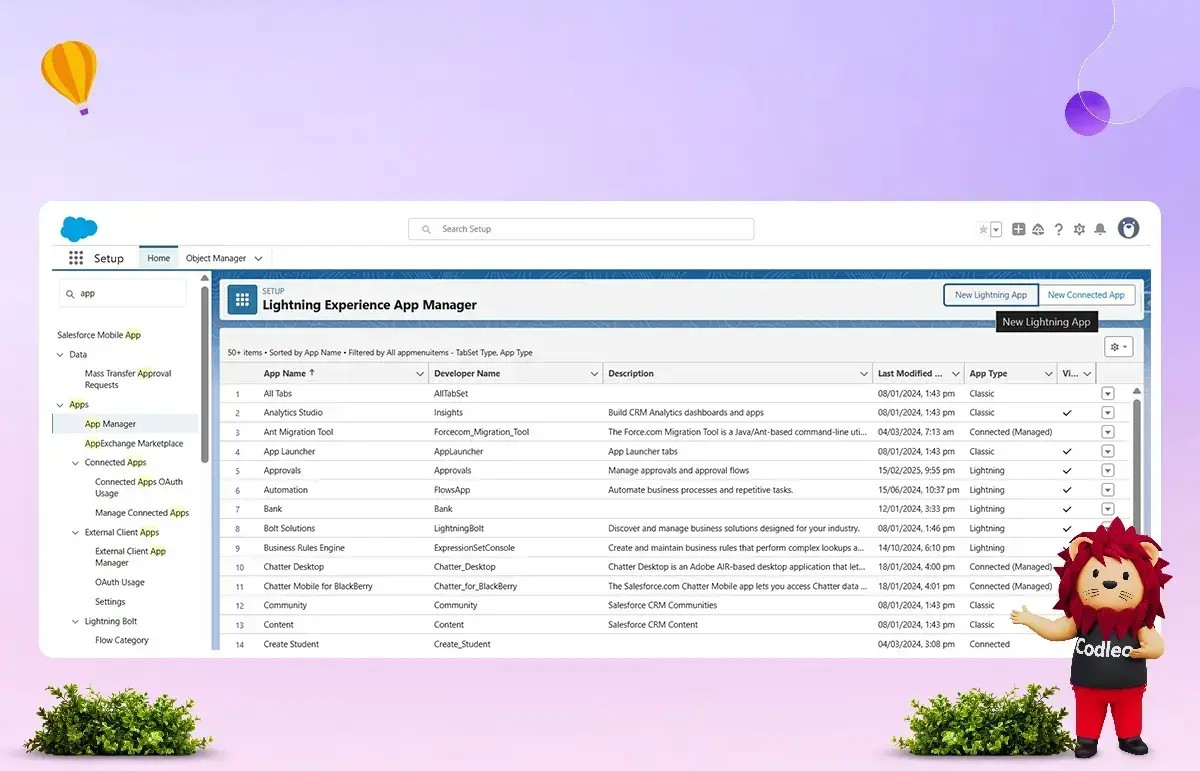
Step 1: Creating the Salesforce Application
-
Navigate to Setup → search for App Manager → open it.
-
Click New Lightning App (top right corner).
-
Add your App Name and description (e.g., “Event Management – Designed for the Event Management Team”).
-
Apply branding by adding a logo and selecting a color scheme that aligns with your organization.
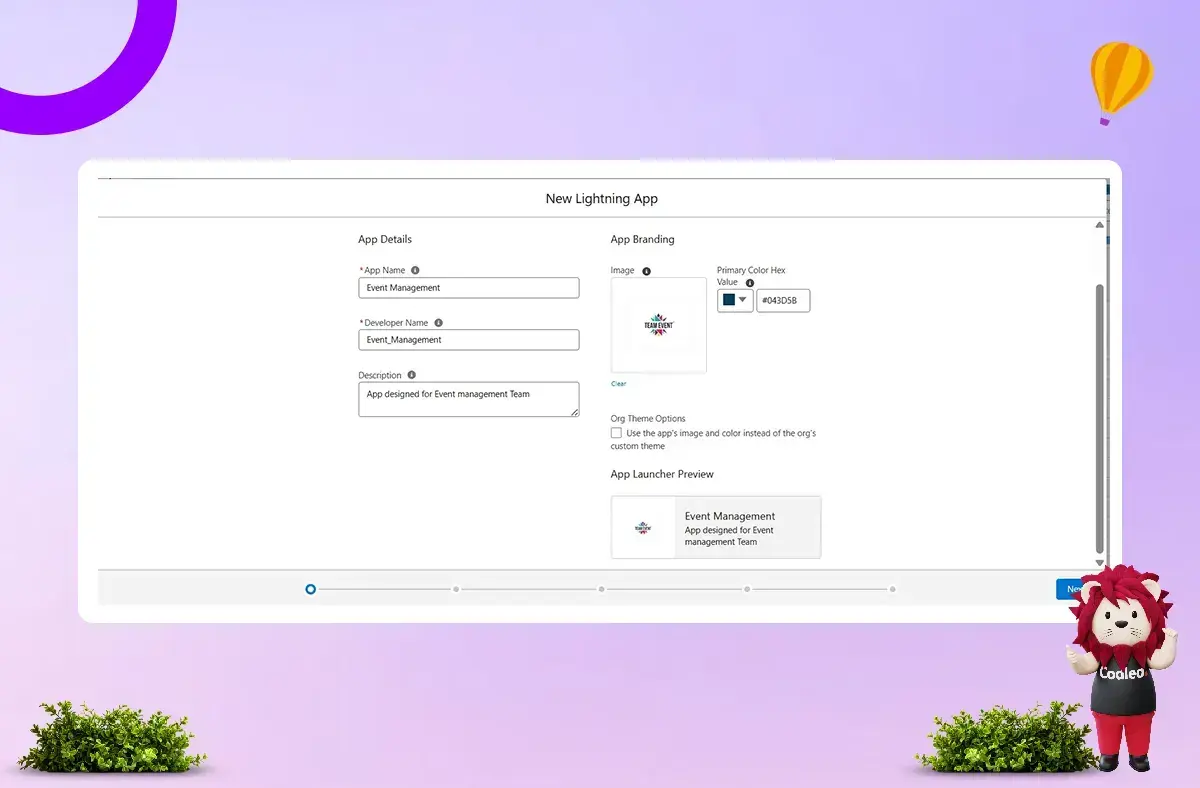
Tip: Follow consistent naming conventions to ensure your app is easily identifiable by users.
Step 2: Configuring Setup & Navigation
Salesforce offers several navigation and setup options to tailor your app to the users’ needs:
-
Navigation Style:
-
-
Standard Navigation: For internal users
-
Console Navigation: For service agents handling multiple cases
-
-
For our Event Management app, we use Standard Navigation.
-
Supported Form Factors: Desktop & Phone (to improve accessibility and productivity).
-
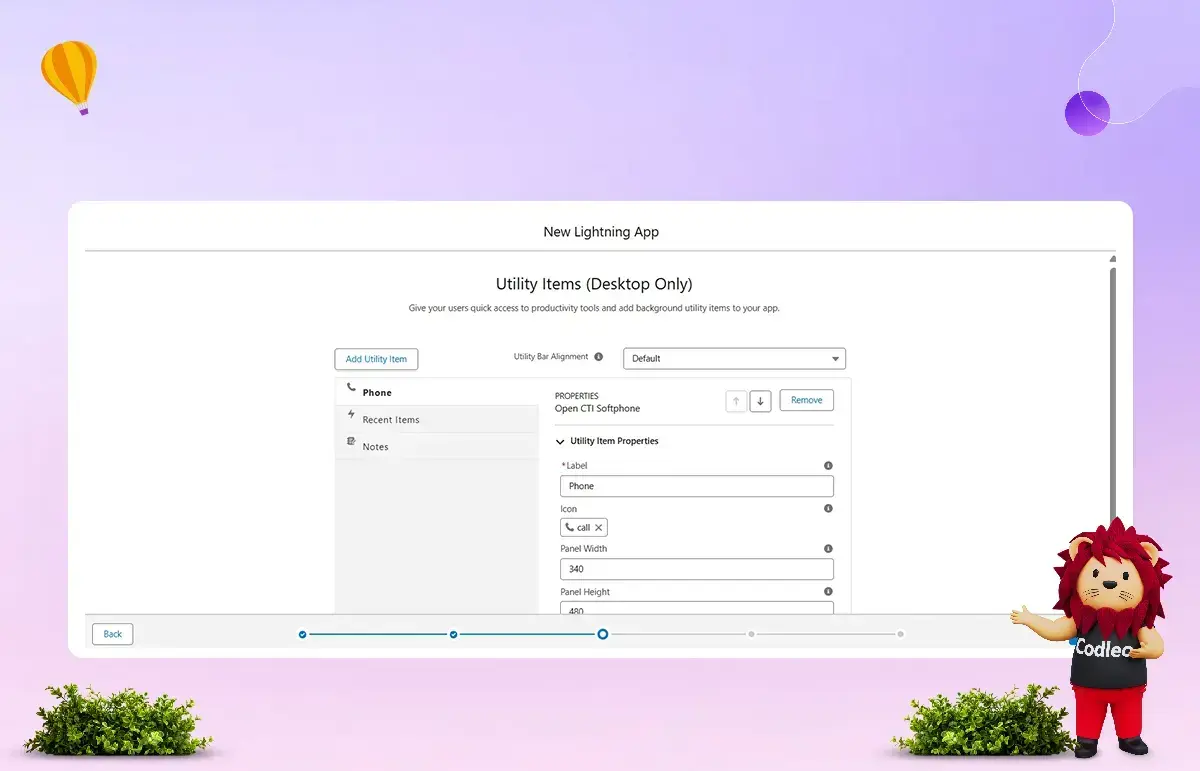
Utility Bar: Add persistent tools like Notes, Recent Items, or Phone for quick access.
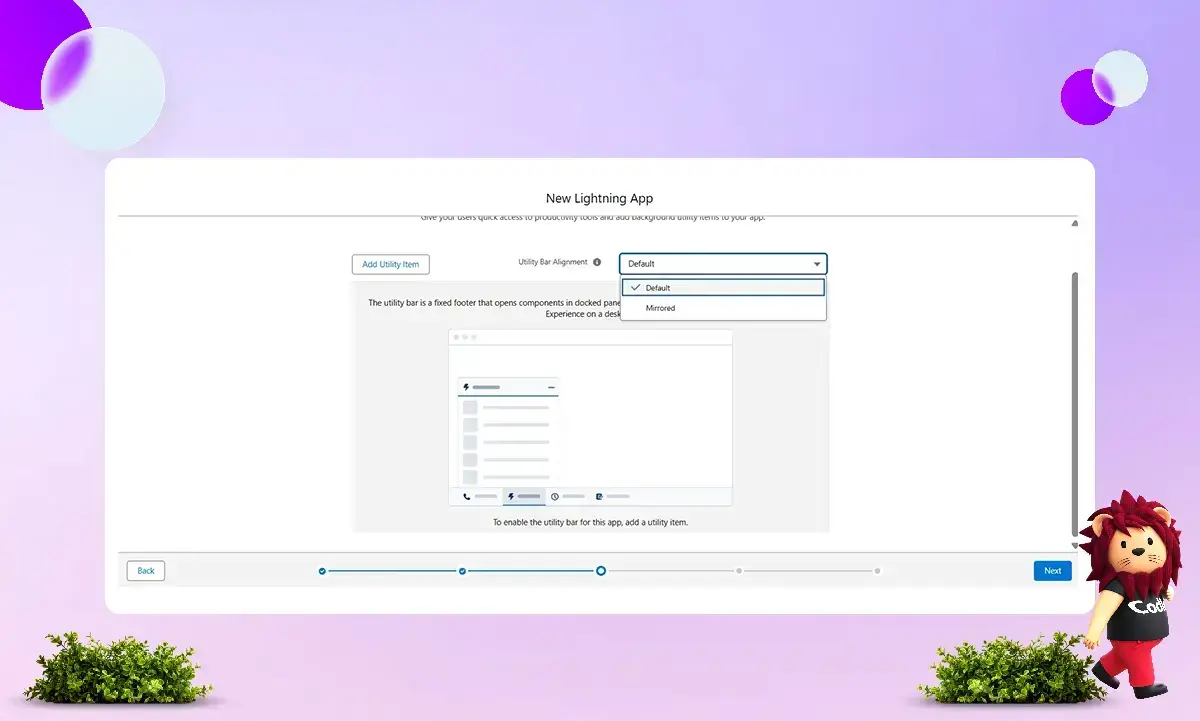
Example: Event Management users require Phone, Recent Items, and Notes to be available at all times.
Step 3: Adding Objects and Tabs
-
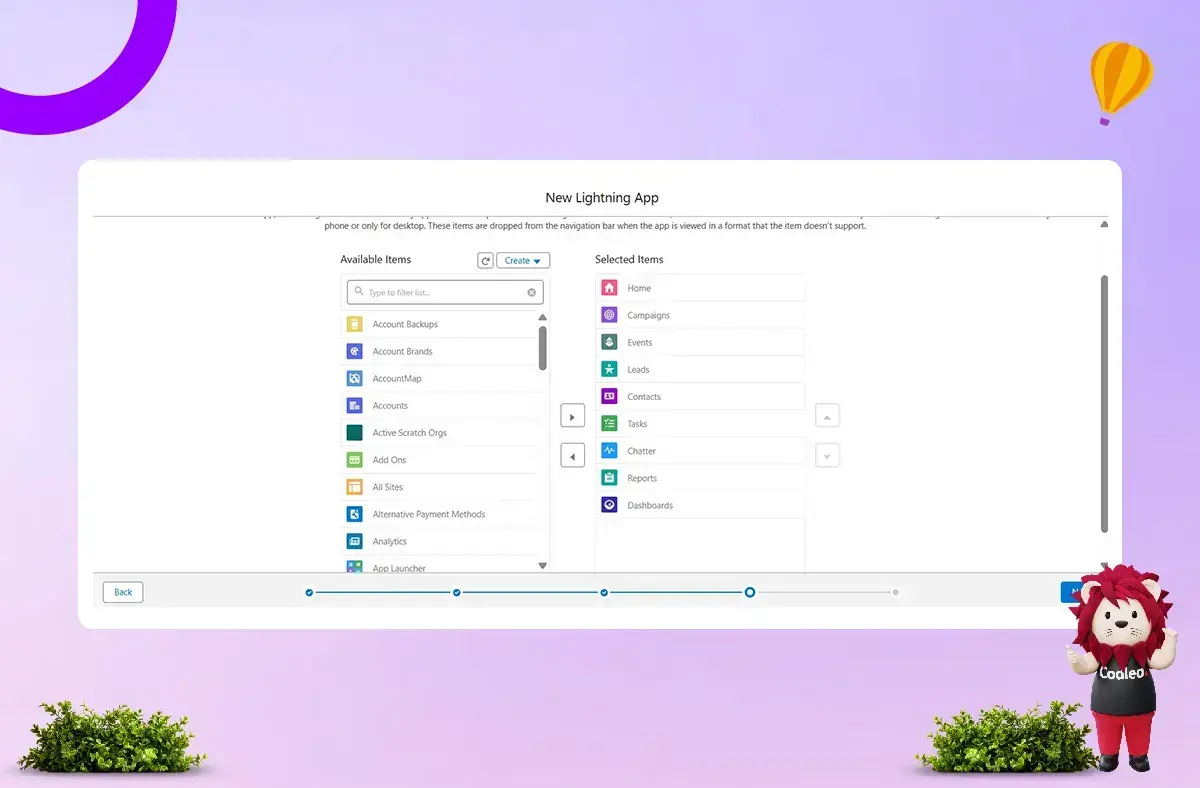
Select the required objects and tabs for your app.
-
Arrange tabs for quick access and avoid overwhelming users.
-
Set the default landing tab.
-
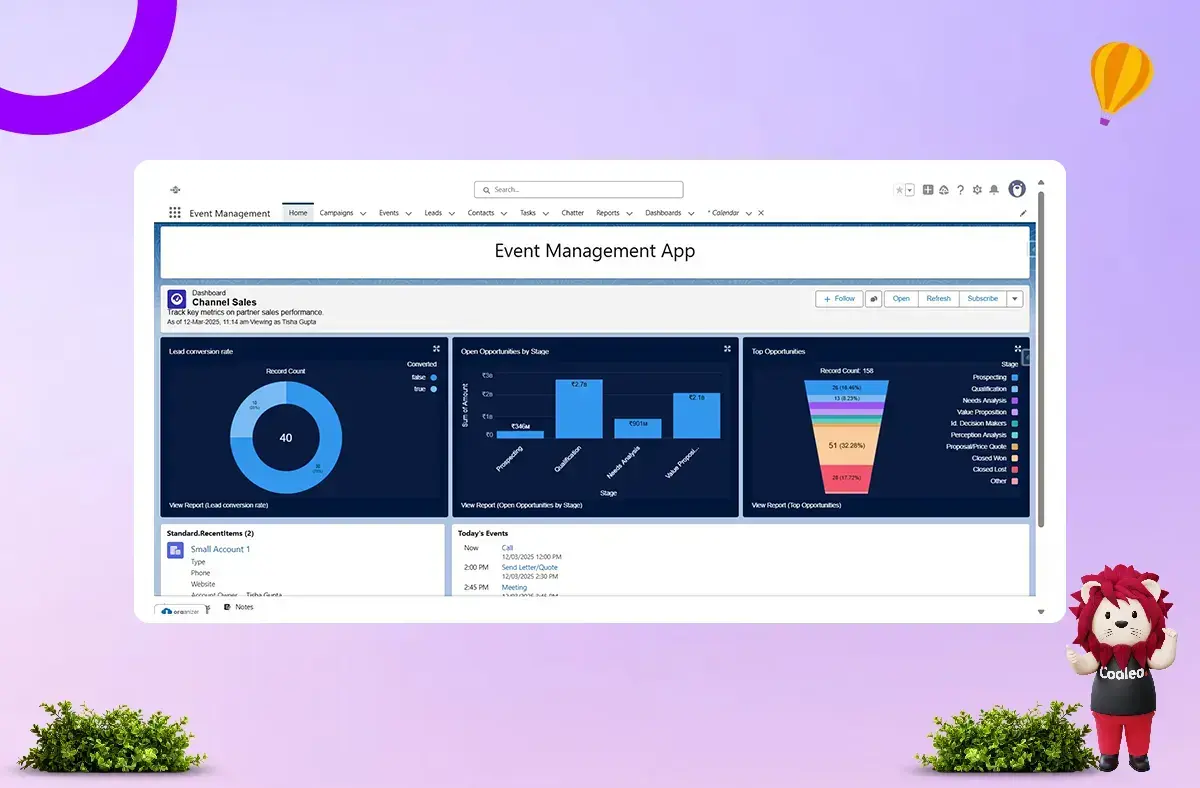
Example Tabs for Event Management App: Home, Campaigns, Events, Leads, Contacts, Tasks, Chatter, Reports, Dashboards.
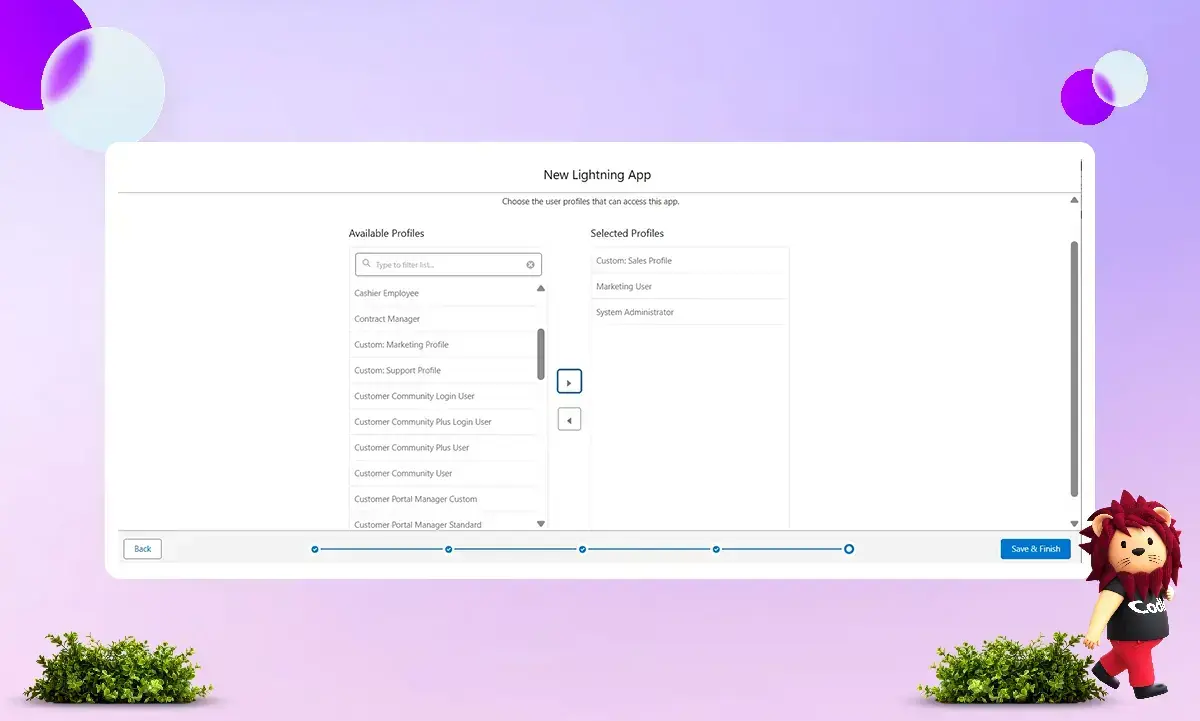
-
Assign User Profiles that need access (e.g., Custom Sales Profile, Marketing User, System Administrator).
Step 4: Customizing the Home Page
-
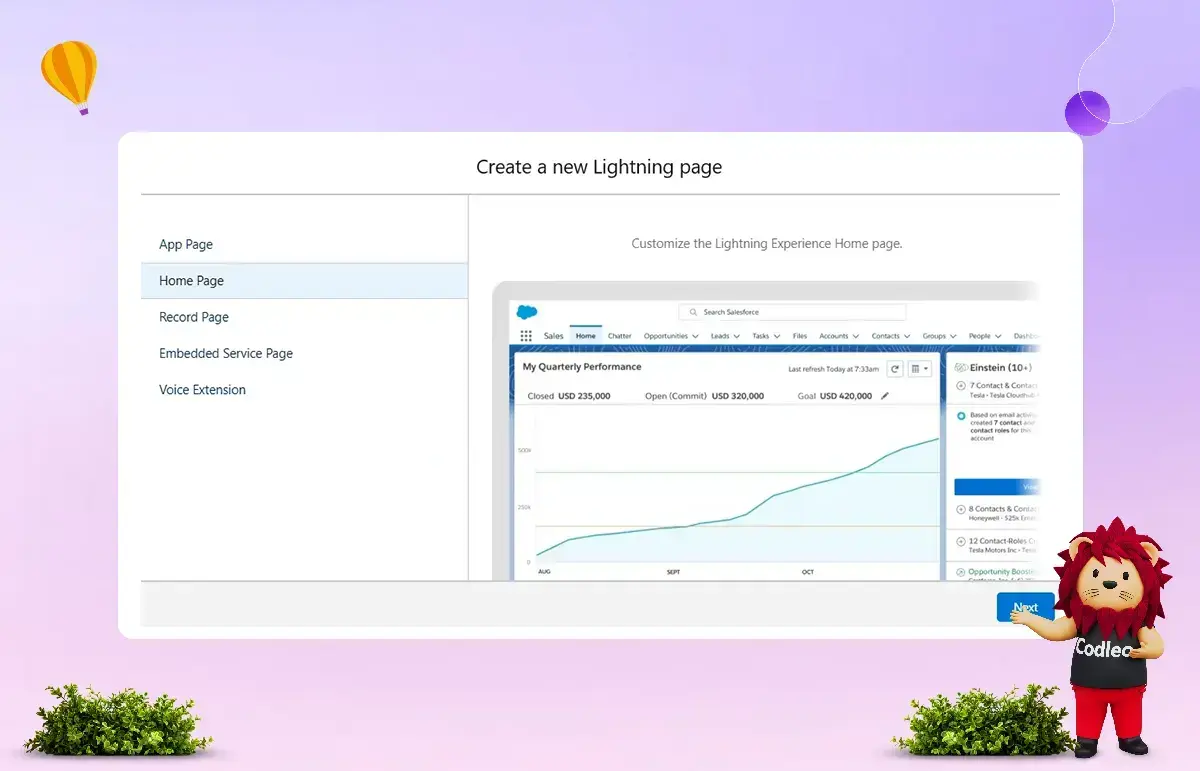
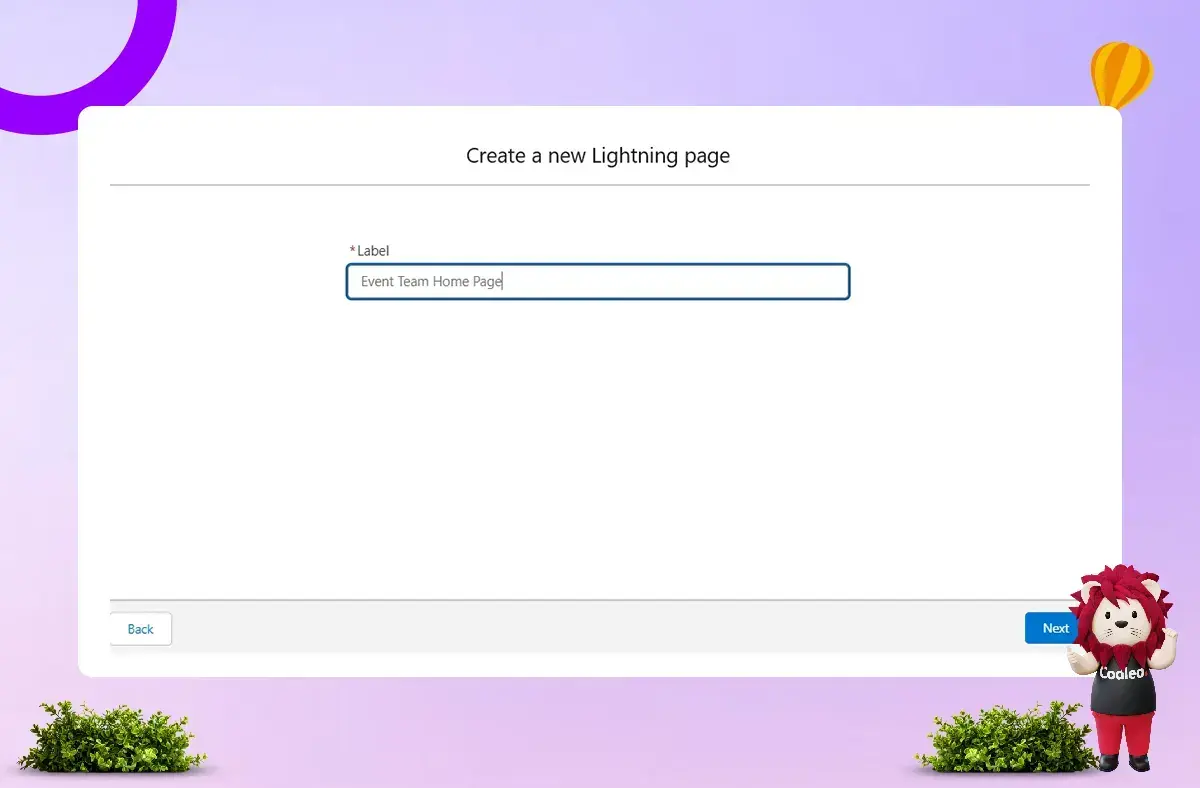
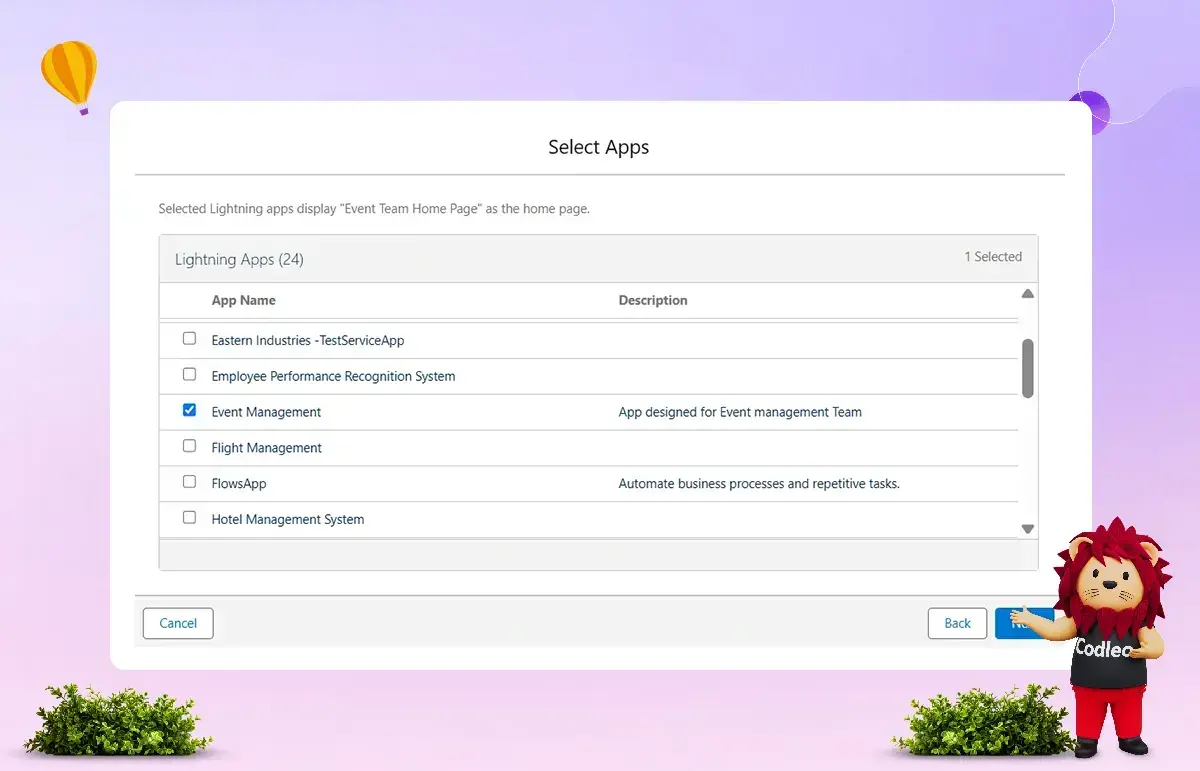
Go to Setup → Lightning App Builder → New Lightning Page.
-
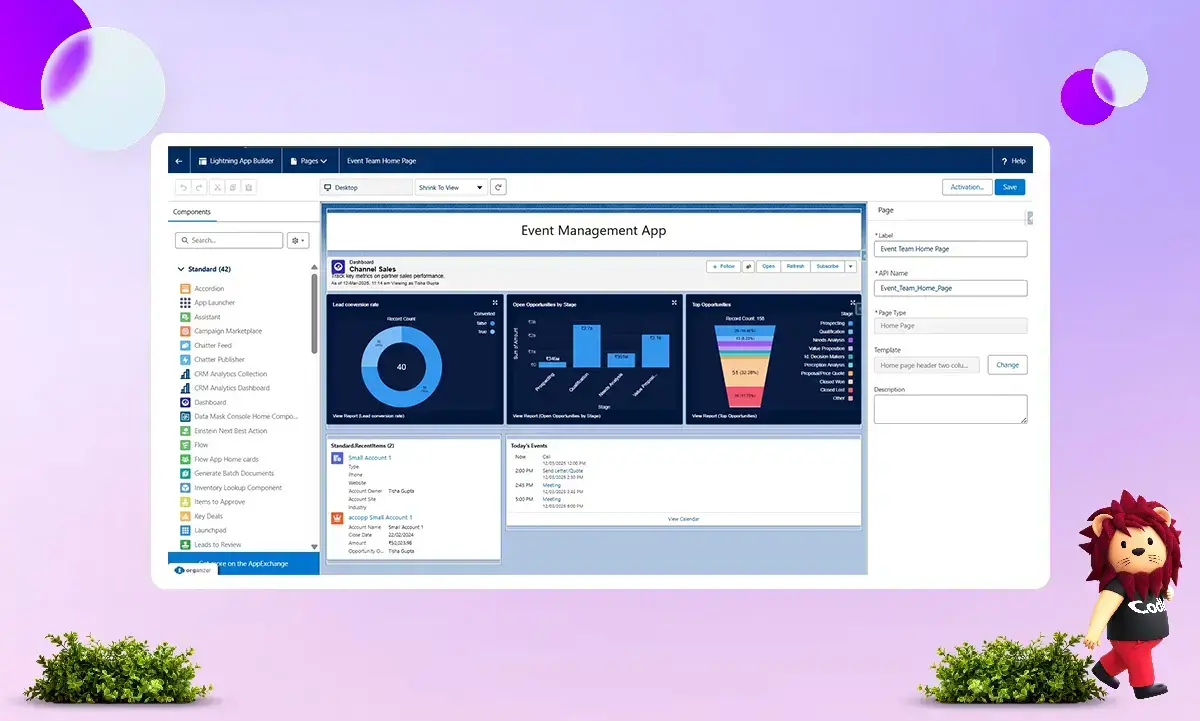
Customize the page:
-
-
Add Dashboards for dynamic insights.
-
Include related lists of child objects.
-
Create Lightning Web Components or Screen Flows
-
Embed CRM Analytics Reports
-
-
Save and activate the page, then assign it to relevant apps.
-
Test performance across devices and user profiles.
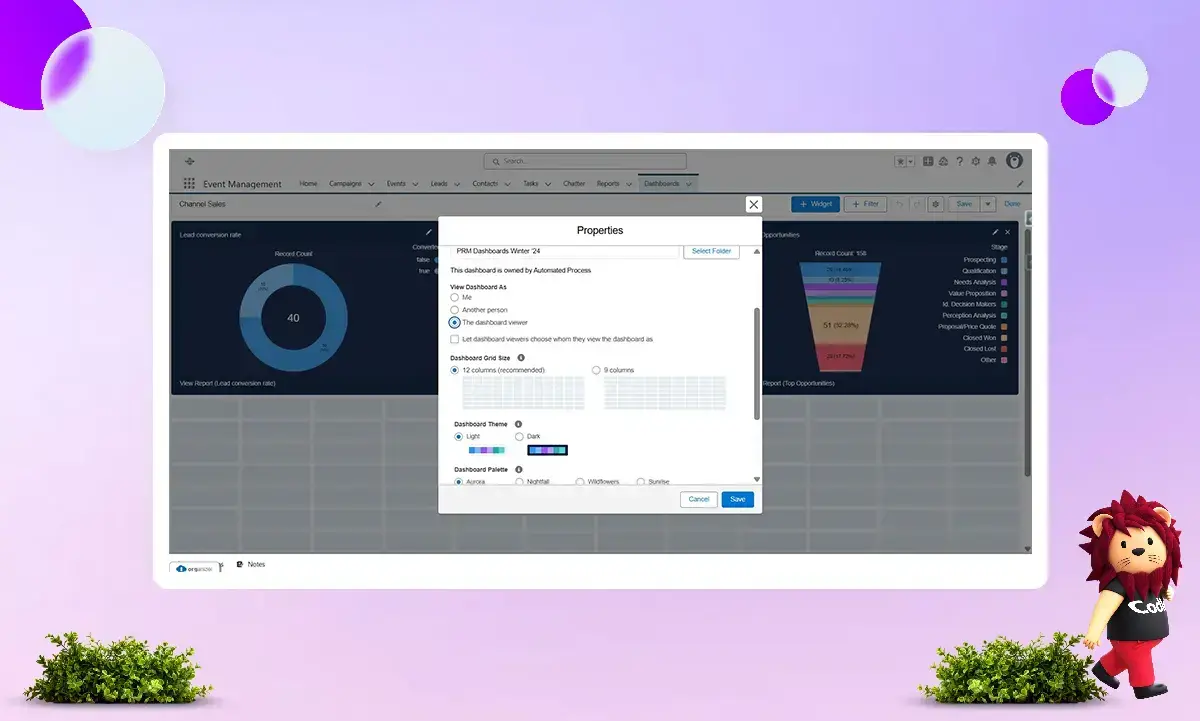
Pro Tip: Use the “View Dashboard As” setting to ensure dashboards respect security and sharing permissions.
Step 5: Setting Default Apps for Specific Profiles
-
Navigate to the Profile → Edit → Custom App Settings.
-
Mark the app as the Default for relevant profiles.
-
Example: Assign the Event Management App as the default for the Custom Sales Profile and Marketing User Profile.
-
Benefit: Users are automatically directed to the apps most relevant to their role, enhancing efficiency and security.
Step 6: Managing Tab Visibility
-
Go to the desired Profile → Edit → Tab Settings.
-
Set visibility for tabs:
-
-
Default On
-
Default Off
-
Tab Hidden
-
This ensures users only see tabs necessary for their workflow, minimizing clutter and maintaining data security.
Create Your Salesforce App the Right Way
A custom Salesforce app is often a good choice since it can be tailored and flexible to fit your business needs. Still, some companies build an app too quickly without considering long-term growth, return on investment, or usability. This can result in an app that consumes resources but does not deliver real value.
A Salesforce app can be a powerful tool that boosts efficiency, enhances customer experiences, and drives business growth when developed clearly and with the right approach. Codleo, a reliable Salesforce app development company, focuses on delivering scalable, future-ready solutions that solve real problems.
The key question is not whether you need a customized Salesforce app, but whether you are prepared to build it the right way. Contact our experts to turn your idea into a successful reality.
Why Choose Codleo as Your Salesforce App Development Partner
Picking the right Salesforce App Development partner can have a significant impact on your business growth with Salesforce. Here are some reasons why many businesses trust Codleo for Salesforce app development.
Proven Experience in Salesforce App Development
Codleo brings strong hands-on experience in building custom Salesforce applications tailored to diverse business needs. From startups to growing enterprises, we have delivered scalable, secure, and performance-driven Salesforce apps that solve real business challenges.
Skilled Team of Certified Salesforce Experts
Our team consists of certified Salesforce developers and consultants with expertise across Apex, Lightning Web Components (LWC), Visualforce, Salesforce APIs, and integrations.
We support a wide range of Salesforce app development services, including:
-
Custom Salesforce app development
-
App customization and feature enhancement
-
Salesforce Security Review readiness
-
App upgrades, bug fixes & optimization
-
Managed package development & deployment
-
App UI/UX design aligned with Salesforce standards
-
Testing, code review & performance optimization
Customer-Centric Development Approach
At Codleo, we focus on understanding your business goals, users, and workflows before writing a single line of code. Our Salesforce app development process is collaborative and transparent, ensuring the final solution delivers measurable value and long-term usability.
Long-Term Partnership Mindset
We don’t believe in one-time deliveries. Codleo builds long-term partnerships, working closely with clients throughout the planning, development, testing, deployment, and post-launch support phases. Your success on Salesforce is our shared goal.
End-to-End Salesforce App Development Services
Codleo offers complete end-to-end Salesforce app development services, including:
-
Requirement analysis & solution architecture
-
App design & development
-
Integration with third-party systems
-
Testing & quality assurance
-
Deployment & release management
-
Ongoing support & enhancements
It ensures a smooth, efficient, and risk-free Salesforce app development experience.
Our Salesforce Application Development Services
Salesforce Mobile App Development
Build custom mobile applications for Android and iOS platforms powered by Salesforce. We create secure and high-performing Salesforce mobile apps. We will also help you to integrate Salesforce apps with your existing environment.
Salesforce Custom Application Development
Codleo is the one-stop solution for all your Salesforce-enabled applications, whether you are looking to create custom functionality for your Salesforce org or update or migrate your existing codebase.
Salesforce AppExchange App Development
We can create AppExchange applications for you to list in the marketplace, enabling you to offer them to your customers. It makes an excellent choice for any ISV partner. We can also work on Lightning-enabled apps that support Salesforce 1.
Salesforce Internal App Development
Salesforce internal apps are designed to enhance and leverage business processes that standard Salesforce functionality doesn't meet. As a result, Salesforce internal apps automate workflows and improve business processes.
Salesforce Lightning App Development
Take full advantage of Lightning app development with our domain expertise to make your Salesforce application Lightning-ready. In addition, we can develop your Lightning components to meet your business requirements.
Salesforce App Integration Services
Our Salesforce experts enable seamless Salesforce integration with your other business-critical platforms. We help you connect the front office (sales, marketing, and customer service) with the back office (accounts and production).
Ready to Build a Powerful Salesforce App?
If you’re looking for a reliable, experienced, and business-focused Salesforce App Development partner, Codleo is here to help.
Contact us today and let’s build a Salesforce app that genuinely works for your business.
 0
0
About the Author



 603 D-Mall Netaji Subhash Place, Delhi 110034 IND


