


Publish date:
Quick Answer: Salesforce Service Cloud implementation is the process of configuring Salesforce to manage and improve customer support operations across channels such as email, phone, chat, messaging, and self-service. A typical implementation includes requirements discovery, case management setup, Omni-Channel routing, workflow automation, knowledge management, integrations, data migration, testing, agent training, and post-launch optimization.
For most businesses, successful implementation is not simply about enabling Service Cloud features. The platform needs to be configured around existing support processes, service-level agreements (SLAs), escalation rules, customer data, and agent workflows.
TL;DR
-
Best for: Businesses looking to centralize and automate customer service operations.
-
Core implementation areas: Case management, Service Console, Omni-Channel, Knowledge, automation, reporting, integrations, and self-service.
-
Typical project scope: Discovery → solution design → configuration → integration/migration → testing → training → go-live → optimization.
-
Implementation complexity: Depends on support channels, user count, integrations, existing data, automation requirements, and customization.
-
Partner involvement: A Salesforce Service Cloud implementation partner can help businesses design the architecture, configure the platform, migrate data, integrate existing systems, train teams, and support deployment.
Why Salesforce Service Cloud Implementation Requires More Than Basic Setup
Salesforce Service Cloud can bring customer cases, conversations, knowledge, automation, and service analytics into one connected environment. However, simply purchasing licenses and activating features rarely creates an efficient customer service operation.
A successful Salesforce Service Cloud implementation starts with understanding how customers currently contact your business, how cases are assigned and escalated, what information agents need to resolve issues, and where manual processes slow service.
For example, an implementation may involve:
-
Configuring case types, queues, assignment rules, and escalation processes
-
Setting up Omni-Channel routing based on agent skills, availability, and workload
-
Automating repetitive service workflows using Salesforce Flow
-
Building a centralized knowledge base for agents and customers
-
Connecting telephony, email, chat, ERP, order management, or other business systems
-
Migrating historical customer and case data
-
Creating service dashboards for metrics such as response time, case volume, resolution time, SLA compliance, and customer satisfaction
-
Introducing AI and Agentforce capabilities where they provide measurable value
The goal should not be to implement every available feature. It should be to build a Service Cloud environment that helps your service team resolve cases faster, reduce manual work, improve agent productivity, and provide customers with a consistent support experience.
What Is Salesforce Service Cloud Implementation?
Salesforce Service Cloud implementation is the process of designing, configuring, integrating, and deploying Service Cloud around a company's customer support operations. It transforms Salesforce from a standard CRM platform into a centralized service environment where teams can manage customer cases, automate workflows, route requests, access knowledge, and track service performance.
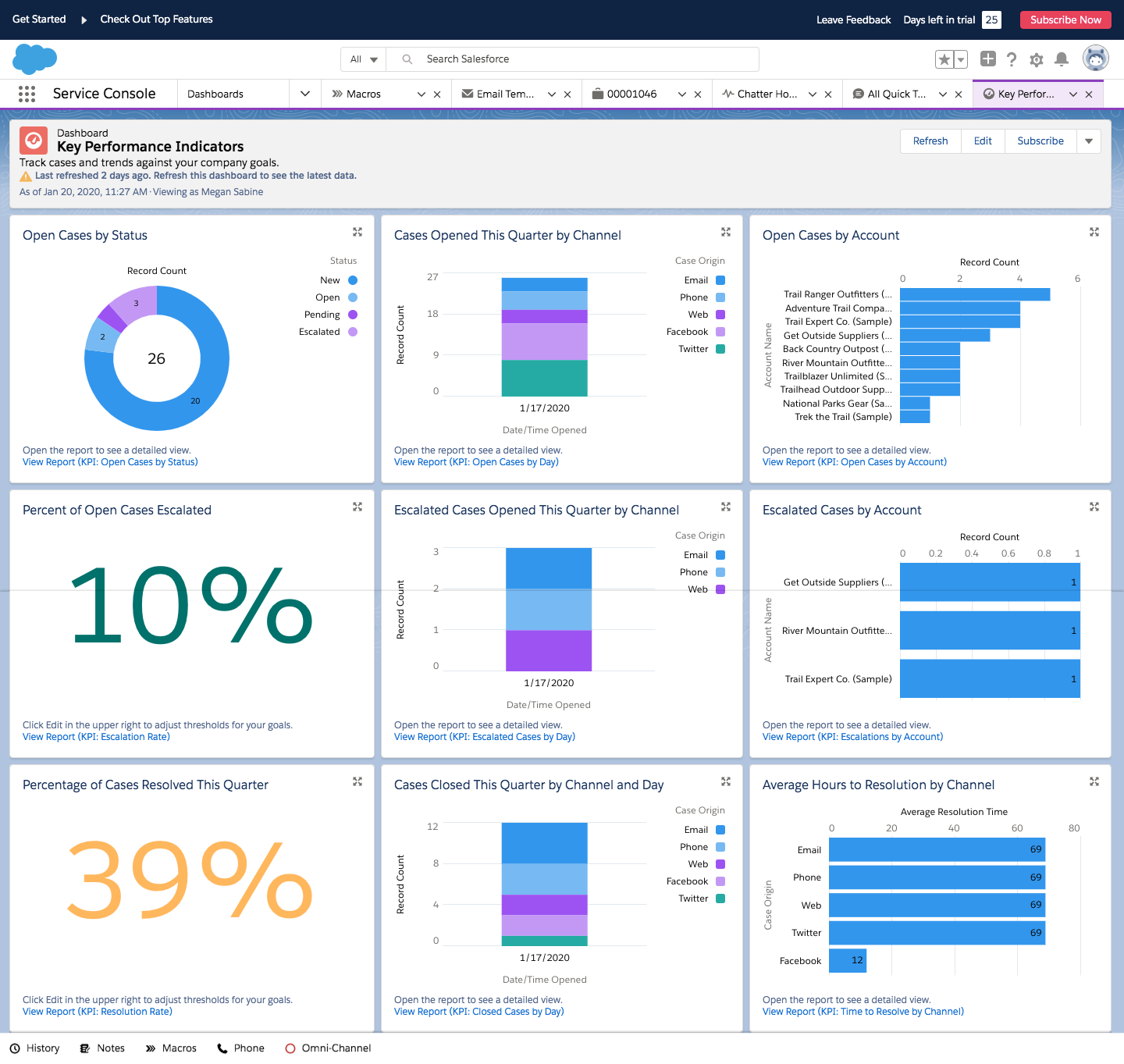
A typical implementation may include:
-
Case Management: Configure case creation, assignment, prioritization, escalation rules, and SLAs.
-
Service Console: Give agents a unified workspace to access customer information, cases, interactions, and related records.
-
Omni-Channel: Route cases and conversations to the right agents based on availability, capacity, priority, or skills.
-
Knowledge Management: Build a searchable knowledge base for agents and customer self-service.
-
Workflow Automation: Automate repetitive support processes, approvals, notifications, and case updates using Salesforce Flow.
-
Digital Customer Service: Connect channels such as email, messaging, chat, and self-service experiences.
-
System Integration: Connect Service Cloud with ERP, telephony, order management, payment, or other business applications.
-
Data Migration: Move customer, account, contact, case, and historical service data from legacy systems into Salesforce.
-
Reporting & Analytics: Create dashboards for case volume, response time, resolution time, SLA performance, agent productivity, and other service KPIs.
-
AI & Agentforce: Introduce AI-assisted service capabilities where they can reduce repetitive work and improve service efficiency.
Service Cloud Setup vs. Service Cloud Implementation
These terms are often used interchangeably, but they are not the same.
| Service Cloud Setup | Service Cloud Implementation |
|---|---|
| Enables standard Salesforce features | Designs Service Cloud around business processes |
| Basic users, permissions, queues, and cases | End-to-end case and service workflow configuration |
| Limited automation | Advanced routing and workflow automation |
| Minimal integrations | Integration with existing business systems |
| Limited data movement | Structured legacy data migration |
| Suitable for simple requirements | Suitable for growing or complex service operations |
| Focuses on getting Salesforce running | Focuses on measurable service outcomes |
For organizations with multiple support channels, complex case workflows, legacy systems, or automation requirements, a structured Salesforce Service Cloud implementation service can reduce configuration gaps and help ensure the platform reflects real customer-service processes rather than default settings.
Salesforce Service Cloud Implementation Process: Step-by-Step
A successful Salesforce Service Cloud implementation requires more than configuring cases and adding users. The implementation should connect customer service processes, data, channels, automation, and reporting within one scalable service environment.
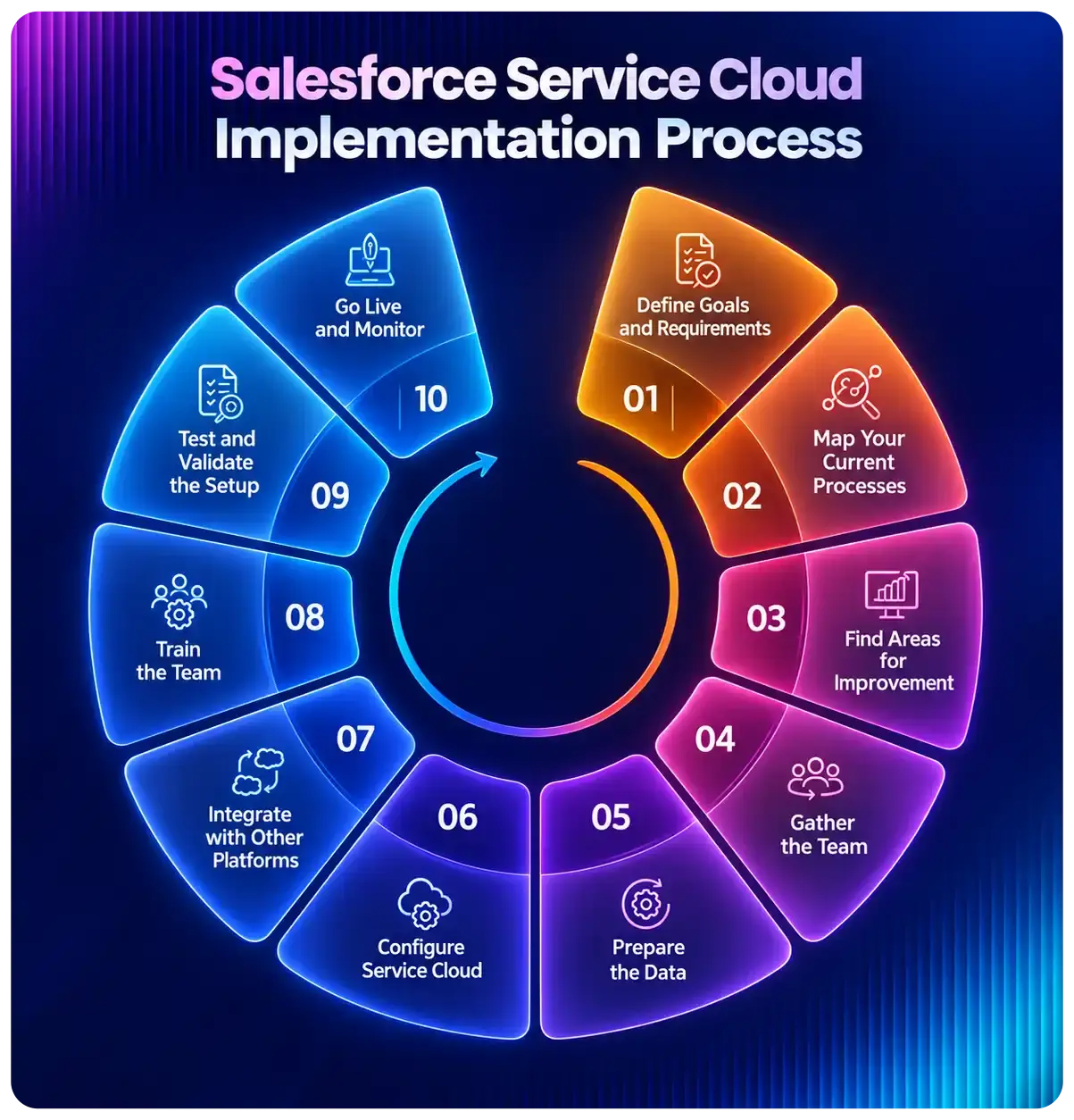
Here is a practical Service Cloud implementation process businesses can follow from discovery to post-launch optimization.
1. Discovery and Service Process Assessment
Start by understanding how your customer service operation works today. Map existing support channels, case volumes, escalation paths, SLAs, agent responsibilities, repetitive tasks, and current technology.
Key questions include:
-
How do customers currently contact support?
-
How are cases created, categorized, assigned, and escalated?
-
Which processes consume the most agent time?
-
What are your response and resolution targets?
-
Which existing systems need to exchange data with Salesforce?
-
Which service KPIs need to improve?
Deliverable: Requirements document, current-state assessment, implementation scope, and prioritized use cases.
2. Service Cloud Solution Design
Translate business requirements into a Salesforce architecture. Define case structures, queues, user roles, permissions, routing logic, automation, integrations, data requirements, and reporting.
Avoid enabling every Service Cloud feature simply because it is available. Prioritize capabilities that solve measurable service problems.
Deliverable: Service Cloud solution design and implementation roadmap.
3. Configure Case Management and Service Console
Configure the core environment agents will use every day, including:
-
Case fields and record types
-
Case queues and assignment rules
-
Escalation rules
-
Email-to-Case
-
Agent workspace and Service Console
-
SLAs and entitlement processes where required
-
Macros, quick actions, and productivity tools
The objective is to reduce unnecessary clicks and give agents the information they need to resolve cases efficiently.
4. Set Up Omni-Channel Routing
Configure Omni-Channel to route service work based on agent availability, capacity, priority, and skills.
Routing rules should reflect actual support operations rather than simply distributing cases evenly across agents.
Business outcome: Faster assignment and fewer manually transferred cases.
5. Build Service Automation
Identify repetitive tasks you can automate using Salesforce Flow and other platform capabilities.
Common examples include:
-
Case assignment
-
Priority updates
-
SLA notifications
-
Escalations
-
Follow-up tasks
-
Approval processes
-
Customer notifications
-
Case closure workflows
Automation should reduce manual work without unnecessarily complicating service workflows.
6. Integrate Service Cloud With Business Systems
Service agents often need information stored outside Salesforce. Depending on the business, Service Cloud may need to integrate with:
ERP | Telephony | Order Management | Billing | Payment Systems | E-commerce | Marketing Platforms | Custom Applications
A well-planned Salesforce Service Cloud integration helps agents access relevant customer information without constantly switching between systems.
7. Migrate and Validate Customer Service Data
Prepare legacy customer and support data before migration. Remove duplicates, standardize fields, define mappings, and decide which historical records actually need to move.
Typical migration data includes accounts, contacts, open cases, historical cases, knowledge articles, entitlement information, and related service records.
Run validation after migration to confirm record relationships, ownership, field mappings, and data completeness.
8. Configure Knowledge and Self-Service
Create a structured knowledge base that helps agents find answers quickly and allows customers to resolve common issues independently.
Where appropriate, businesses can also introduce self-service experiences for FAQs, case creation, case tracking, and knowledge access.
9. Test the Service Cloud Environment
Testing should validate complete service scenarios, not individual features.
Include:
-
Functional testing
-
Integration testing
-
Data validation
-
User acceptance testing (UAT)
-
Permission and security testing
-
Routing and escalation testing
-
End-to-end customer service scenarios
Use real-world cases wherever possible during UAT.
10. Train Agents and Launch Service Cloud
Train agents, supervisors, and administrators according to how they will actually use the platform.
Instead of feature-only training, use scenarios such as creating a case, transferring work, escalating an issue, searching Knowledge, updating customer information, and closing cases.
After UAT approval, deploy Service Cloud using a controlled go-live plan.
11. Measure and Optimize After Go-Live
Implementation should not end at deployment. Monitor whether Service Cloud is actually improving customer service performance.
Track metrics such as:
| KPI | What to Monitor |
|---|---|
| First Response Time | How quickly customers receive an initial response |
| Average Resolution Time | Time required to resolve cases |
| SLA Compliance | Percentage of cases resolved within agreed service levels |
| Case Backlog | Number and age of unresolved cases |
| Agent Productivity | Cases handled and repetitive work reduced |
| Escalation Rate | Cases requiring additional intervention |
| Self-Service Usage | Issues resolved without direct agent assistance |
Use these insights to refine routing rules, automation, dashboards, knowledge content, and agent workflows.
How Much Does Salesforce Service Cloud Implementation Cost?
The cost of Salesforce Service Cloud implementation varies based on the number of users, service channels, automation requirements, integrations, data migration, customization, and overall project complexity.
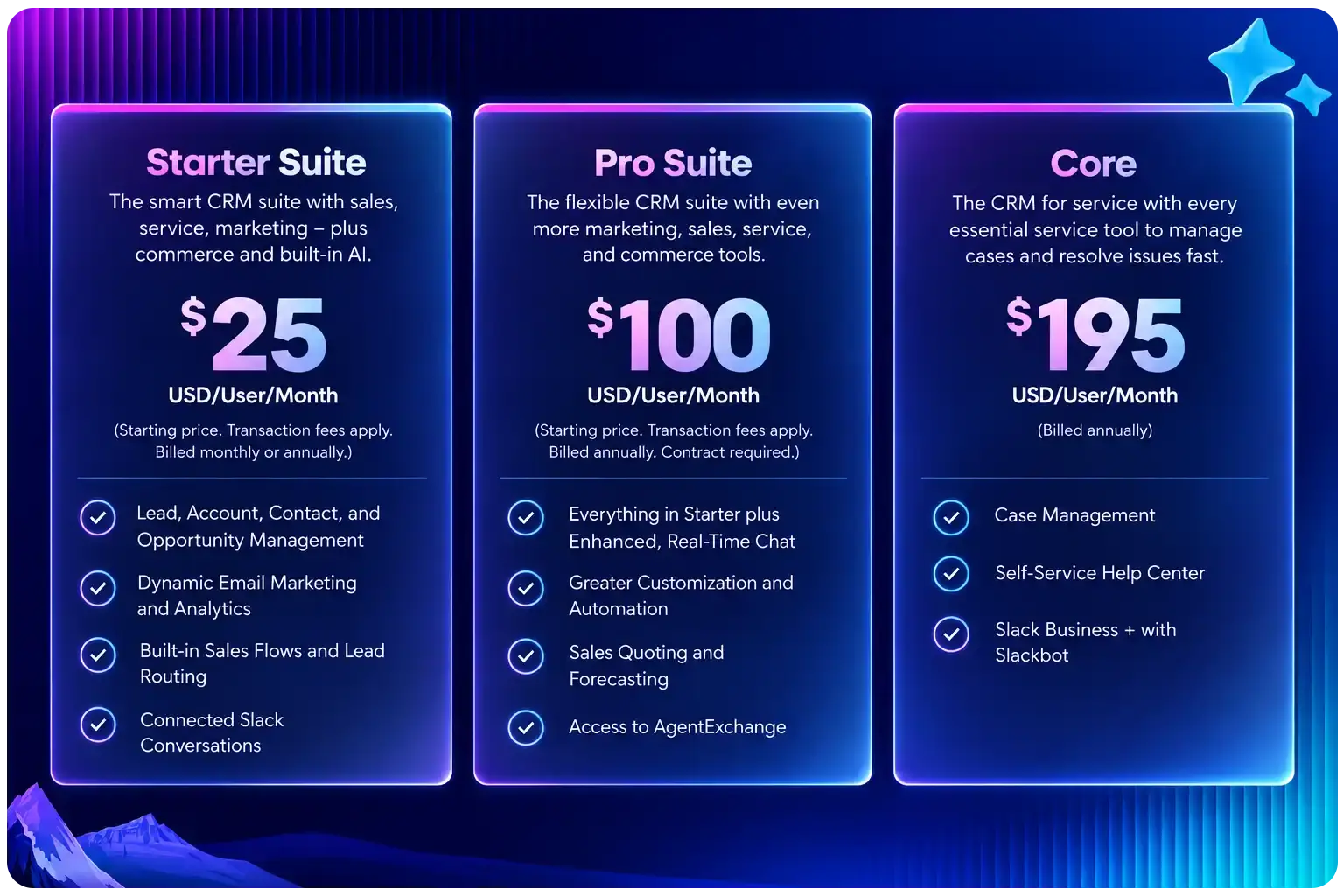
For budgeting purposes, businesses can think about implementation in three broad categories:
| Implementation Type | Typical Scope | Indicative Implementation Budget* |
|---|---|---|
| Basic | Case management, Service Console, queues, basic automation, reports | $5,000–$15,000 |
| Mid-Market | Omni-Channel, advanced automation, data migration, integrations, Knowledge | $15,000–$50,000+ |
| Complex / Enterprise | Multiple channels, complex integrations, large-scale migration, advanced workflows, AI, extensive customization | $50,000–$150,000+ |
These are general planning ranges for implementation services, not Salesforce license prices. Actual project costs depend on business requirements and implementation scope.
What Affects Service Cloud Implementation Cost?
Several factors can increase or reduce your final implementation budget:
-
Number of users and teams: More agents, departments, roles, and permission structures increase configuration requirements.
-
Support channels: Email-only support is typically simpler than implementing voice, messaging, chat, and multiple digital channels.
-
Workflow complexity: Advanced case assignment, approvals, SLAs, escalations, and automation require additional design and testing.
-
Integrations: Connecting Salesforce with ERP, telephony, billing, e-commerce, or custom applications adds integration effort.
-
Data migration: Large or poorly structured legacy datasets require additional cleansing, mapping, migration, and validation.
-
Customization: Custom objects, components, workflows, or business-specific service processes can increase development effort.
-
Knowledge and self-service: Building structured Knowledge and customer self-service experiences expands project scope.
-
AI requirements: Agentforce and other AI-assisted service use cases may require additional architecture, data preparation, governance, and testing.
Service Cloud Licensing vs. Implementation Cost
Separate Salesforce licensing costs from implementation costs.
Salesforce licensing gives your organization access to the platform and selected Service Cloud capabilities. Implementation services cover the work required to design, configure, integrate, migrate, test, deploy, and optimize Salesforce for your customer service operation.
Therefore, the total investment may include:
Salesforce licenses + implementation + integrations + data migration + training + ongoing optimization
How to Get an Accurate Service Cloud Implementation Estimate
Before requesting a quote, define your number of agents, existing support channels, required integrations, data migration volume, automation requirements, and desired go-live timeline.
A scoped discovery session can then convert these requirements into a realistic implementation roadmap, timeline, and budget.
How Long Does Salesforce Service Cloud Implementation Take?
A Salesforce Service Cloud implementation can take anywhere from a few weeks to several months depending on the project scope, number of support channels, integrations, data migration, automation, customization, and testing requirements.
A focused implementation with standard case management and limited integrations can move relatively quickly, while an enterprise deployment involving multiple service teams, complex integrations, legacy data, and advanced automation requires a longer implementation cycle.
Typical Salesforce Service Cloud Implementation Timeline
| Project Complexity | Typical Requirements | Estimated Timeline |
|---|---|---|
| Basic Implementation | Case management, Service Console, queues, basic automation and reporting | 4–8 weeks |
| Mid-Sized Implementation | Omni-Channel, Knowledge, data migration, multiple workflows and integrations | 2–4 months |
| Complex / Enterprise Implementation | Multiple service channels, large data migration, complex integrations, advanced automation and AI use cases | 4–9+ months |
Timelines are indicative. Actual delivery schedules depend on requirements, stakeholder availability, data readiness, integration complexity, testing, and deployment strategy.
What Can Extend the Implementation Timeline?
Common factors that can delay a Service Cloud rollout include:
-
Unclear or frequently changing requirements
-
Poor-quality legacy customer and case data
-
Complex third-party integrations
-
Extensive custom development
-
Delays in stakeholder approvals
-
Insufficient user acceptance testing
-
Changes to existing customer service processes during implementation
-
Limited availability of business users for discovery and UAT
Can Service Cloud Be Implemented Faster?
Yes—but reducing the timeline should not mean skipping discovery, testing, or user training.
For businesses that need to launch quickly, a phased Salesforce Service Cloud implementation can be more practical.
For example:
-
Phase 1: Case Management + Service Console + Email-to-Case
-
Phase 2: Omni-Channel + Automation + Knowledge
-
Phase 3: Integrations + Self-Service + Advanced Analytics
-
Phase 4: AI/Agentforce + Continuous Optimization
This approach lets teams launch essential service capabilities first and add more complex functionality as business requirements mature.
Quick Answer
How long does Salesforce Service Cloud implementation take?
A straightforward implementation may take approximately 4–8 weeks, while implementations involving multiple integrations, channels, data migration, advanced automation, or enterprise requirements can take several months. The most reliable timeline comes after requirements discovery and technical assessment.
Planning your Service Cloud rollout? A structured implementation roadmap can help define the required phases, dependencies, resources, and realistic go-live timeline before development begins.
Salesforce Service Cloud Implementation Checklist
Before going live, use this Salesforce Service Cloud implementation checklist to confirm that your customer service processes, data, automation, integrations, and users are ready.
| Implementation Area | What to Check | Status |
|---|---|---|
| Business Requirements | Support channels, case types, SLAs, escalation paths, and service goals are documented | ☐ |
| User Access | Agent roles, profiles, permission sets, queues, and access levels are configured | ☐ |
| Case Management | Case fields, record types, assignment rules, priorities, and escalation rules are tested | ☐ |
| Service Console | Agent workspace provides the customer and case information required for daily support | ☐ |
| Omni-Channel | Routing logic, capacity, skills, priorities, and agent availability are configured and tested | ☐ |
| Automation | Flows, notifications, approvals, escalations, and automated case actions work as expected | ☐ |
| Knowledge | Articles are categorized, searchable, approved, and accessible to the appropriate users | ☐ |
| Integrations | Connected systems exchange the correct customer and service data with Salesforce | ☐ |
| Data Migration | Accounts, contacts, cases, and historical data have been cleaned, mapped, migrated, and validated | ☐ |
| Reporting | Dashboards track agreed service KPIs such as response time, resolution time, backlog, and SLA compliance | ☐ |
| Security | Data access, sharing rules, permissions, and sensitive customer information have been reviewed | ☐ |
| Testing & UAT | Real-world service scenarios have been tested and business stakeholders have approved the solution | ☐ |
| Agent Training | Agents and supervisors understand their workflows and know how to use the new environment | ☐ |
| Go-Live Plan | Deployment steps, ownership, rollback considerations, and launch support are documented | ☐ |
| Post-Launch Support | A process exists for monitoring issues, adoption, performance, and optimization after launch | ☐ |
Pre-Go-Live Questions to Ask
Before approving the deployment, your team should be able to answer yes to these questions:
-
Can every incoming service request reach the correct queue or agent?
-
Have SLA and escalation scenarios been tested end-to-end?
-
Can agents access the customer information they need without unnecessary system switching?
-
Have you tested critical integrations with realistic data volumes?
-
Has migrated data been validated against the source system?
-
Have agents completed scenario-based training?
-
Are dashboards ready to measure service performance from day one?
-
Is there a defined owner for post-launch issues and optimization?
Quick Takeaway
A Service Cloud implementation is ready for go-live when technology, data, processes, integrations, and users have all been validated together. Completing technical configuration alone does not mean the implementation is production-ready.
For complex deployments, a structured Salesforce Service Cloud implementation service can help manage these dependencies across discovery, configuration, migration, integration, testing, deployment, and post-launch optimization.
Common Salesforce Service Cloud Implementation Challenges—and How to Avoid Them
Even a well-planned Salesforce Service Cloud implementation can struggle if businesses don't address processes, data, integrations, and user adoption early. Based on common CRM implementation patterns, here are some areas businesses should evaluate before deployment.
| Implementation Challenge | Business Impact | How to Reduce the Risk |
|---|---|---|
| Unclear service requirements | Rework, scope changes, and unnecessary configuration | Map case journeys, SLAs, channels, roles, and desired outcomes before configuration |
| Over-customization | Higher maintenance effort and difficult future upgrades | Use standard Salesforce capabilities where they meet the requirement; customize only where business value justifies it |
| Poor data quality | Duplicate customers, incomplete case history, and unreliable reporting | Clean, deduplicate, map, and validate data before migration |
| Incorrect Omni-Channel design | Cases reach the wrong agents or workloads become unbalanced | Design routing around skills, priority, capacity, and real case volumes |
| Too much automation at once | Complex workflows become difficult to test and maintain | Automate high-value repetitive processes first and expand gradually |
| Integration gaps | Agents continue switching between systems to find customer information | Identify critical systems and required data flows during solution design |
| Insufficient UAT | Issues appear only after agents start using the system | Test end-to-end scenarios using realistic cases, users, permissions, and data |
| Limited agent involvement | Low adoption and inefficient workflows | Include agents and service managers during discovery, UAT, and training |
| No post-launch optimization | Inefficient processes remain unchanged after deployment | Review KPIs, user feedback, routing, automation, and backlog after go-live |
1. Don't Replicate a Broken Support Process
One of the biggest implementation mistakes is rebuilding an inefficient legacy process inside Salesforce.
Before configuring Service Cloud, identify unnecessary approvals, manual handoffs, duplicate data entry, and repetitive agent tasks. Decide what to eliminate, simplify, or automate rather than simply migrate.
2. Design for the Agent's Daily Workflow
Service Cloud may technically work while still creating a poor agent experience.
During solution design, consider how many clicks an agent needs to resolve a case, which customer information should be visible immediately, when cases should escalate, and which actions can be automated.
A successful implementation should make the agent's job simpler—not add another layer of administration.
3. Don't Treat Go-Live as the End of Implementation
The first weeks after deployment can reveal issues that were difficult to identify during configuration.
Monitor:
Case backlog → routing accuracy → response times → resolution times → SLA breaches → agent feedback → automation failures → adoption
Use these insights to prioritize post-launch improvements.
When Should You Consider Professional Implementation Support?
Professional Salesforce Service Cloud implementation services become particularly valuable when the project involves multiple support channels, complex case routing, legacy data migration, third-party integrations, advanced automation, or many service users.
The objective should not simply be to launch Service Cloud. It should be to create a service operation that is maintainable, measurable, scalable, and aligned with how your support teams actually work.
In-House vs. Salesforce Service Cloud Implementation Partner
Businesses can implement Service Cloud using an internal Salesforce team, an external Salesforce Service Cloud implementation partner, or a hybrid model. The right approach depends on internal expertise, project complexity, integrations, timeline, and available resources.
| Factor | In-House Implementation | Implementation Partner |
|---|---|---|
| Best suited for | Simple requirements and experienced internal Salesforce teams | Mid-size to complex implementations |
| Service Cloud expertise | Depends on existing team capabilities | Specialized implementation experience |
| Initial discovery | Managed internally | Structured discovery and solution design |
| Configuration & automation | Internal team owns development | Partner handles configuration and automation |
| Integrations | Requires internal integration expertise | Can support multi-system integration |
| Data migration | Internal responsibility | Migration planning, mapping, testing, and validation |
| Testing & deployment | Managed by internal resources | Structured QA, UAT, and go-live support |
| Project capacity | Competes with daily internal priorities | Dedicated implementation resources |
| Post-launch | Internal team manages optimization | Can transition to internal ownership or ongoing support |
When Does In-House Implementation Make Sense?
An in-house approach may work when your organization already has experienced Salesforce administrators and architects, requirements are relatively straightforward, integrations are limited, and the internal team has enough capacity to manage discovery, configuration, testing, training, and deployment.
For example, a business implementing basic case management, queues, Email-to-Case, and standard reporting may not require a large external delivery team.
When Should You Work With a Service Cloud Implementation Partner?
Consider an experienced Service Cloud implementation partner when your project involves:
-
Multiple customer service channels
-
Complex Omni-Channel routing
-
Advanced Salesforce Flow automation
-
ERP, telephony, billing, or other third-party integrations
-
Large-scale legacy data migration
-
Complex security and permission requirements
-
Multiple service teams, regions, or business units
-
Aggressive deployment timelines
-
AI or Agentforce service use cases
An implementation partner can also provide an outside perspective on whether an existing service process should be recreated, redesigned, simplified, or automated before it moves into Salesforce.
What Should a Service Cloud Implementation Partner Deliver?
Instead of evaluating a provider only on certifications or hourly rates, define the expected implementation deliverables.
Your implementation partner should be able to provide:
Discovery & Requirements → Solution Architecture → Configuration → Automation → Integration → Data Migration → Testing → Training → Deployment → Post-Go-Live Optimization
The engagement should also establish clear project ownership, milestones, dependencies, acceptance criteria, documentation, and knowledge transfer.
Quick Answer: In-House or Implementation Partner?
Choose an in-house implementation when requirements are straightforward, and your team already has sufficient Service Cloud expertise and delivery capacity.
Consider a Salesforce Service Cloud implementation partner when the deployment involves complex workflows, integrations, migration, multiple channels, advanced automation, or limited internal Salesforce resources.
Base the decision on implementation risk and capability—not simply the lowest initial cost.
Which Salesforce Service Cloud Features Should You Prioritize During Implementation?
Not every organization needs every Service Cloud capability on day one. During Salesforce Service Cloud implementation, prioritize features based on your support channels, case volumes, agent workflows, SLAs, automation requirements, and customer expectations.
A phased approach can reduce unnecessary complexity and help teams focus first on capabilities that deliver measurable service improvements.
| Service Cloud Capability | When to Prioritize It | Potential Business Value |
|---|---|---|
| Case Management | Almost every Service Cloud implementation | Centralizes customer issues and standardizes case handling |
| Service Console | Agents manage multiple customer interactions and records | Gives agents a unified workspace and reduces navigation |
| Omni-Channel | Cases or conversations need intelligent routing | Distributes work based on priority, capacity, availability, and skills |
| Salesforce Flow | Agents perform repetitive manual tasks | Automates assignments, notifications, updates, and service workflows |
| Knowledge | Customers repeatedly ask similar questions | Helps agents find answers faster and supports self-service |
| Entitlements & Milestones | Your business operates with contractual SLAs | Helps track service commitments and escalation deadlines |
| Digital Engagement | Customers contact support through multiple digital channels | Brings digital conversations into connected service workflows |
| Self-Service | High volumes of repeatable support requests | Allows customers to find answers or manage common requests independently |
| Service Analytics | Managers need visibility into service performance | Tracks backlog, response times, resolution performance, and agent activity |
| AI & Agentforce | Service processes have suitable repetitive or assistive AI use cases | Can assist agents and automate appropriate service interactions |
Start With the Service Cloud Foundation
For many organizations, the first implementation phase should establish the core service foundation:
Case Management → Service Console → Routing → Automation → Reporting
Once these workflows are stable, organizations can introduce additional capabilities such as Knowledge, self-service, integrations, advanced analytics, and AI based on business priorities.
Where Does Agentforce Fit Into Service Cloud Implementation?
AI should generally be treated as a business use case rather than a feature that must be enabled simply because it is available.
Before introducing Agentforce for customer service, identify specific scenarios where AI could improve an existing process—for example:
-
Answering repetitive customer questions
-
Assisting agents with relevant customer context
-
Surfacing knowledge during case resolution
-
Handling appropriate routine service interactions
-
Supporting after-hours service scenarios
-
Reducing repetitive administrative work
AI readiness also depends on the quality of your customer data, knowledge content, permissions, integrations, and governance.
For this reason, organizations planning an AI-enabled service operation should establish a reliable Service Cloud foundation before expanding into more advanced Agentforce use cases.
What Should You Implement First?
Quick Answer: Start with the capabilities required to manage your core customer service journey effectively. For most organizations, this means case management, the agent workspace, routing, essential automation, and reporting.
Add integrations, Knowledge, self-service, additional channels, and AI as the underlying service processes mature.
The best Salesforce Service Cloud implementation strategy is not the one with the most enabled features—it is the one that solves the highest-priority service problems with the least unnecessary complexity.
Salesforce Service Cloud Implementation in Practice
A successful Service Cloud project is ultimately measured by how well the new system works in day-to-day customer service—not by how many Salesforce features are enabled.
At Codleo Consulting, our implementation approach starts with the existing service journey and identifies where Salesforce can simplify case handling, automate repetitive activities, connect customer information, and improve visibility for service teams.
What We Evaluate During a Service Cloud Implementation
Before configuring the solution, our team typically evaluates:
| Area | What We Look For |
|---|---|
| Case Journey | How cases enter, move through, escalate, and close |
| Agent Workflow | Information and actions agents need to resolve requests |
| Routing | How work should be distributed across teams and agents |
| Automation | Manual activities that can be simplified using Salesforce |
| Customer Data | Where service-related customer information currently resides |
| Integrations | Systems agents depend on during case resolution |
| Knowledge | Repetitive questions that could be supported with reusable content |
| Reporting | KPIs managers need to monitor service performance |
| Adoption | How agents will be trained and transitioned to the new workflow |
This discovery-first approach helps prevent a common implementation problem: recreating an inefficient legacy support process inside a new Salesforce environment.
From Business Requirement to Service Cloud Solution
Consider a service organization where customer requests arrive through different channels, agents manually decide who should handle each request, and customer information is distributed across multiple systems.
Instead of treating these as separate configuration tasks, a Service Cloud implementation should connect them into one service journey:
Customer Request → Case Creation → Routing → Agent Workspace → Resolution Workflow → Escalation (if required) → Closure → Reporting
Depending on the requirements, the solution can combine Case Management, Service Console, Omni-Channel, Salesforce Flow, Knowledge, integrations, dashboards, and AI-assisted service capabilities.
The result should be a Service Cloud environment designed around how the service team actually operates and the outcomes the business wants to improve.
What Should You Measure After Implementation?
Once Service Cloud goes live, evaluate whether the implementation is improving measurable service outcomes:
-
First response time
-
Average resolution time
-
Case backlog
-
SLA compliance
-
Escalation rate
-
Agent productivity
-
Customer self-service usage
-
User adoption
-
Automation success and failure rates
These measurements create a baseline for continuous Service Cloud optimization rather than treating go-live as the end of the project.
Real Salesforce Service Cloud Implementation Case Studies
The best way to understand a Salesforce Service Cloud implementation is to see how different service challenges are translated into Salesforce workflows, integrations, automation, and measurable operational improvements.
Below are examples from Codleo Consulting's Service Cloud delivery experience.
Case Study 1: Centralizing Customer Support for MobiKwik
MobiKwik managed customer support across disconnected ticket sources, making tracking, workload distribution, escalation management, and performance monitoring difficult. Historical support data was also stored in Freshdesk and needed to be migrated into Salesforce.
The Challenge
The service operation included several issues:
-
Customer tickets were coming from disconnected sources
-
Case handling was largely manual
-
SLA, TAT, and escalation processes were not structured
-
Agent workloads were not distributed efficiently
-
Agents lacked a centralized workspace
-
Telephony was not integrated with the support system
-
Historical Freshdesk data needed structured migration
-
Reporting and agent-performance visibility were limited
Salesforce Service Cloud Solution
Codleo implemented a centralized Service Cloud environment that brought multiple support channels and service workflows into one system.
The implementation included:
-
Centralized ticket and case management
-
Integration of email, mobile app, WhatsApp, and CTI
-
SLA and turnaround-time configuration
-
Automated case escalation logic
-
Omni-Channel routing and workload balancing
-
Agent Console configuration
-
Agent activity and call-disposition tracking
-
Ozontel CTI integration with click-to-call and call pop-ups
-
Migration of two years of Freshdesk data
-
Salesforce Flow automation for assignments, escalations, and notifications
-
Custom reports and dashboards
-
Role-based access controls
-
Post-launch Hypercare and AMC support
Business Outcome
The implementation created a unified platform for customer interactions, improved SLA accountability, distributed agent workload more effectively, increased visibility into service performance, and reduced manual effort through workflow automation.
Implementation takeaway: For organizations replacing an existing helpdesk, Service Cloud implementation should address not only case configuration but also historical data migration, telephony, routing, SLAs, automation, reporting, and post-go-live support.
Case Study 2: Building Structured Case Management for Europcar
Europcar needed greater consistency in how customer service cases were created, assigned, prioritized, escalated, and resolved.
Its existing support model lacked defined case lifecycle stages, structured routing, TAT-based prioritization, and systematic escalation management.
The Challenge
Key challenges included:
-
Cases arriving through multiple sources such as email and phone
-
Manual ticket assignment
-
Missing case data required for categorization and reporting
-
Uneven agent workload
-
No TAT-based ticket prioritization
-
Escalations that were not systematically controlled
-
Limited real-time alerts
-
No structured routing by complaint type or customer domain
Salesforce Service Cloud Solution
The Service Cloud implementation introduced:
-
Defined end-to-end case lifecycle stages
-
Omni-Channel for capturing and routing cases
-
Structured case fields and dependent dispositions
-
Automated and manual ticket assignment rules
-
TAT configuration based on priority, complaint type, and region
-
Time-based escalation rules
-
Email alerts for case creation, assignment, escalation, and closure
-
Queue-based case review and allocation by team leaders
Business Outcome
The project created more consistent case resolution, improved agent productivity, reduced SLA violations through timely escalations, improved workload distribution, and provided stronger visibility into ticket trends and service performance.
Implementation takeaway: When service teams struggle with inconsistent case handling, prioritize designing the case lifecycle, routing, escalation, and TAT logic before adding more advanced functionality.
Case Study 3: Multi-Channel Service Transformation for Toyota Financial Services
Toyota Financial Services required a more connected service environment across marketing, customer service, operations, telephony, and digital engagement.
The existing environment included inefficient case management, limited automation, fragmented digital channels, complex access management, manual operational processes, and limited reporting visibility.
Salesforce Solution
Codleo deployed Salesforce Service Cloud and Marketing Cloud and configured the service operation around multiple digital and operational workflows.
The implementation included:
-
Service Cloud case management
-
Agent Console
-
Omni-Channel Supervisor
-
Cloud telephony
-
Website integration
-
WhatsApp chatbot integration
-
Third-party integrations
-
Workflow and approval automation
-
Secure user-access configuration
-
Advanced reporting
-
Data migration
-
Automation for leasing, funding, KYC, NOC, and related operational processes
Business Outcome
The resulting environment improved agent efficiency, customer engagement, multi-channel communication, workflow automation, reporting visibility, and overall operational efficiency.
Implementation takeaway: Enterprise Service Cloud implementations often extend beyond case management. They may need to connect telephony, messaging, websites, operations, approvals, user access, and analytics within a single service architecture.
Case Study 4: Creating a Scalable Service Cloud Foundation
A Service Cloud implementation does not always need to begin with extensive customization.
For Apple Weighing & Automation Solutions, the need was to create a structured Salesforce environment with better case automation, data consistency, security, reporting, and user adoption.
Salesforce Service Cloud Solution
The implementation focused on a scalable foundation using:
-
Web-to-Case
-
Email-to-Case
-
Case, Account, and Contact Management
-
Standardized data structures
-
Workflow automation
-
Standardized email templates
-
Service reports and dashboards
-
Structured user profiles and roles
-
Secure data access and governance
-
Minimal customization for easier maintenance and faster deployment
Business Outcome
The solution provided a structured Service Cloud environment designed to reduce manual workload, improve service visibility, support secure customer-data management, and provide a scalable base for future growth.
Implementation takeaway: Businesses with straightforward service requirements can often achieve faster time-to-value by starting with standard Salesforce capabilities and introducing customization only when justified.
What These Service Cloud Projects Tell Us
These implementations show that no single Salesforce Service Cloud configuration works for every organization.
The right implementation depends on the specific service problem:
| Business Requirement | Relevant Service Cloud Approach |
|---|---|
| Multiple incoming support channels | Centralized case management + Omni-Channel |
| Uneven agent workload | Skills, queue, or capacity-based routing |
| Repeated SLA breaches | TAT, milestones, escalation rules, and alerts |
| Legacy helpdesk replacement | Structured data migration + case mapping |
| High call volumes | CTI integration + Agent Console |
| Manual ticket assignment | Flow automation + routing |
| Weak reporting | Service dashboards and KPI tracking |
| Distributed customer communication | Email, WhatsApp, app, web, and telephony integration |
| Security concerns | Role-based access, profiles, and governance |
| Low adoption | Simplified workflows, training, and post-launch support |
The common pattern is clear: a successful Salesforce Service Cloud implementation connects the service process, agent experience, customer data, channels, automation, and reporting, rather than treating each Salesforce feature as an isolated configuration task.
Why Codleo's Service Cloud Delivery Experience Matters
Codleo's Salesforce practice includes Service Cloud along with advisory, migration, integration, support, automation, and industry-specific Salesforce solutions. The company's capability profile also lists integration and migration expertise, 24x7 support, Omni-Channel, incident management, and dedicated Salesforce resources.
Its broader Salesforce delivery capabilities cover data migration, Salesforce configuration, customization, REST/SOAP APIs, MuleSoft, QA, deployment, Salesforce Flow, reporting, dashboards, and integration technologies.
For organizations planning a new implementation or migrating from an existing service platform, this combination matters because Service Cloud projects often require more than configuration alone—they can include process redesign, integration, data migration, automation, testing, deployment, and ongoing optimization.
Planning a Salesforce Service Cloud Implementation?
Codleo Consulting can help assess your current service environment and design a phased implementation roadmap covering case management, Omni-Channel, automation, integrations, data migration, telephony, reporting, deployment, and post-launch optimization.
Start with a Service Cloud discovery session to define the implementation scope, technical dependencies, timeline, and priorities before development begins.
Salesforce Service Cloud Implementation Best Practices
A successful Salesforce Service Cloud implementation is more than enabling features. It requires the right case-management process, routing logic, integrations, automation, data structure, reporting, and agent experience.
Based on the Service Cloud implementation scenarios covered above, these are some of the most important practices to consider.
1. Design the Case Lifecycle Before Configuring Salesforce
Define how a case should move from creation to closure before building automation.
Document:
-
Case sources and entry points
-
Case categories and priorities
-
Ownership and assignment rules
-
SLA and turnaround-time requirements
-
Escalation conditions
-
Resolution and closure criteria
For example, Codleo's Europcar project included defined case lifecycle stages, TAT configuration, assignment rules, escalation processes, queues, and automated alerts.
This prevents Salesforce from simply reproducing an inefficient existing support process.
2. Use Omni-Channel to Improve Case Routing
When cases arrive through multiple channels or support teams, manual assignment can create uneven workloads and slower response times.
Salesforce Omni-Channel can help route work to the appropriate agents based on the routing model and service process.
Codleo used Omni-Channel as part of the MobiKwik implementation to improve workload balancing and case distribution, while Europcar used it to capture and route cases.
3. Automate SLA, TAT, and Escalation Processes
Avoid relying on agents to manually identify overdue or high-priority cases.
Configure automation around:
-
Case priority
-
SLA/TAT
-
Escalation conditions
-
Assignment
-
Notifications
-
Case status changes
In MobiKwik's implementation, Codleo configured SLA/TAT processes, automated escalation logic, assignments, and notifications. Europcar's implementation similarly included TAT configuration and time-based escalation rules.
4. Plan CTI and Communication Integrations Early
If customer-service teams rely heavily on calls, email, WhatsApp, mobile apps, or other channels, identify integration requirements during discovery—not after the core implementation.
For MobiKwik, the Service Cloud environment connected email, mobile app, WhatsApp, and CTI, including Ozontel integration for click-to-call and call pop-ups.
Toyota Financial Services also incorporated cloud telephony, website integration, WhatsApp chatbot integration, and other third-party integrations into its Salesforce environment.
5. Treat Data Migration as a Separate Workstream
Moving from a legacy helpdesk to Salesforce Service Cloud requires more than importing records.
Before migration, define:
-
What historical data needs to move
-
Source-to-Salesforce field mapping
-
Duplicate handling
-
Data quality requirements
-
Relationships between customer and case records
-
Validation requirements
The MobiKwik project, for example, migrated two years of Freshdesk data into Salesforce.
6. Build Service Dashboards Around Decisions
Avoid creating dashboards simply because data is available.
Service reporting should help managers answer questions such as:
-
Where are cases getting delayed?
-
Which queues have the highest workload?
-
Are escalations increasing?
-
How are agents performing?
-
Which types of customer issues occur most frequently?
Reporting and dashboards formed part of Codleo's MobiKwik, Toyota Financial Services, and Apple Weighing implementations.
7. Avoid Unnecessary Customization
Not every service requirement needs custom development.
Where possible, start with standard Service Cloud capabilities and customize only when a clear business requirement exists.
Codleo's Apple Weighing implementation used Web-to-Case, Email-to-Case, standard case management, reports, dashboards, roles, and workflow automation, while intentionally limiting customization for easier maintenance and deployment.
8. Include Post-Go-Live Optimization
Don't treat go-live as the end of a Salesforce Service Cloud implementation.
After launch, review:
-
Agent adoption
-
Routing effectiveness
-
SLA performance
-
Automation failures
-
Case backlog
-
Reporting accuracy
-
New integration requirements
Codleo's MobiKwik engagement included Hypercare and AMC support after implementation, showing the importance of stabilization and continued optimization after deployment.
Quick Checklist: Before You Go Live
| Area | Check Before Launch |
|---|---|
| Case Management | Case lifecycle, status, and ownership defined |
| Omni-Channel | Routing and workload logic tested |
| SLA/TAT | Escalations and alerts tested |
| Integrations | CTI, email, and required channels validated |
| Data Migration | Historical data reconciled and validated |
| Automation | Flows and notifications tested |
| Security | Roles and access permissions reviewed |
| Reporting | Service KPIs and dashboards validated |
| Users | Agents trained on the new workflow |
| Support | Hypercare/post-launch process established |
Quick Answer: The strongest Service Cloud implementations start with the service process, not Salesforce configuration. Define how cases enter, route, escalate, resolve, and get measured first; then configure Service Cloud around that operating model.
How to Choose a Salesforce Service Cloud Implementation Partner
Choosing the right Salesforce Service Cloud implementation partner requires more than checking certifications or comparing hourly rates. The partner should understand customer service operations and translate them into scalable case management, routing, automation, integrations, data migration, and reporting.
Use the following criteria when evaluating a potential implementation partner:
| What to Evaluate | What to Look For |
|---|---|
| Service Cloud Experience | Proven experience with case management, Service Console, Omni-Channel, SLAs, automation, and reporting |
| Implementation Experience | Discovery, solution design, configuration, testing, deployment, and optimization capabilities |
| Integration Expertise | Experience connecting telephony, WhatsApp, email, ERP, helpdesk, websites, and other systems |
| Data Migration | Ability to map, clean, migrate, validate, and reconcile legacy service data |
| Automation | Practical experience with Salesforce Flow, assignments, notifications, and escalation workflows |
| Security & Governance | Roles, profiles, permissions, data access, and governance planning |
| Industry Understanding | Ability to understand your service workflows and operational requirements |
| Testing & Training | Structured QA, UAT, agent training, and knowledge transfer |
| Post-Go-Live Support | Hypercare, issue resolution, monitoring, and ongoing optimization |
| Evidence of Delivery | Relevant implementation case studies and verified customer reviews |
Ask for Relevant Service Cloud Experience
Don't evaluate a partner only on the total number of Salesforce projects completed.
Ask for experience relevant to your implementation.
For example, Codleo's Service Cloud work documented in the provided case studies includes Omni-Channel routing, SLA/TAT configuration, CTI, Freshdesk migration, Agent Console, automation, dashboards, Web-to-Case, Email-to-Case, and post-launch Hypercare.
This evidence is more useful for assessing implementation capability than a generic statement about Salesforce expertise.
Check Integration and Migration Capabilities
Service Cloud rarely operates completely independently.
Your implementation may need connections with:
Telephony → Email → WhatsApp → Website → ERP → Existing Helpdesk → Other Business Applications
Codleo's broader Salesforce capability profile includes REST/SOAP APIs, MuleSoft, Boomi, Informatica, data migration support, Salesforce configuration, customization, and integration services.
For example, its MobiKwik Service Cloud project integrated email, app, WhatsApp, and CTI while migrating two years of Freshdesk data.
Ask What Happens After Go-Live
A good implementation plan should explain what happens when real agents begin using the system.
Ask potential partners:
-
Who handles production issues after launch?
-
Is Hypercare included?
-
How will routing and automation be monitored?
-
How will agent feedback be incorporated?
-
Who handles future enhancements?
-
How will knowledge be transferred to your internal team?
Codleo's MobiKwik engagement, for example, included ongoing Hypercare and AMC support for maintenance and upgrades.
Look for Verified Customer Evidence
Case studies show what a partner says it delivered. Independent customer reviews provide another layer of validation.
The supplied Codleo case-study deck includes Salesforce AppExchange success-story screenshots, including a Service Cloud review in the Healthcare & Life Sciences category.
When evaluating any implementation partner, look for a combination of relevant case studies, project outcomes, and independently published customer feedback.
Questions to Ask Before Signing a Service Cloud Implementation Contract
Before selecting a Salesforce Service Cloud implementation partner, ask:
-
Have you implemented Service Cloud for a similar support environment?
-
Who will design our case lifecycle and routing architecture?
-
How will you approach Omni-Channel and workload distribution?
-
How will you migrate and validate existing service data?
-
Which integrations are included in the project scope?
-
How will you configure SLAs, escalations, and notifications?
-
What is your QA and UAT process?
-
What training and documentation will our team receive?
-
What happens during go-live and Hypercare?
-
How will future enhancements be managed?
Choose a Salesforce Service Cloud implementation partner based on relevant delivery experience, architecture capability, integrations, migration expertise, testing methodology, and post-launch support—not simply the lowest quote.
A partner should be able to show how it will take your project from Discovery → Design → Configuration → Integration → Migration → Testing → Training → Go-Live → Optimization.
Final Thoughts: Building a Service Cloud That Works Beyond Go-Live
A successful Salesforce Service Cloud implementation is not about enabling every available feature. It is about building a service environment where customer requests reach the right teams, agents have the information they need, repetitive processes are automated, SLAs are visible, and service performance can be measured.
As the implementation examples above show, requirements can vary significantly. MobiKwik needed centralized case management, Omni-Channel, CTI, automation, Freshdesk migration, and Hypercare, while Europcar required structured case lifecycles, TAT-based prioritization, routing, and escalation management.
The right approach is therefore to start with your service processes and business outcomes, then design Salesforce around them.
Ready to Implement Salesforce Service Cloud?
Codleo Consulting provides Salesforce Service Cloud implementation services covering discovery, solution design, configuration, case management, Omni-Channel, automation, integrations, data migration, testing, deployment, and post-launch support.
Codleo's documented Service Cloud delivery experience includes multi-channel case management, CTI integration, SLA/TAT configuration, legacy helpdesk migration, Agent Console, reporting, workflow automation, and Hypercare.
Planning a new Service Cloud implementation or moving from an existing support platform?
Talk to Codleo's Salesforce team to assess your current service environment and build an implementation roadmap based on your workflows, integrations, data, priorities, and expected outcomes.
Discuss Your Service Cloud Implementation
 0
0
About the Author






 16192 Coastal Highway Lewes, Delaware 19958 USA


